
Stop Losing Shoppers: Update Shopify Variant Images Without Refresh

Learn how to update Shopify variant images without refresh, improve product discovery, and create a smoother shopping experience with dynamic image updates.
A shopper clicks on a different color, pattern, or style, but the product image stays exactly the same. Suddenly, they are left wondering whether they selected the right variant at all. That uncertainty matters because 75% of online shoppers rely on product photography to make purchasing decisions.
In this article, you will learn how to update Shopify variant images without refresh and create a smoother, more confidence-building shopping experience.
By the end of this article, you will know that:
- Variant image updates matter because shoppers rely heavily on product photography when making purchasing decisions. Showing the right images at the right time helps build confidence.
- Static galleries create friction when customers must search for images that match their selected variant. This challenge is especially noticeable on mobile devices.
- Dynamic image switching improves product discovery and visual confirmation. Shoppers can evaluate options faster and with less uncertainty.
- Proper implementation requires more than uploading product photos. Variant-image assignments, gallery structure, theme compatibility, and testing all play important roles.
- Variant Image Automator helps Shopify stores display the correct images automatically when shoppers select a variant. This creates a smoother and more intuitive buying experience.
Why Static Product Images Create Friction
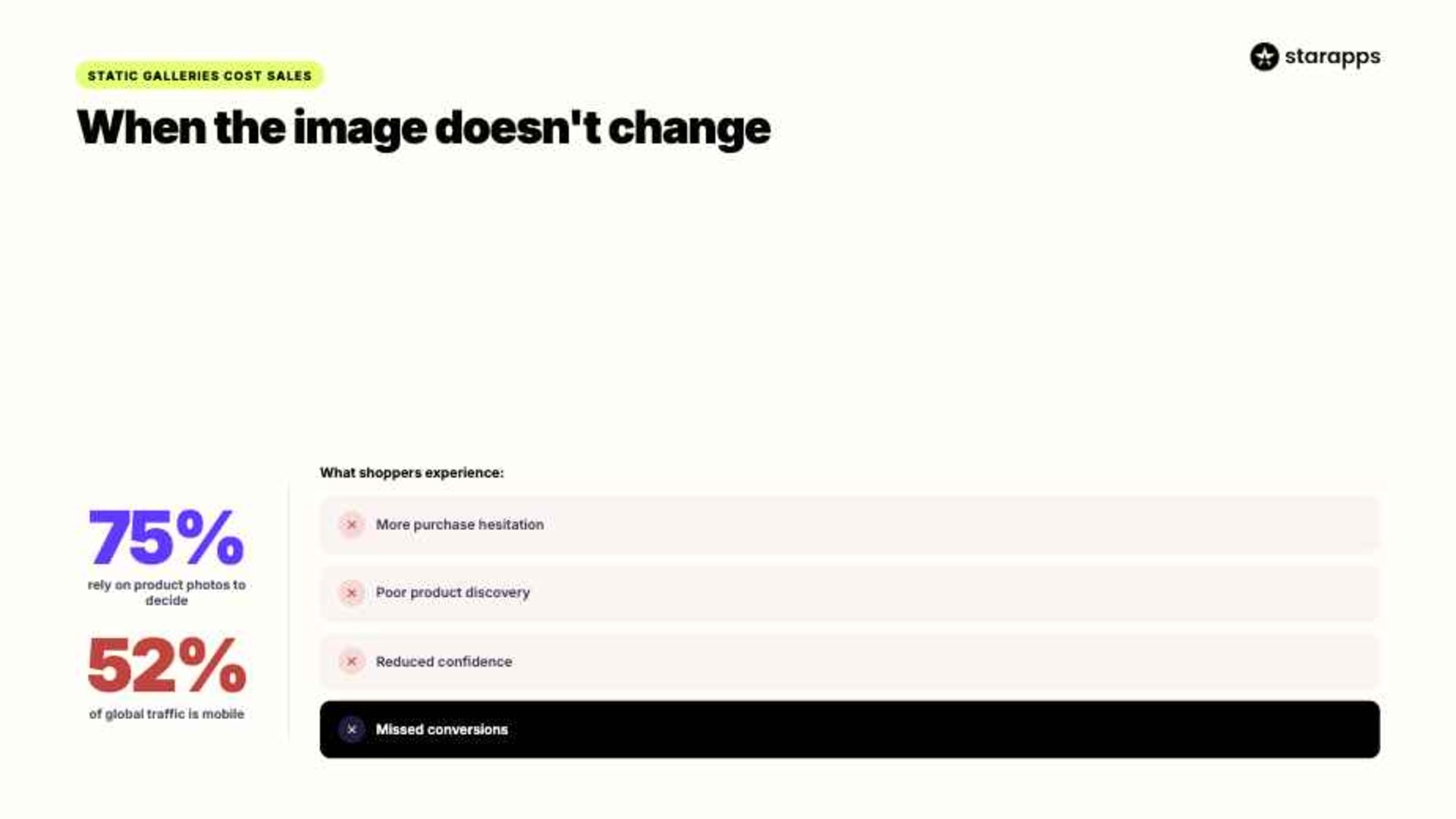
Mobile shoppers are not known for their patience. In the first quarter of 2026, mobile devices accounted for 52.27% of global website traffic, making fast and intuitive experiences more important than ever. When a customer selects a variant and the product images do not update, it creates a disconnect between what they clicked and what they see.
That friction often shows up in several ways:
- More Purchase Hesitation: Shoppers may question whether they selected the correct variant. Even small moments of uncertainty can slow decision-making.
- Poor Product Discovery: Customers have to search through image galleries manually. This adds unnecessary effort to the buying process.
- Reduced Confidence: If the displayed images do not match the selected option, shoppers may worry about receiving the wrong product.
- A Weaker Mobile Experience: Scrolling through image galleries is more cumbersome on smaller screens. Mobile users benefit from instant visual feedback.
- Missed Conversion Opportunities: Every additional step creates another chance for a shopper to leave. Clear visual confirmation helps keep momentum moving toward checkout.
The good news is that customer expectations are fairly straightforward. When shoppers select a variant, they expect the product page to respond immediately and reflect that choice.
Suggested Read: Hide Variant Images on Shopify Product Pages: Complete Guide for Cleaner Product Galleries
What Shoppers Expect When They Select a Variant
Online shopping has trained customers to expect immediate feedback. When someone selects a different color, size, material, or style, they expect the product page to respond instantly and reflect that choice.
Here is what most shoppers expect:
- The Correct Images
Customers want to see the exact product they selected. If they choose a blue backpack, they expect to see the blue backpack, not a gallery filled with every available color. - Accurate Product Information
Variant-specific details should update alongside the selection. This helps shoppers evaluate the product without second-guessing their choices. - A Seamless Experience
Product pages should feel responsive and intuitive. Nobody wants to refresh a page or search through dozens of images to confirm a selection. - Consistency Across Devices
Whether they are shopping on a phone, tablet, or desktop, customers expect the experience to work the same way. Consistency helps build trust throughout the buying journey. - Confidence Before Checkout
Shoppers want reassurance that they are purchasing the right variant. Clear visual confirmation removes uncertainty before they add an item to their cart.
If your product images do not update automatically, meeting these expectations can be difficult.
That is where Variant Image Automator by StarApps comes in. It automatically displays the images associated with the selected variant, helping customers see exactly what they are buying without refreshing the page or scrolling through unrelated photos. Try for free.
5 Steps to Update Shopify Variant Images Without Refresh
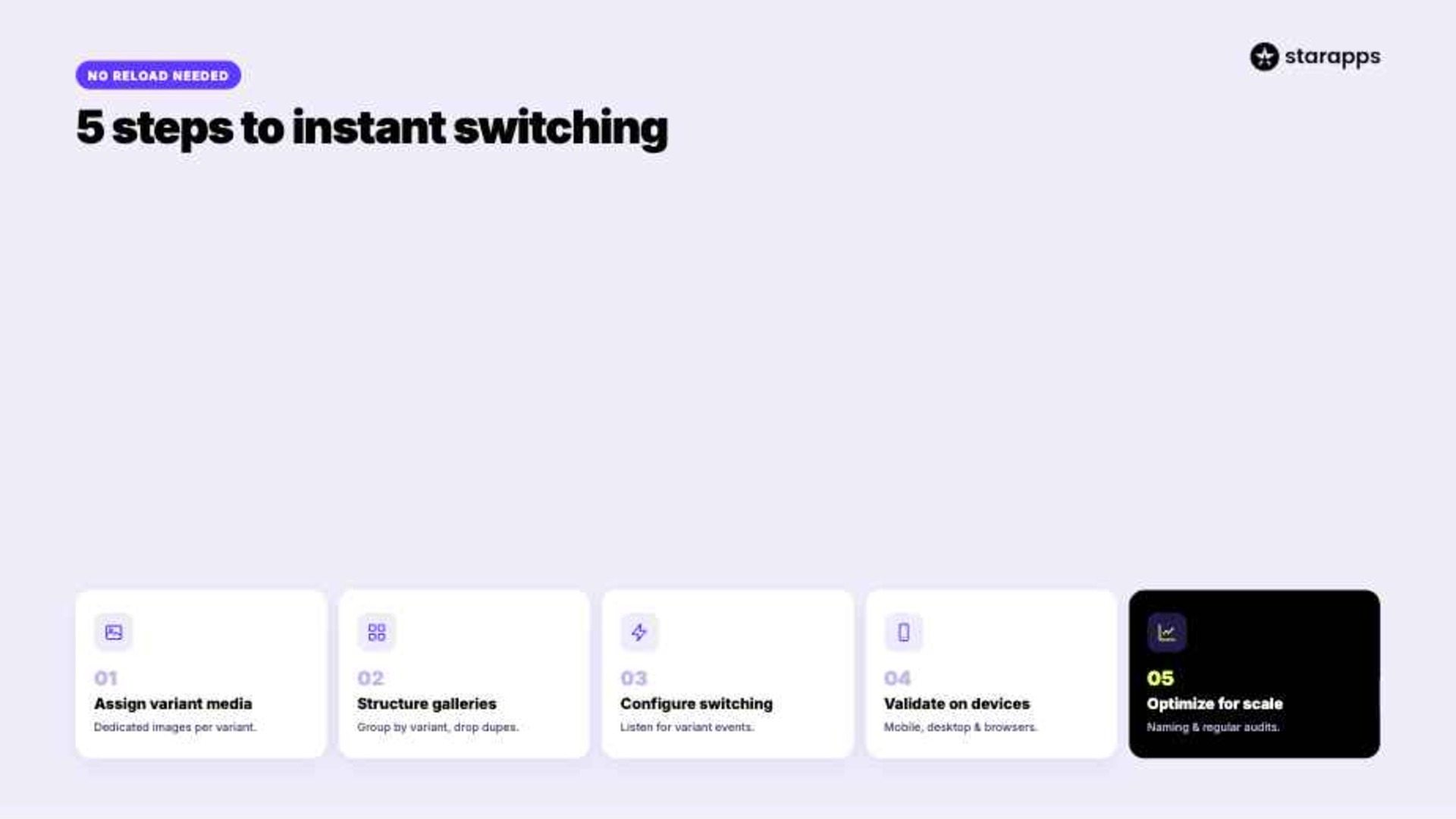
Updating variant images without a page reload requires more than uploading product photos. The product media structure, variant configuration, theme behavior, and image mapping logic must all work together to create a seamless experience.
This can be done by:
1. Assign Variant Media
Each variant should have dedicated media assets linked directly to it. If multiple variants share the same image set, Shopify has no reliable way to display variant-specific visuals when selections change.
Focus on the following:
- Assign primary images to every variant
- Use unique media for visual differences
- Avoid reusing generic product photos
2. Structure Product Galleries
A disorganized gallery can undermine even a well-configured variant setup. For example, if a red jacket variant displays images of blue, green, and black versions in the same gallery, shoppers may struggle to identify what they are actually purchasing.
Review your gallery structure:
- Group images by variant
- Remove duplicate media assets
- Maintain a consistent image sequence
3. Configure Dynamic Switching
The storefront must listen for variant-selection events and update the media gallery dynamically. When a customer selects "Navy Blue," the product gallery should immediately display images assigned to that variant without triggering a page refresh.
Verify these elements:
- Variant event detection
- Dynamic media rendering
- Theme compatibility
4. Validate Across Devices
Variant image updates often behave differently across devices and themes. What works perfectly on desktop may create gallery synchronization issues on mobile.
Test the following scenarios:
- Mobile variant switching
- Desktop variant switching
- Cross-browser behavior
5. Optimize for Scale
The complexity increases as catalogs grow. A product with three color variants behaves differently than one with twenty color and size combinations.
Plan for scalability by:
- Standardizing image naming conventions
- Creating repeatable media workflows
- Auditing variant-image mappings regularly
When implemented correctly, dynamic image updates do more than improve product presentation. They create a faster, clearer, and more confidence-building shopping experience for customers.
Suggested Read: Ecommerce Store: Display Variant Images with Dropdown Options
Benefits of Dynamic Variant Image Updates

When variant images update instantly, the product page feels more responsive and intuitive. Shoppers no longer need to interpret product options and image galleries separately because the page does that work for them.
Other benefits include:
- Improves Product Discovery: Customers can evaluate each variant visually as they browse. This makes large catalogs easier to navigate and compare.
- Provides Instant Visual Confirmation: Shoppers immediately see the product associated with their selection. This reduces uncertainty during the buying process.
- Reduces Gallery Friction: Customers do not have to scroll through unrelated images to find the variant they selected. The correct visuals appear automatically.
- Supports Mobile Shopping: Dynamic image updates eliminate extra taps and scrolling on smaller screens. This creates a more efficient mobile experience.
- Creates More Accurate Product Pages: Images stay aligned with the selected variant. Product presentation becomes more consistent and reliable.
Of course, dynamic image updates only work when they are implemented correctly. Unfortunately, many Shopify stores still make a few common mistakes that prevent shoppers from getting the experience they expect.
Suggested Read: Alt Text vs Image Description: When and How to Use Each
Common Variant Image Mistakes on Shopify (And Fixes)
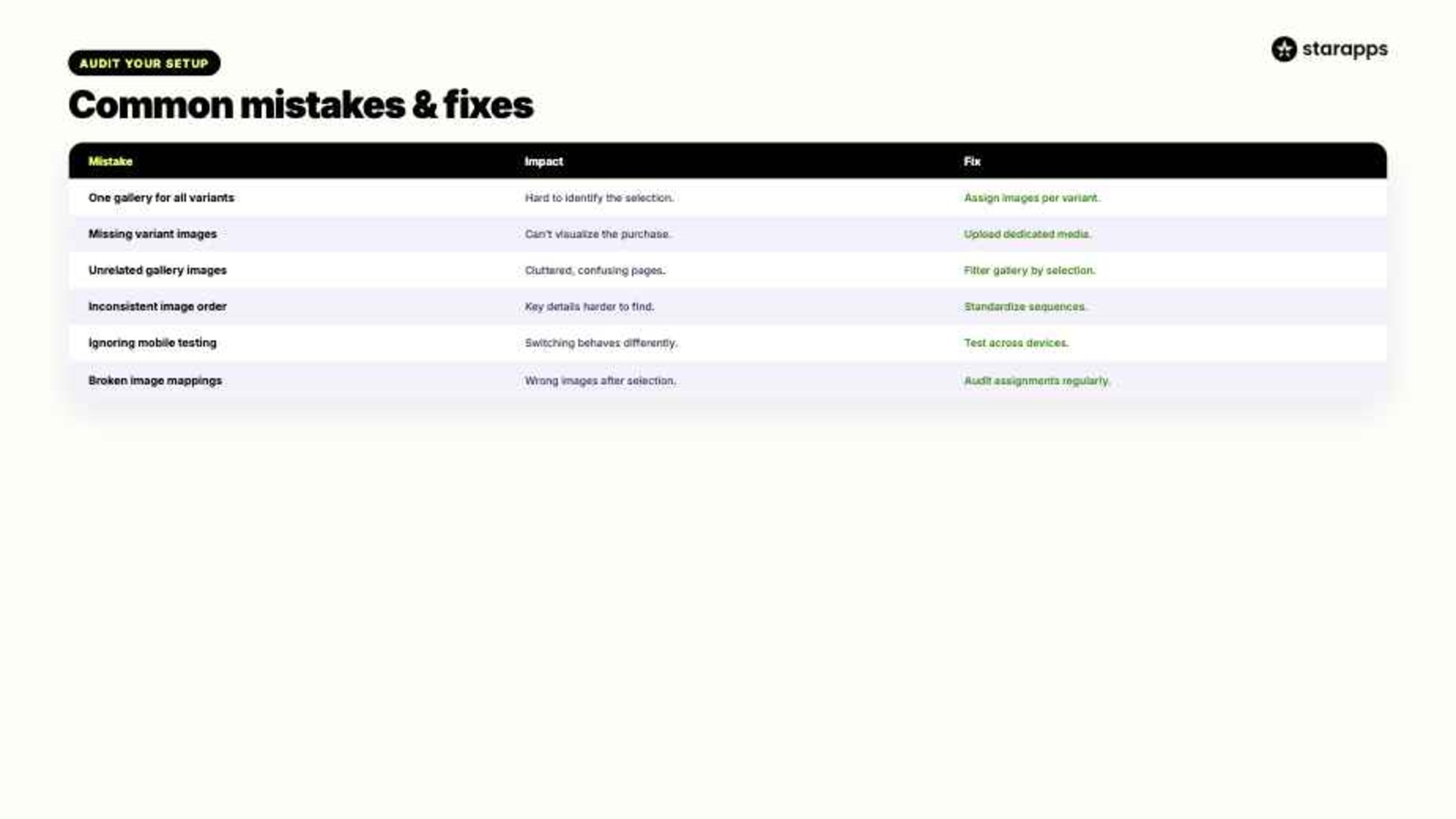
Many merchants invest time in product photography but overlook how those images are connected to variants. The result is a shopping experience that feels disconnected, confusing, or unnecessarily difficult to navigate.
Table showing common mistakes and their fixes:
Most of these issues are not caused by poor photography. They stem from how product media is structured, assigned, and displayed throughout the shopping experience.
A few best practices can help:
- Assign images to every variant
- Test switching on mobile
- Standardize gallery structures
- Remove duplicate product photos
- Audit mappings regularly
Fixing these issues improves more than storefront usability. It also influences how customers evaluate products and make purchase decisions. In the next section, we look at how the right image can affect a purchase decision.
Suggested Read: "My Theme Already Does That" And Other Expensive Assumptions
How Variant Images Influence Buying Decisions
Visual information does far more than showcase a product. When customers cannot clearly connect their selected variant to the images they see, confidence can erode surprisingly quickly.
Variant images influence buying decisions in several ways:
- They Confirm Product Selection
Shoppers want immediate reassurance that they selected the correct option. Updated images provide that confirmation without requiring additional effort. - They Reduce Cognitive Load
Customers should not have to compare variant names against a gallery of unrelated images. Dynamic image updates make product evaluation more intuitive. - They Improve Product Understanding
Different colors, materials, finishes, and styles can dramatically change how a product looks. Variant-specific images help shoppers evaluate those differences accurately. - They Support Mobile Browsing
Mobile shoppers often make decisions with limited screen space. Showing the right images immediately reduces scrolling and unnecessary interactions. - They Build Purchase Confidence
Clear visual feedback helps customers feel more certain about what they are adding to their cart. Confidence is often the final ingredient before conversion. - They Reduce Post-Purchase Surprises
Customers are less likely to feel misled when the selected variant matches the displayed imagery. This helps set accurate expectations before checkout.
As product catalogs become more complex, manually managing these experiences becomes increasingly difficult. The right Shopify tools can automate variant image updates and ensure customers always see the visuals that match their selections.
Create Smarter Product Galleries With StarApps
StarApps builds Shopify apps that help merchants improve product discovery, variant presentation, and the overall shopping experience. If you want Shopify variant images to update without refresh, Variant Image Automator is designed specifically for that challenge. It automatically displays the images associated with the selected variant, helping customers see exactly what they are buying without searching through unrelated gallery images.
Variant Image Automator helps by:
- Showing Relevant Images: Display only the images associated with the selected variant. This creates a cleaner and more focused product gallery.
- Reducing Visual Confusion: Customers no longer need to guess which images belong to which option. Every variant is supported by the correct visual context.
- Improving Product Discovery: Shoppers can evaluate colors, materials, patterns, and styles more efficiently. This is especially valuable for products with multiple visual variants.
- Supporting Mobile Shoppers: Dynamic image updates reduce unnecessary scrolling and gallery navigation. The experience feels faster and more intuitive on smaller screens.
- Scaling Across Large Catalogs: Manage variant-specific image experiences without manually restructuring every product page. This helps maintain consistency as catalogs grow.
More than 25,000 active merchants use StarApps to improve their Shopify stores, including over 1,000 Shopify Plus stores. Beyond Variant Image Automator, merchants also use other apps from our product suite.
For instance, Swatch King makes variant selection more intuitive with visual swatches, Variant Title King updates product titles based on the selected option
Make Every Variant Feel Like Its Own Product
When variant images do not update correctly, shoppers are forced to do extra work. They must connect product options, image galleries, and purchase decisions on their own. That friction can create uncertainty, slow conversions, and make even well-designed product pages feel less intuitive.
Dynamic image updates solve that problem by giving customers immediate visual confirmation of their selections. With Variant Image Automator, StarApps helps merchants create cleaner galleries, stronger product experiences, and more confident buying journeys.
A smarter gallery can make every variant easier to discover, evaluate, and purchase. Explore Variant Image Automator and give shoppers the visual feedback they expect. Try for free.
Frequently Asked Questions
1. Can Shopify display different images for each variant?
Yes. Shopify allows merchants to assign images to individual variants. When configured correctly, customers can view images that correspond to their selected option.
2. Why are my Shopify variant images not changing?
This usually happens when variant images are not assigned properly or the theme does not support dynamic image switching. Some stores also require an app to create a smoother experience.
3. Do variant image updates affect page speed?
They can if images are not optimized. Proper image sizing, compression, and loading strategies help maintain performance while supporting dynamic galleries.
4. Can I show only images related to the selected variant?
Yes. Variant-specific galleries allow shoppers to see only the images associated with their chosen option, reducing clutter and confusion.
5. Do dynamic variant images work with Shopify themes?
Most modern Shopify themes support some form of variant image switching. However, the experience and level of customization can vary significantly between themes.
Heading

End-to-end traceability
To ensure regulatory compliance, you must have a complete overview of your products from production to shipping. Book a demo to see how Katana can give you full visibility of your operations.
.png)

.svg)

.svg)

.svg)
.png)