
Shopify 50000 Variant Limit: Why It Matters and How to Bypass It

Hit the Shopify 50,000 variant limit? Learn how to bypass restrictions, fix performance lags & best practices to scale your high-volume store with our guide.
Scaling your e-commerce brand is exciting until you suddenly hit technical ceilings that halt your operations. You might upload a new seasonal collection only to find your bulk changes failing or your API connections timing out. This often happens when your store hits a specific data threshold known as the shopify 50000 variant limit.
This limit is not just a warning; it disrupts how quickly you can create or update products on your store. For high-volume fashion or home goods brands, this restriction creates a bottleneck that affects inventory management and sales. It forces you to rethink how you structure your product data.
In this guide, we will break down exactly what this limit entails and how to structure your store to bypass it.
Quick Look
- After 50,000 variants, Shopify limits you to creating only 1,000 new variants per day.
- This throttle affects apps, bulk uploads, and ERP integrations, not just manual product creation.
- Splitting variant-heavy products into individual product listings is the most effective workaround.
- Individual listings allow you to rank for specific long-tail keywords like "Blue Silk Shirt" rather than just "Silk Shirt."
- You must use tools to visually group these separate products back together so customers can still browse easily.
- Standard Shopify features cannot manage split products effectively without third-party tools like StarApps.
What are Shopify Variants and How Do They Work
Shopify variants are the specific versions of a product that a customer actually buys, such as a "Small Red T-Shirt." While the "T-Shirt" is the parent product, the specific combination of options creates the variant.
This structure allows you to track inventory for every single item configuration in your warehouse. Here’s how it works:
- Parent-Child Relationship: The main product holds the general description, while variants hold specific data like SKU and price.
- Inventory Tracking: Each variant has a unique ID, allowing Shopify to deduct stock for that specific combination.
- Option Limits: By default, Shopify allows up to 3 options (Size, Color, Material) and 100 variants per product.
- Data Weight: Every variant adds to the total data load of your store, contributing to the 50,000 limit.
Understanding the mechanics of variants helps you see why the 50,000 limit becomes a major hurdle for growing brands.
Also read: How to Edit Shopify Theme Code for Beginners
The Shopify 50,000 Variant Limit Explained
The "50,000 limit" is an API rate limit imposed by Shopify to maintain platform stability for all merchants. Once your store exceeds 50,000 total variants, you can no longer create an unlimited number of new variants rapidly. Instead, Shopify restricts you to creating 1,000 new variants per 24-hour period.
Importance:
- Throttles Growth: You cannot execute massive catalog migrations or seasonal drops in a single day.
- Breaks Integrations: Third-party ERPs or inventory management systems often fail when they hit this creation wall.
- Impacts Plus Merchants: Even Shopify Plus merchants face this throttle, requiring complex workarounds or API adjustments.
- Permanent Restriction: This limit applies as long as your total variant count remains above the 50,000 mark.
While this limit affects the backend, it is essential to distinguish between the components that make up your product data.
Ready to stop hitting the 50K limit? SA Variants: Combined Listings is the core tool for scaling your catalog. Start Your Free Trial Today!
Shopify Variants vs. Options: What’s the Difference
Confusing variants with options is a common mistake that leads to poor catalog structure and bloated data. Options are the categories of choices you offer, while variants are the concrete results of those choices.
Here is how these two distinct elements compare in the context of store limits:
Knowing the difference is vital, but ignoring the volume of your variants leads to high operational costs.
The Hidden Costs of Hitting Shopify's Variant Limit
Reaching the variant ceiling does more than just stop you from uploading new products. It creates a ripple effect of inefficiencies that damage your internal operations and the customer experience.
These hidden costs often go unnoticed until they cause critical failures during high-traffic sales periods. The consequences of ignoring this limit include:
1. Inventory Management Failures
When you cannot upload variants quickly, your inventory system may desynchronize from your live store. This leads to overselling products that you cannot fulfill or showing items as out of stock when they are available.
2. Slower Site Performance
An excessive number of variants on a single product page loads a massive amount of JSON data in the background. This slows down page load times, especially on mobile devices, which negatively impacts your conversion rates.
3. Administrative Lag
Your Shopify admin panel becomes sluggish when trying to manage products with maxed-out variants. Simple tasks like updating prices or editing descriptions take twice as long, reducing your team's overall productivity.
These operational headaches highlight why proactive management of your product structure is non-negotiable.
Also read: Shopee vs Shopify: Which Platform Will Skyrocket Your Sales in 2025
Why High-Volume Variant Management is Important for Your Brand

Managing a large catalog is not just about organizing data; it is about survival and scalability in a competitive market. Brands that master variant management provide a smoother shopping experience and retain more customers.
Conversely, a messy catalog frustrates users and confuses search engines.
Here is why you must prioritize this aspect of your business:
1. Enhanced User Experience (UX)
Customers want to find the exact color and size they need without clicking through endless dropdown menus. Proper management ensures that filters work correctly and that out-of-stock options are hidden or clearly marked.
Example: Fashion Brands (e.g., Gymshark, MVMT). Instead of a confusing dropdown, successful Shopify stores use color and image swatches on the collection page. This allows customers to view every available color instantly, drastically cutting down the clicks needed to find the right item.
2. Accurate Search Visibility
Search engines prefer clear, distinct product pages over one massive page with 100 confusing combinations. Managing variants well allows Google to index specific items, bringing in more qualified organic traffic.
Example: Home Goods Stores (e.g., Casper, AllModern). If a merchant sells a sofa in 15 fabrics, treating each fabric as a separate product (linked together) allows Google to index the page for "Velvet Navy Sofa" and "Linen Grey Sofa." This strategy captures highly specific, purchase-ready searches.
3. Scalable Marketing Campaigns
When you run ads, you want to direct traffic to a specific variant, like a "Green Summer Dress." Proper structure allows you to link directly to that item, improving your return on ad spend (ROAS).
Example: Beauty/Cosmetics Brands (e.g., ColourPop, Tatcha). Running an Instagram ad for a specific shade of lipstick requires a direct link to the product page with that shade pre-selected. High-volume variant management ensures that every unique shade has a stable, dedicated link for campaign success.
Also read: Shop vs Store: Which Should Your Shopify Brand Use?
Recognizing the importance of this management leads us to the practical strategies for overcoming the limit.
How to Bypass the Shopify 50,000 Variant Limit
You do not have to delete products to stay under the limit; you need to restructure how you present them. The goal is to keep your total variant count manageable while still offering a wide range of choices to your customers.
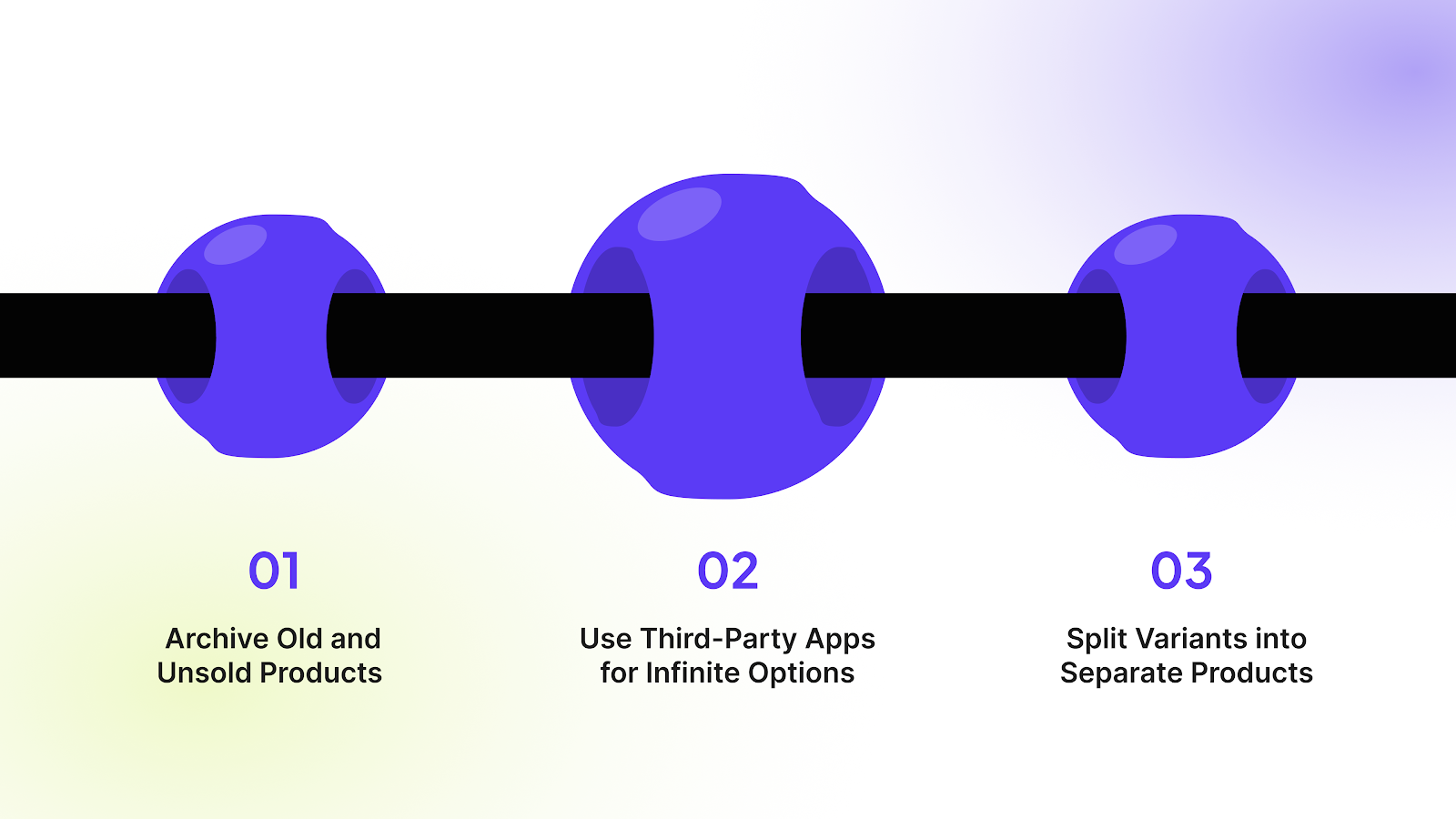
Consider these strategic approaches to keep your store efficient:
1. Archive Old and Unsold Products
Many stores unknowingly hoard thousands of variants of products that haven't sold in years. Regularly identifying and archiving these dead SKUs frees up space for new inventory without deleting historical data permanently.
2. Use Third-Party Apps for Infinite Options
If you offer customizations like engravings or monograms, do not create a variant for every possibility. Use apps that use "line item properties" to capture this data, which does not count toward your variant limit.
3. Split Variants into Separate Products
The most effective method is to break a complex product into multiple individual products based on color or style. This bypasses the per-product limit and spreads your total variant count across distinct, manageable listings.
Also read: How to Do Shopify Admin Login in 6 Easy Steps
Splitting products is the most robust solution, so let us look at how to implement it correctly.
How to Add Shopify Variants as Individual Products
Treating variants as standalone products is the standard strategy for major retailers like Gymshark or Fashion Nova. Instead of one "T-Shirt" with 5 colors and 5 sizes, you create 5 separate "Color T-Shirt" products.
Follow this workflow to restructure your catalog effectively:
1. Create Distinct Product Listings
Create a new product in Shopify for each major variation, such as "Red T-Shirt," "Blue T-Shirt," and "Green T-Shirt." This allows each color to have its own dedicated URL, description, and image gallery.
2. Link Products Using Tags or Metafields
You must establish a connection between these separate products so apps can recognize they are related. Add a specific tag like style-123 or a custom metafield to all the related color products.
3. Implement a Virtual Swatch System
Since these are now separate products, the native Shopify color selector will not work automatically. You need a solution that displays the other colors as swatches on the product page and links them together.
Managing this split structure manually is difficult, which is why specialized tools are required.
Also read: How to Complete Shopify Domain Verification in 5 Easy Steps
Essential Tools and Apps for Managing Product Variants at Scale
Manual management of high-volume stores is impossible without automation. StarApps Studio suite of tools is specifically built to handle complex variant structures and improve the frontend experience.
Here are the essential apps you need:
Variants: Combined Listings

This is the ultimate solution for the split-product strategy mentioned above. It groups separate products together on collection pages and product pages.
- Unified Display: Shows all variant colors as swatches on the collection page.
- SEO Boost: Gives each variant its own URL and ranking potential.
- Seamless Navigation: Customers switch between "products" as if they were simple variants.
Color Swatch King: Variants
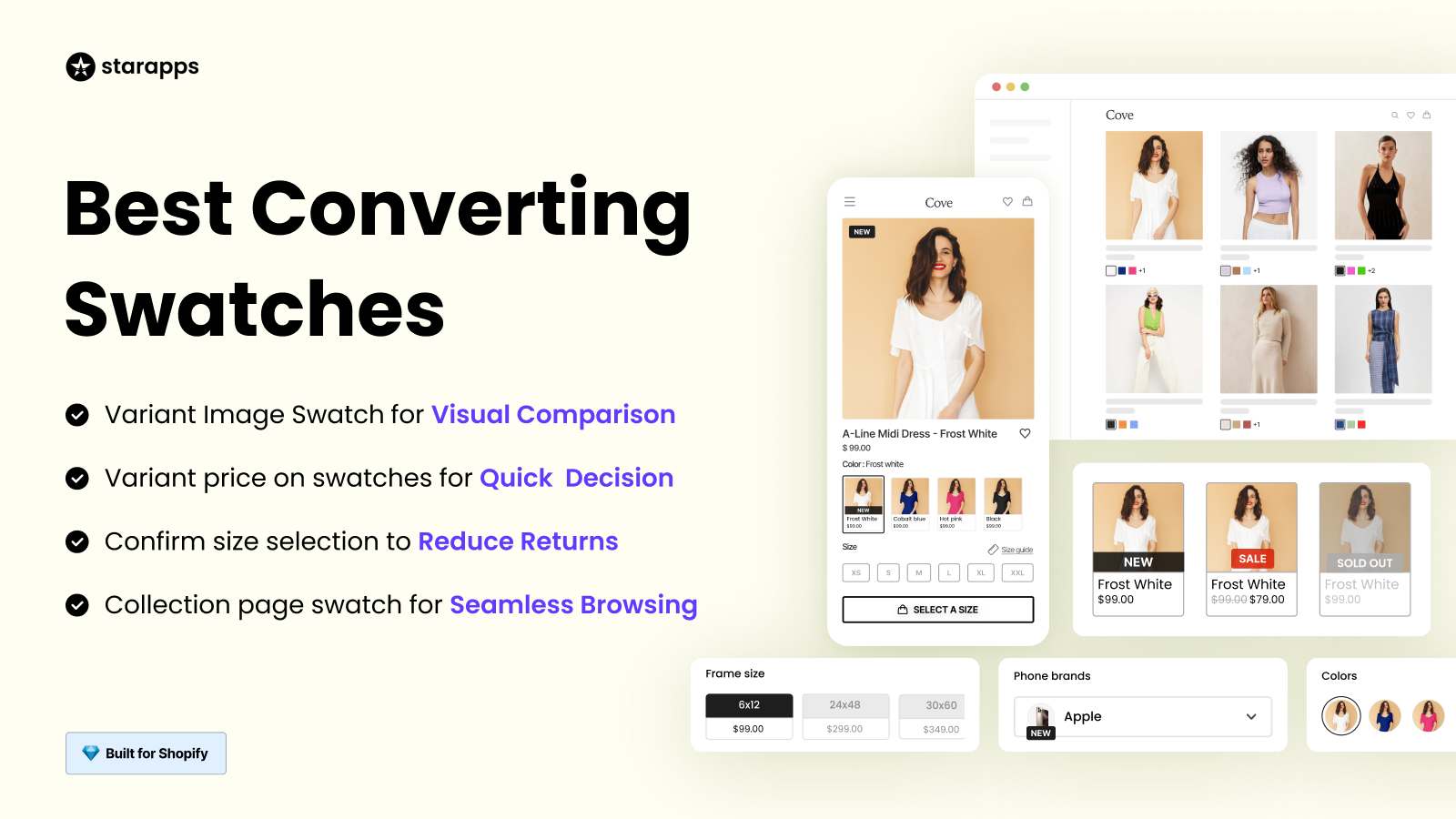
This app replaces standard dropdowns with visual swatches, making it easier for customers to choose options.
- Visual Appeal: Replaces text with images or color codes.
- Bulk Upload: Manage thousands of swatches via CSV.
- Stock Awareness: Automatically crosses out unavailable variants.
SA Variant Image Automator
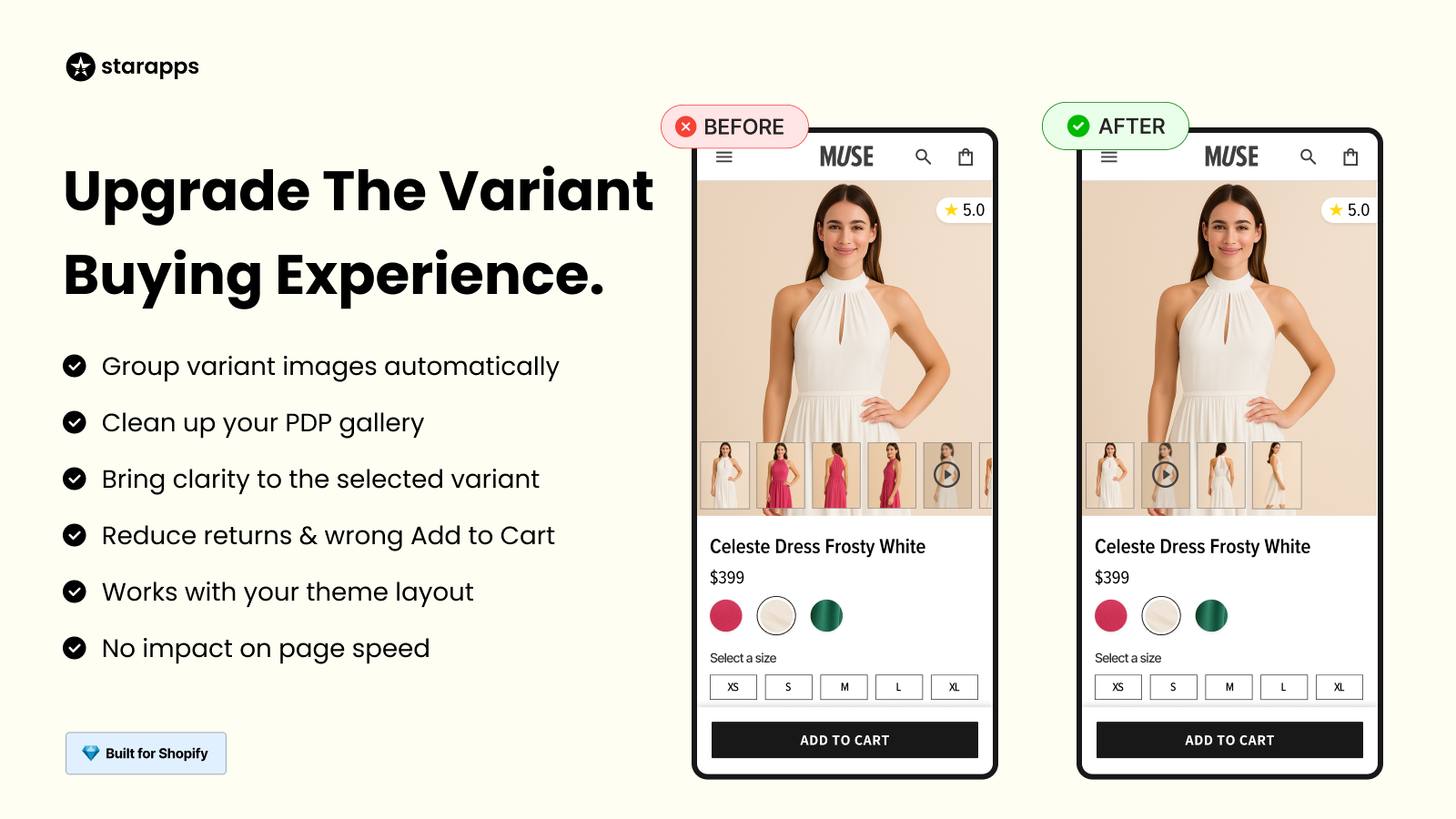
This tool ensures your product galleries look professional by showing only the relevant images for the selected variant.
- Clean Gallery: Hides images of the red shirt when the blue shirt is selected.
- Auto-Assignment: No need to manually tag thousands of images.
- Reduced Returns: Customers see exactly what they are buying.
Variant Alt Text King: SEO
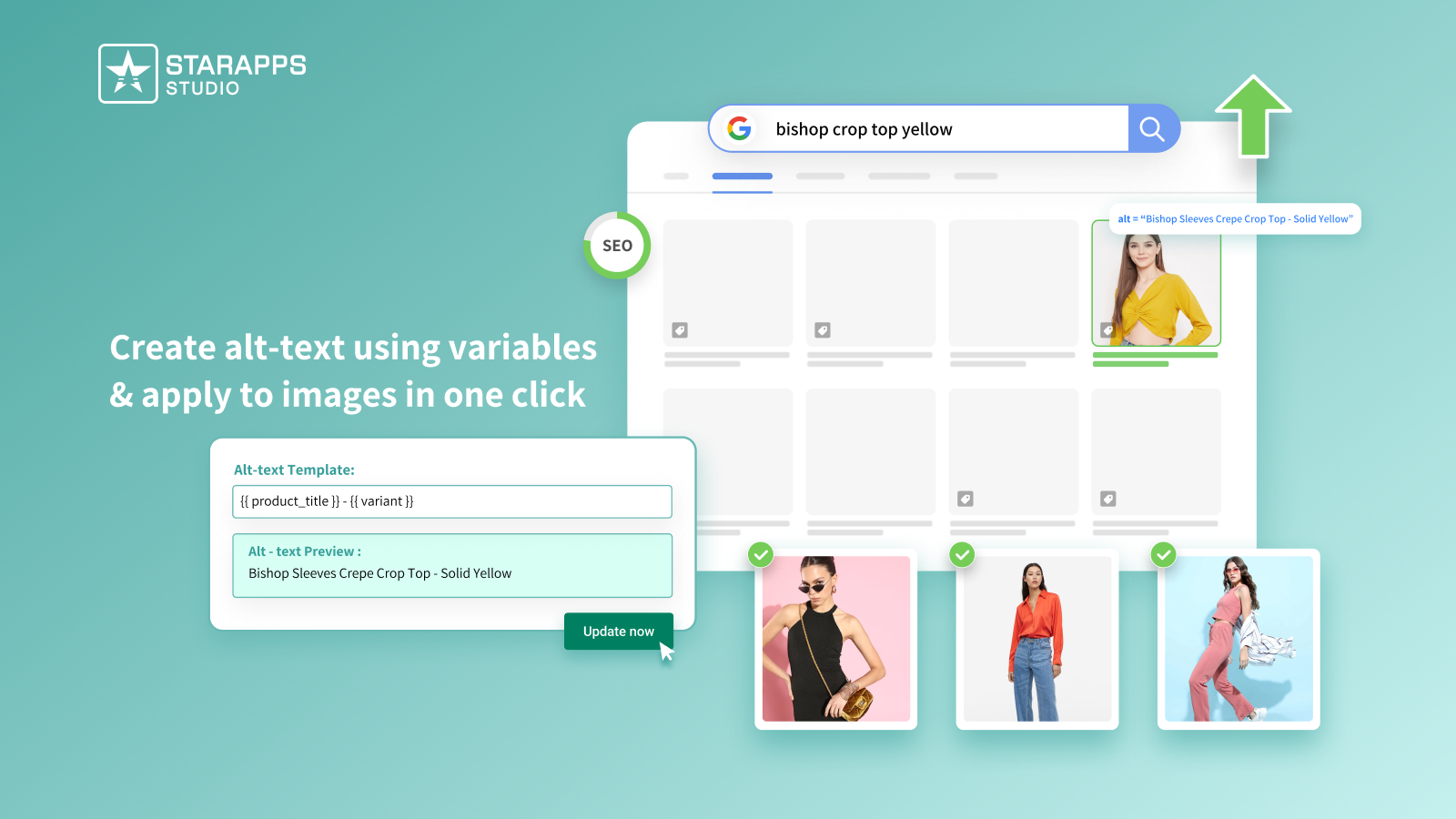
Automates the process of writing alt text for thousands of variant images, ensuring accessibility and SEO compliance.
- Daily Sync: Automatically updates new images.
- Templates: Uses variables to generate unique text for every SKU.
- Accessibility: Helps you meet ADA standards effortlessly.
Variant Title King: Color, SKU
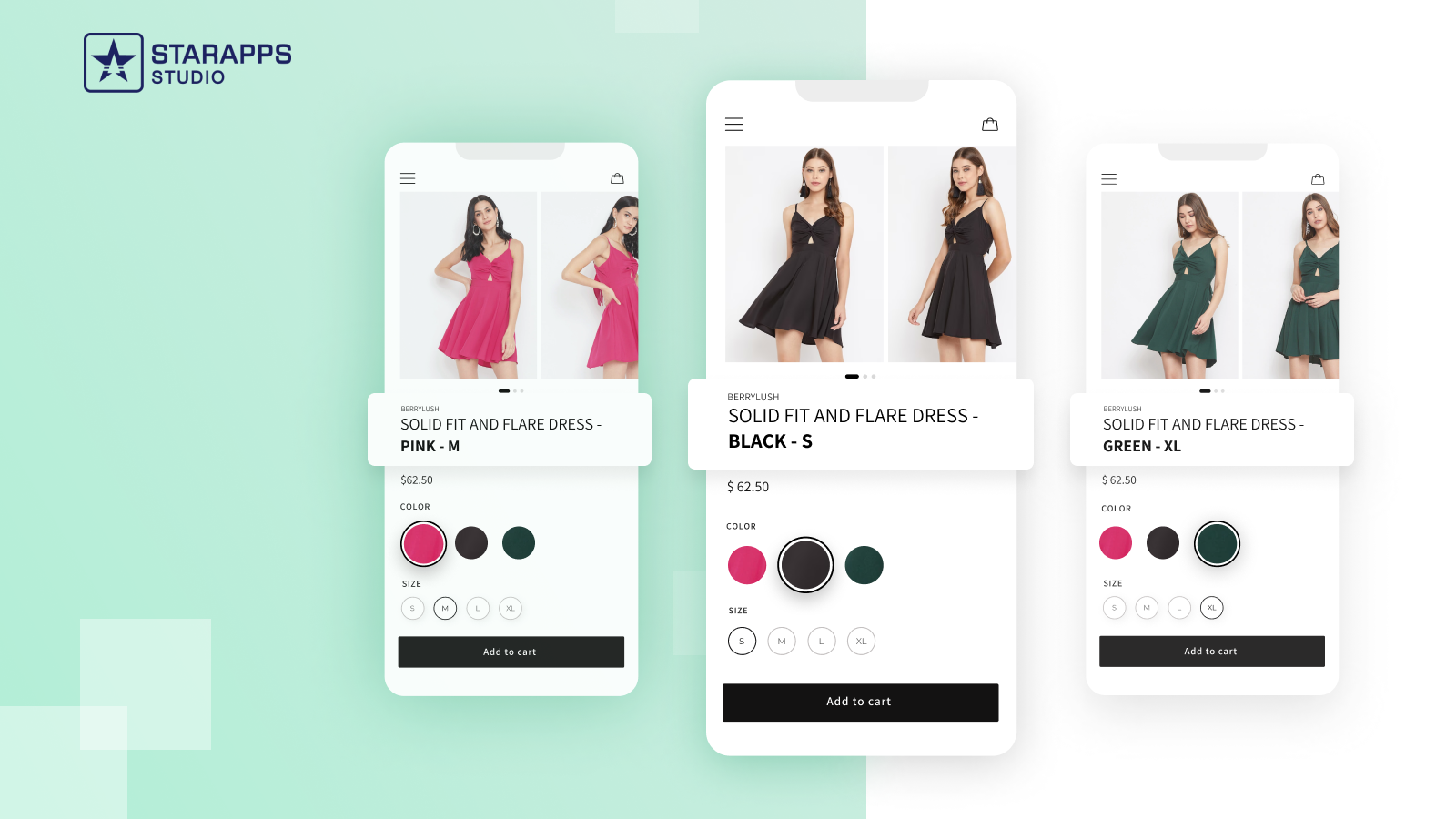
Updates the product title dynamically as the customer changes their selection, reducing confusion at checkout.
- Dynamic Updates: Changes "T-Shirt" to "Red T-Shirt - Small" in the cart.
- Reduced Support: Customers know exactly what they ordered.
- SKU Visibility: Displays the specific SKU for the selected variant.
Variant Descriptions King

Allows you to show unique descriptions for different variants, which is perfect when splitting products.
- Unique Content: Show specific care instructions for different materials.
- Organized Layout: Uses tabs and accordions to save space.
- Lower Returns: detailed info helps customers make better choices.
Using these tools solves the technical limitations, but you must also be aware of behavioral mistakes.
Common Mistakes and How to Avoid Them
Even with the right tools, merchants often fall into operational traps that hurt their store's performance. Identifying these errors early prevents data corruption and lost sales.
Avoid these common pitfalls when managing high variant volumes:
1. Overloading a Single Product
Merchants often try to force 200+ variants into one product using hacks, causing slow load times and glitches.
Solution: Always split products once you exceed 50 variants or 3 options to maintain page speed and stability.
2. Inconsistent Naming Conventions
Using "Navy" for one product and "Dark Blue" for another creates a disjointed filter experience for customers.
Solution: Create a master naming guide for your team and strictly audit your CSV uploads to ensure consistency.
3. Ignoring Image Data Weight
Uploading high-resolution, uncompressed images for every single variant bloats your site and slows down the browser.
Solution: Use image optimization tools and StarApps Variant Image Automator to only load necessary images for the user.
Are your detailed care instructions buried? Organize long, variant-specific information into clean, mobile-friendly tabs using Variant Descriptions King. Improve Product Page Clarity.
Also read: How to Become a Shopify Plus Partner in 2025: Key Requirements
Correcting these mistakes sets a solid foundation, allowing you to focus on future growth.
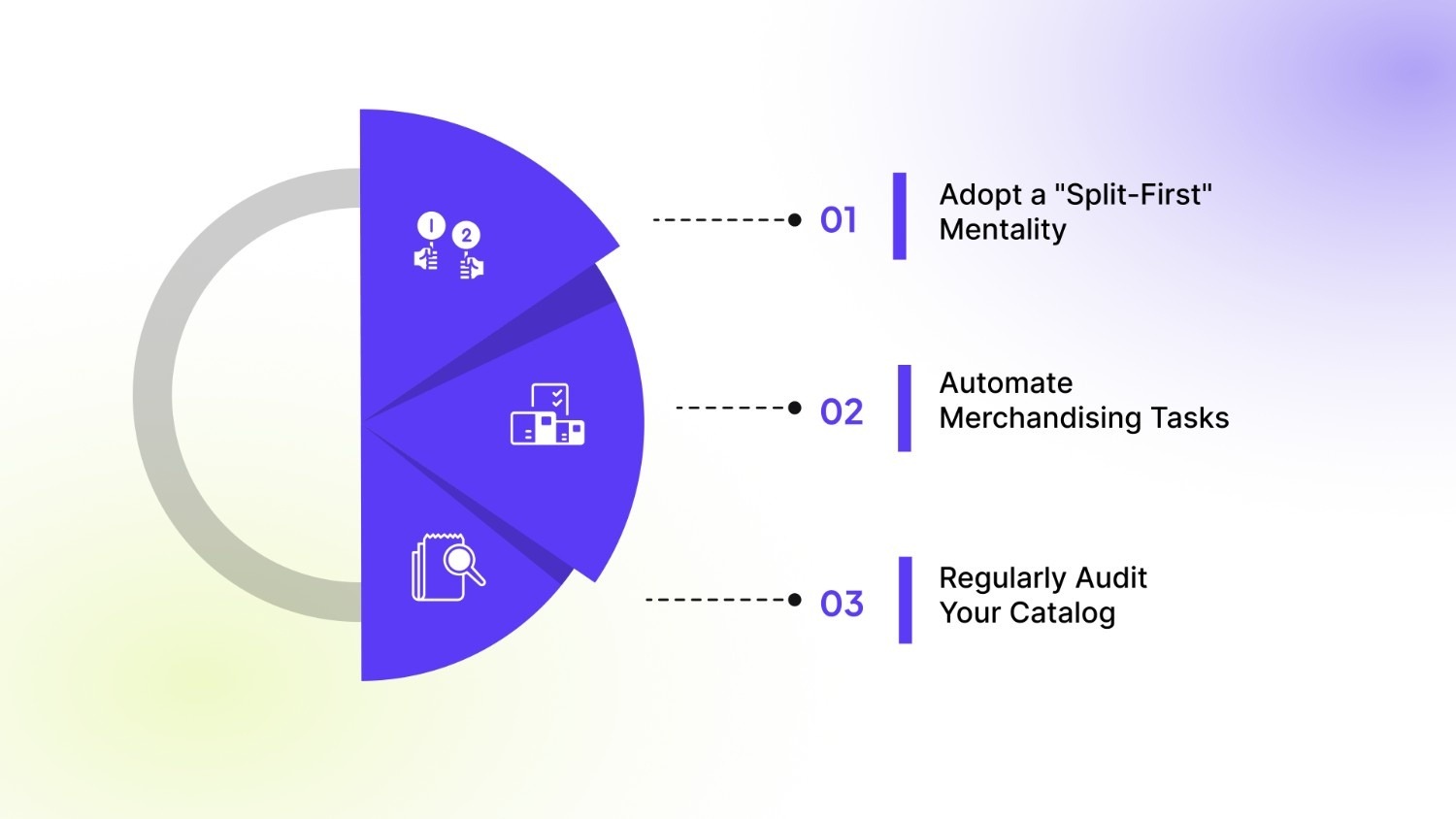
3 Best Practices for Future-Proofing Your Variant Strategy
The e-commerce environment changes rapidly, and your store structure must be ready to adapt. Implementing long-term best practices ensures you do not hit the same wall again next year.
Follow these practices to ensure scalability:
1. Adopt a "Split-First" Mentality
Design your catalog with separate products for distinct colors or styles from day one.
Impact: This prevents you from ever hitting the 100-variant or 50,000-total limit, allowing infinite growth.
2. Automate Merchandising Tasks
Stop doing manual data entry for swatches, alt text, and image assignments.
Impact: Your team saves hundreds of hours, and human error is virtually eliminated from your workflow.
3. Regularly Audit Your Catalog
Schedule a quarterly review to archive discontinued items and clean up your database.
Impact: Keeps your API limits open for new launches and ensures your site search remains fast and relevant.
Also read: Cyber Monday vs Black Friday: 9 Expert Tips for Shopify Stores to Crush BFCM 2026
Conclusion
The shopify 50000 variant limit is a significant hurdle for growing brands, but it does not have to stop your business. By understanding the distinction between variants and options, and shifting toward a split-product strategy, you can scale your catalog indefinitely.
The key is to stop fighting the limit and start structuring your data in a way that favors both Shopify's architecture and your customers' experience.
StarApps Studio offers the complete toolkit required to execute this strategy effectively. With apps like SA Variants: Combined Listings and Color Swatch King, you can manage complex inventories while keeping your storefront simple and beautiful.
Ready to break through your growth ceiling? Reach out to us today and transform how you handle product variants.
FAQs
Q. What happens if I go over the 50,000 variant limit?
You will be restricted to creating only 1,000 new variants per day. This throttle resets every 24 hours but remains in place as long as your total count exceeds 50,000.
Q. Does the 50,000 limit apply to Shopify Plus?
Yes, the daily creation rate limit applies to Shopify Plus merchants as well. However, Plus merchants have a higher per-product limit of 2,000 variants compared to the standard 100.
Q. Can I request Shopify to increase my variant limit?
No, Shopify does not increase this API rate limit for individual stores. You must manage your data structure or archive old products to stay within the optimal range.
Q. Do separate products hurt my SEO?
No, creating separate products for variants (like colors) actually helps SEO. It allows you to target specific keywords for each color, provided you use unique descriptions and titles.
Q. How do I show separate products as one on the collection page?
You need a third-party app like SA Variants: Combined Listings. It visually groups separate products so they appear as a single item with color options on your collection page.
Heading

End-to-end traceability
To ensure regulatory compliance, you must have a complete overview of your products from production to shipping. Book a demo to see how Katana can give you full visibility of your operations.


.png)

.svg)

.svg)

.svg)
.png)