
Top Features to Look for in a Shopify Variant Image and Swatch App


Discover the Shopify variant image and swatch app features that help merchants improve product presentation, navigation, and conversions.
As your Shopify catalog grows, managing product variants becomes more challenging. Shoppers expect to switch between colors, sizes, and styles without sorting through irrelevant images or confusing product options. When variant selection feels difficult, customers may leave before completing a purchase.
According to Baymard Institute, product-page usability plays a major role in ecommerce purchasing decisions. Clear variant presentation helps shoppers find the right product faster and reduces friction during the buying journey.
Choosing the right Shopify variant image and swatch app can improve product discoverability, simplify navigation, and create a more intuitive shopping experience. In this article, we'll cover the key features to look for, common pitfalls to avoid, and how to evaluate the right solution for your store.
TL;DR
- Variant-specific image galleries help reduce visual clutter by showing only the images relevant to the customer's selected option.
- Color swatches, image swatches, and size swatches make variant selection faster and more intuitive than traditional dropdown menus.
- Collection-page swatches improve product discovery by allowing shoppers to browse available variants without opening multiple product pages.
- Theme compatibility and page performance are just as important as feature sets when evaluating a Shopify variant image and swatch app.
- When researching ProductWiz features or similar solutions, merchants should focus on capabilities that support their catalog size, customer experience goals, and merchandising strategy.
Why Variant Images and Swatches Matter for Shopify Stores
Product variants are often the deciding factor in whether a customer makes a purchase. When shoppers browse products with multiple colors, sizes, styles, or materials, they expect to see accurate images and clear selection options for each variation.
If that experience feels confusing, even interested buyers may abandon the product page before reaching checkout.
The Limitations of Default Shopify Variant Presentation
Shopify's native variant selector works well for simple catalogs, but it can become difficult to manage as product complexity increases.
Common challenges include:
- Long dropdown menus that make variant selection slower.
- Product galleries displaying images from every variant at once.
- Limited visibility into available colors or styles.
- Extra clicks required to explore different options.
For stores with dozens of variant combinations, these issues can make product pages feel cluttered and harder to navigate.
How Poor Variant UX Affects Conversions
When customers struggle to find the variant they want, the buying journey becomes less efficient.
This can lead to:
- Longer decision-making times.
- Increased product-page exits.
- Lower engagement with product images.
- Reduced confidence in purchasing the correct item.
The problem becomes even more noticeable on mobile devices, where screen space is limited and shoppers expect quick interactions.
Also Read: Shopify Product Variants: How to Manage and Optimize Them
Multiple Images Per Variant: The Foundation of Better Product Pages
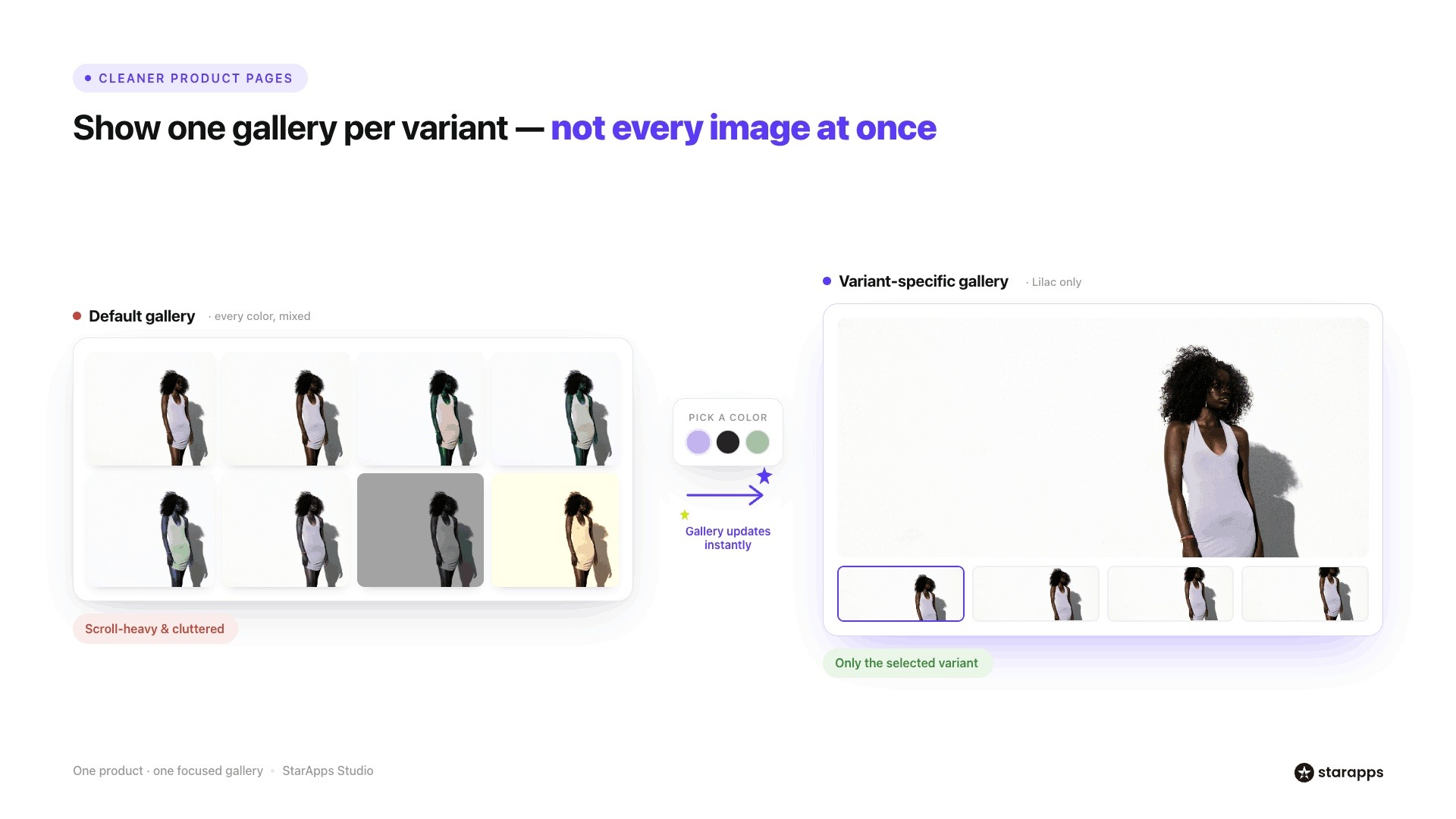
Product images help customers evaluate a product before they buy. However, when a store displays every image from every variant in a single gallery, it can quickly create confusion.
This is especially common in fashion, footwear, and home goods stores where each variant has its own set of images.
The Problem with Showing All Images at Once
Many Shopify stores use a single gallery that contains images from every color, style, or material option. While this approach ensures all images are visible, it often creates a poor browsing experience.
Common issues include:
- Visual clutter caused by large image galleries.
- Difficulty identifying which images belong to the selected variant.
- Extra scrolling, especially on mobile devices.
- Shoppers viewing images that do not match their chosen option.
As the number of variants increases, the gallery becomes harder to navigate and less useful for decision-making.
What to Look For in a Variant Image Solution
A strong Shopify variant image and swatch app should help organize product galleries around the customer's selection.
Key features include:
- Multiple Images Per Variant: Each variant should be able to display its own dedicated image set. For example, when a shopper selects a blue jacket, they should only see images of the blue version rather than images from every available color.
- Automatic Image Assignment: Manually organizing hundreds of product images can become time-consuming as catalogs grow. Automatic image assignment helps map images to the correct variants, reducing ongoing maintenance and minimizing errors.
- Variant-Specific Galleries: The gallery should update instantly when a customer selects a different variant. This creates a cleaner experience and allows shoppers to focus only on the product variation they are considering.
Example: Apparel Store with 10 Color Variations
Imagine an apparel brand selling a hoodie available in 10 different colors. If every product image appears in a single gallery, customers may need to scroll through dozens of photos to confirm what the navy or olive version looks like.
With variant-specific galleries, selecting a color immediately updates the gallery to show only the images associated with that option. This reduces visual clutter, helps customers evaluate products more quickly, and creates a more intuitive shopping experience.
For stores with large variant catalogs, multiple images per variant are no longer just a convenience. They are an important part of creating organized product pages that support product discovery and purchasing decisions.
Also Read: How to Create Multiple Shopify Stores Under One Account
Color Swatches and Image Swatches Help Shoppers Decide Faster
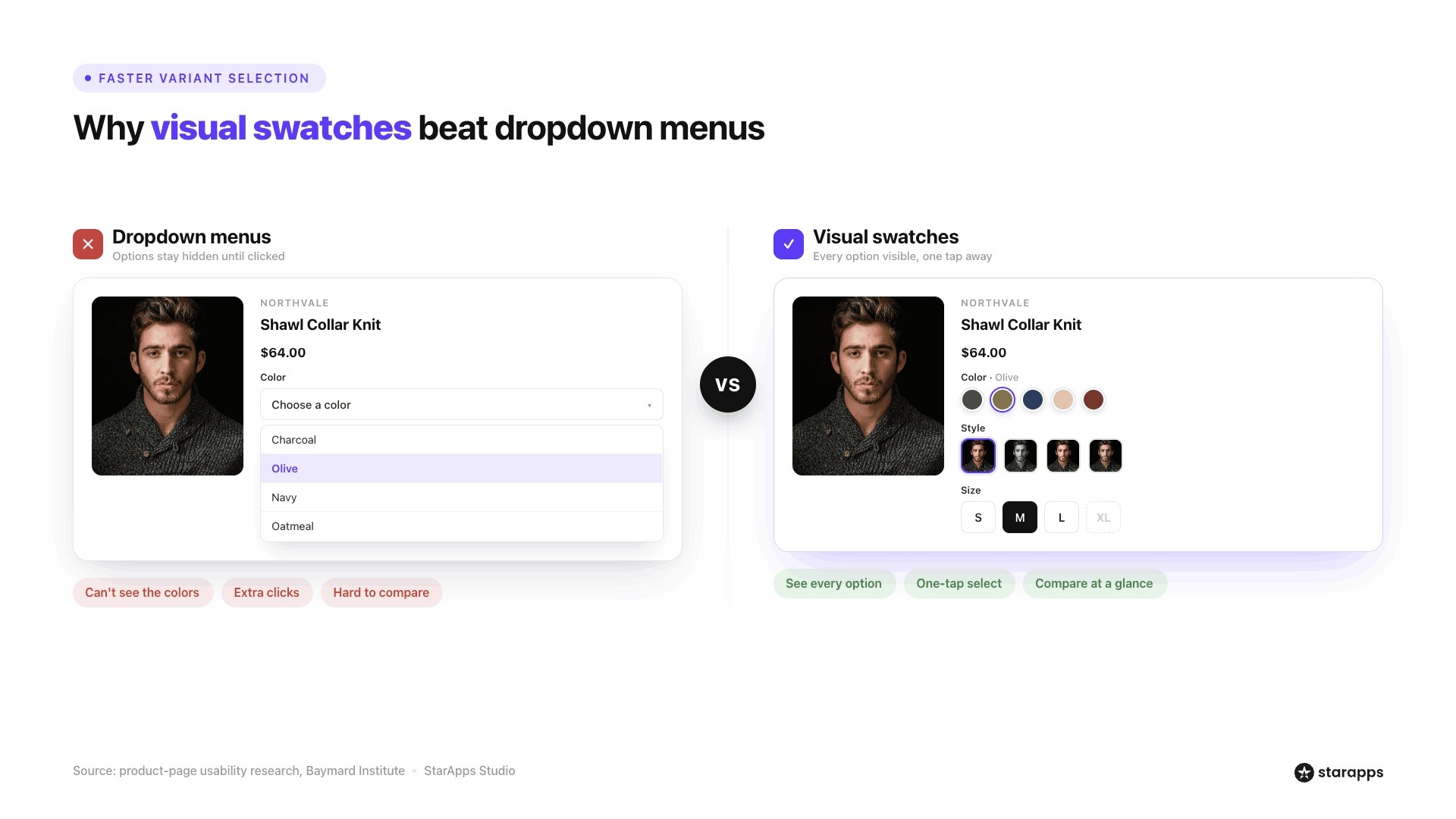
The way product variants are presented can significantly influence how quickly customers find what they want.
While Shopify's default dropdown menus work for basic products, they often create unnecessary friction for stores with multiple colors, sizes, or styles.
Why Dropdown Menus Create Friction
Dropdown selectors hide available options until customers click to expand them. This adds extra steps to the shopping journey and makes it harder to compare variants at a glance.
Common challenges include:
- Customers cannot immediately see all available options.
- Color names may not accurately communicate the actual appearance of a product.
- Switching between variants often requires multiple clicks.
- Mobile users may find long dropdown lists difficult to navigate.
These issues become more noticeable in categories such as fashion, beauty, footwear, and home décor, where visual differences play a major role in purchase decisions.
Features That Improve Variant Selection
Modern variant presentation tools make product options easier to browse and compare.
1. Color Swatches: Color swatches display available colors directly on the product page or collection page. Instead of selecting from a text-based dropdown, shoppers can visually identify and choose the color they want with a single click.
This creates a faster and more intuitive shopping experience, particularly for products available in multiple shades or finishes.
2. Image Swatches: Image swatches take the experience a step further by displaying thumbnail images for each variant. This allows customers to preview patterns, materials, or product styles before making a selection.
Image swatches are especially useful for products where visual differences go beyond color, such as printed apparel, furniture fabrics, or accessories.
3. Size Swatches: For products with multiple size options, button-style size swatches provide a cleaner alternative to dropdown menus. Customers can quickly see which sizes are available and make selections without opening additional menus.
4. Sold-Out Variant Visibility Controls: Displaying unavailable options can sometimes create frustration. Many merchants choose to hide sold-out variants or visually indicate that they are unavailable.
This helps customers focus on products they can actually purchase while still understanding the full range of options.
Business Impact of Better Variant Selection
Improving variant presentation benefits both shoppers and merchants.
Key advantages include:
- Faster product comparisons: Customers can evaluate available options without navigating multiple menus.
- Better mobile experience: Swatches are easier to interact with on smaller screens than lengthy dropdown lists.
- Improved merchandising: Visual variant displays help highlight product variety and encourage exploration.
For example, a footwear retailer offering a sneaker in eight colorways can display all available options through color or image swatches. Instead of opening a dropdown and selecting colors one at a time, shoppers can compare variants instantly and move to purchase more quickly.
As product catalogs become more complex, swatches provide a simple way to reduce friction and help customers make decisions with greater confidence.
Also Read: Key Strategies to Enhance Product Line Item Visibility
Collection Page Variant Selection Improves Product Discovery
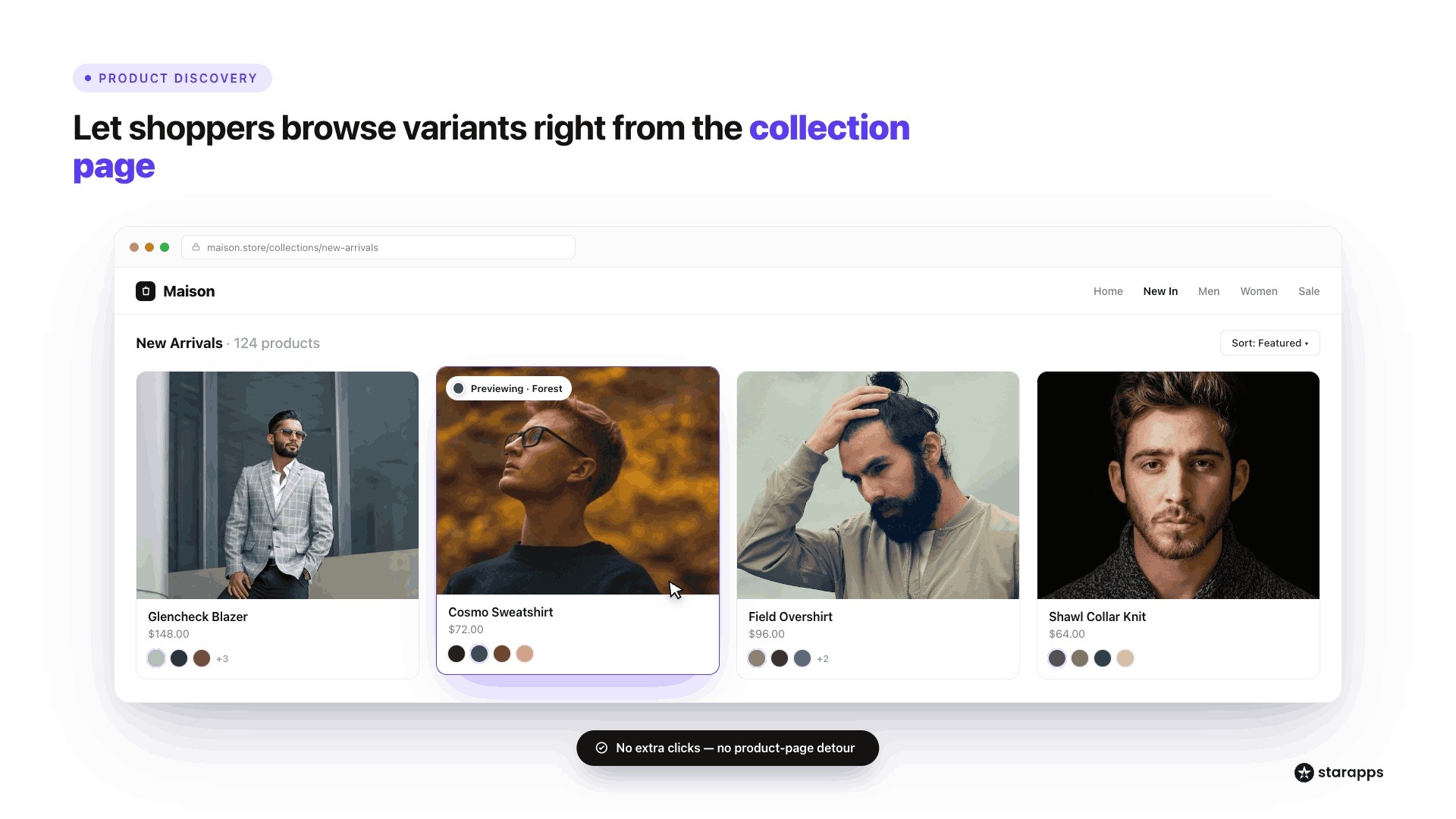
For many Shopify stores, the product discovery journey begins on collection pages rather than product pages. Customers often browse category pages to compare products, colors, and styles before deciding which item deserves a closer look.
If variant options are hidden until shoppers open individual product pages, finding the right product can become a slow and repetitive process.
The Challenge
By default, most collection pages display only a single product image and title. Customers who want to explore different colors or styles typically need to open multiple product pages to see what is available.
This creates several challenges:
- More clicks are required to explore product options.
- Shoppers may overlook variants that match their preferences.
- Browsing large catalogs becomes more time-consuming.
- Product discovery slows down, especially on mobile devices.
For stores with extensive catalogs, these small points of friction can add up quickly.
What to Look For
A strong variant management solution should help customers interact with product options directly from collection pages.
Swatches on Collection Pages: Displaying color, image, or size swatches on collection pages allows shoppers to see available variants without leaving the category view. This creates a more interactive browsing experience and helps customers identify products that match their preferences more quickly.
Variant Previews: Variant previews allow collection page images to update when a shopper hovers over or selects a variant. Instead of opening a product page to see another color option, customers can preview it instantly while continuing to browse.
Quick Variant Browsing: The best solutions reduce unnecessary navigation by allowing customers to compare multiple variants directly from the collection page. This helps shoppers move through large product catalogs more efficiently and reach relevant products faster.
Also Read: Key Strategies to Enhance Product Line Item Visibility
What Merchants Commonly Look for When Researching ProductWiz Features
When merchants search for ProductWiz features or similar Shopify variant-management solutions, they are usually trying to determine whether an app can handle the complexity of their product catalog while creating a better shopping experience.
The focus is often less about the app itself and more about the capabilities needed to manage variants efficiently at scale.
The Capabilities Most Merchants Evaluate
While feature requirements vary by store type, several capabilities consistently influence purchasing decisions.
- Variant Image Galleries: Merchants want product galleries that update dynamically based on the selected variant. Showing only relevant images helps reduce confusion and creates a cleaner browsing experience.
- Multiple Images Per Variant: For products available in multiple colors or styles, a single image is often not enough. Many merchants look for solutions that support multiple images for each variant so customers can view products from different angles before purchasing.
- Color and Image Swatches: Visual selectors help customers compare options more quickly than traditional dropdown menus. Color swatches and image swatches are particularly valuable for fashion, beauty, footwear, and home décor brands where visual appearance strongly influences buying decisions.
- Collection-Page Swatches: Many merchants also prioritize the ability to display swatches directly on collection pages. This allows shoppers to browse available variants without repeatedly opening product pages.
- Theme Compatibility: A feature-rich app provides little value if it creates storefront issues. Merchants often evaluate whether a solution works with Online Store 2.0 themes, custom themes, and future theme updates.
- Ease of Setup: Implementation time is another important consideration. Merchants generally prefer solutions that can be installed and configured without extensive theme modifications or ongoing developer support.
The Bigger Question Merchants Should Ask
When evaluating ProductWiz features or any Shopify variant-management solution, the more important question is whether the feature set supports your specific business goals.
For example:
- Large fashion catalogs may prioritize image swatches and variant-specific galleries.
- Stores with hundreds of SKUs may benefit from collection-page variant browsing.
- Merchants focused on SEO may need stronger variant organization and discoverability features.
- High-growth stores may place greater importance on scalability and theme compatibility.
Rather than comparing feature lists alone, merchants should evaluate how each capability contributes to a better customer experience and more effective merchandising strategy.
SEO and Product Discoverability Features Worth Considering
Variant presentation affects more than just product-page usability. The way variants are organized, described, and displayed can also influence how easily customers discover products through search, navigation, and filtering.
Why Variant Content Affects Discoverability
As product catalogs expand, customers rely heavily on search bars, collection pages, filters, and category navigation to find relevant products. Poorly organized variant information can make products harder to discover, even when the right items are available.
A well-structured variant strategy helps shoppers locate products more efficiently while improving catalog organization behind the scenes.
Features to Evaluate
1. Variant-Specific Content: Providing variant-specific information helps create a more accurate shopping experience.
Details such as color descriptions, material information, sizing guidance, and product specifications can help customers better understand the option they are considering.
2. Image ALT Text Optimization: Product images play an important role in both accessibility and search visibility.
Optimized ALT text helps search engines understand image content while making storefronts more accessible to customers using screen readers. For stores managing hundreds or thousands of images, automation can significantly reduce the manual effort involved in maintaining image metadata.
3. Better Product Organization: Well-organized variants improve navigation across product pages, collection pages, and search results.
Clear relationships between products and variants make it easier for customers to browse catalogs and discover relevant items.
4. Search and Filtering Support: Advanced filtering allows customers to narrow results based on attributes such as color, size, material, or style. The more effectively variants are structured, the easier it becomes for shoppers to locate the products they want.
A Trade-Off to Consider
Advanced variant structures can improve discoverability and customer experience, but they may also introduce additional catalog-management responsibilities.
For example, merchants using variant-specific content, expanded product listings, or more sophisticated merchandising strategies may need to spend additional time maintaining product information and ensuring consistency across variants.
The goal is to find a balance between discoverability and operational efficiency. Features should help customers find products more easily without creating unnecessary complexity for the team managing the catalog.
How StarApps Helps Shopify Merchants Improve Variant Management
Choosing the right variant management strategy is not just about adding features to your storefront. It is about helping customers find the right product faster, reducing friction during the buying journey, and making large catalogs easier to manage. As your product range grows, organizing variants effectively becomes increasingly important for both user experience and product discoverability.
StarApps Studio develops Shopify apps that help merchants improve product presentation, variant selection, and merchandising performance. Trusted by over 25,000 active merchants and 1,000+ Shopify Plus stores, StarApps solutions are designed to support growing catalogs without compromising storefront usability.
Here is how StarApps helps Shopify merchants manage variants more effectively:
- Color Swatch King: Replace traditional dropdown menus with visual color, image, and size swatches that make product options easier to browse. Merchants can also display swatches on collection pages and manage how sold-out variants appear, helping customers compare options more quickly and confidently.
- Variant Image Automator: Automatically assign multiple images to the correct product variants and display only relevant images when a shopper makes a selection. This keeps product galleries organized and helps customers evaluate products without sorting through unrelated images.
- SA Variants: Combined Listings: Improve product discoverability by creating richer variant experiences across your catalog. Variant-focused listings can support better filtering, easier browsing, and stronger search visibility for stores managing large numbers of products and variations.
If your store struggles with variant presentation, image organization, or product discoverability, consider using Shopify apps designed specifically for variant management and merchandising.
Book a demo to create a more intuitive shopping experience while making your catalog easier to manage and scale.
Final Thoughts
Choosing a Shopify variant image and swatch app involves more than comparing feature lists. You need to consider how variant images, swatches, collection-page browsing, and theme compatibility work together to create a smoother shopping experience and support long-term catalog growth.
As your product catalog expands, the way variants are displayed becomes increasingly important. StarApps Studio helps Shopify merchants improve variant presentation, product discoverability, and storefront experience through apps built specifically for growing ecommerce brands.
If you want customers to find products faster, compare variants more easily, and navigate your catalog with confidence, explore the StarApps app suite and choose the tools that best support your store's next stage of growth.
FAQs
1. What is the difference between color swatches and image swatches in Shopify?
Color swatches use solid colors or color codes to represent product variants, while image swatches display actual images or thumbnails of each variant. Color swatches work well when the primary difference is color, whereas image swatches are more useful for products with unique patterns, textures, materials, or designs. Many merchants use both to create a more visual shopping experience.
2. Can multiple images per variant improve conversion rates?
Multiple images per variant can help customers better understand what they are purchasing by showing different angles, details, and use cases for the selected option. This reduces uncertainty and makes product evaluation easier. While results vary by store, clearer product presentation often supports stronger customer confidence and a smoother buying journey.
3. Do Shopify variant image apps affect page speed?
A well-built Shopify variant image app should have minimal impact on page performance. However, performance can vary depending on how images are loaded, how the app integrates with your theme, and the size of your product catalog. Merchants should look for solutions that prioritize efficient image handling and compatibility with modern Shopify themes.
4. What should merchants look for when evaluating ProductWiz features or similar apps?
Rather than focusing solely on feature lists, merchants should evaluate whether the app supports their specific catalog and merchandising requirements. Important considerations include multiple images per variant, color and image swatches, collection-page variant browsing, theme compatibility, ease of setup, and long-term scalability as the store grows.
5. Are collection-page swatches useful for large Shopify catalogs?
Yes. Collection-page swatches allow customers to explore available variants without opening individual product pages. This can be especially helpful for fashion, footwear, beauty, and home goods stores that manage hundreds of products and variations. By reducing unnecessary clicks, collection-page swatches help improve product discovery and browsing efficiency.
6. Which Shopify stores benefit most from variant image and swatch apps?
Variant image and swatch apps are particularly valuable for stores that sell products with multiple colors, sizes, materials, or styles. Fashion brands, footwear retailers, beauty companies, furniture stores, and home décor businesses often benefit the most because visual product comparisons play an important role in customer decision-making. These apps become increasingly useful as catalogs and SKU counts grow.
Heading

End-to-end traceability
To ensure regulatory compliance, you must have a complete overview of your products from production to shipping. Book a demo to see how Katana can give you full visibility of your operations.



.png)

.svg)

.svg)

.svg)
.png)