


Explore NestScale features, pricing, and limitations to see if this all-in-one Shopify variant app fits your store’s needs and growth plans.
When you look into NestScale features, you’re usually trying to answer a practical question: can one app handle how your variants look, behave, and appear across your store without adding extra complexity?
That becomes harder to answer as your product range expands. What starts as a simple setup can quickly turn into scattered variant displays, inconsistent images, and limited control over how options show up on collection pages.
NestScale Product Variants brings these elements together into a single solution. With a 4.5-star rating across 151 reviews on the Shopify App Store, it’s often considered by merchants who want a more unified approach. But how well does it actually perform as your store scales? That’s exactly what we’ll break down in this article.
In Short
- NestScale offers an all-in-one approach to variant presentation. It combines swatches, variant images, and product grouping into a single app for easier setup.
- Best suited for stores that want quick implementation without multiple tools. It simplifies how variants are displayed across product and collection pages.
- Affordable to start, but pricing can increase with add-ons. The base plans are low-cost, though additional features and support may add up over time.
- Covers multiple areas, but with limited depth in each. Works well for basic to moderate needs, but may feel less flexible as requirements grow.
- StarApps Studio fits better when a deeper variant of UX and merchandising optimization is needed. It becomes relevant for stores focused on improving clarity, browsing, and scalability.
NestScale Overview: Key Features and Pricing Breakdown
NestScale Product Variants is built for Shopify merchants who want to manage how product variants are displayed without relying on multiple apps. Instead of handling swatches, images, and variant grouping separately, it brings these elements into a single setup.
The app focuses on improving how customers interact with product options across both product and collection pages. This includes making variant selection more visual, keeping image galleries relevant to selected options, and organizing related products in a more structured way.
For stores looking to simplify variant presentation while maintaining a consistent storefront experience, NestScale positions itself as an all-in-one solution.
What NestScale is Made For
At its core, NestScale extends Shopify’s default variant experience by improving how options are presented and explored across the storefront.
Instead of relying only on dropdowns or basic selectors, the app allows merchants to create more interactive and visual variant experiences. This includes displaying swatches, linking multiple images to specific variants, and restructuring how related products appear across collection pages.
For example, a store can use NestScale to:
- Replace dropdowns with color, image, or button-based swatches
- Show only relevant images when a specific variant is selected
- Group separate products into a single combined listing
- Display variants as individual products on collection pages
- Maintain consistency across product and collection browsing
This makes NestScale more of a variant presentation and organization tool, rather than a customization or input-focused app.
Key Features of NestScale
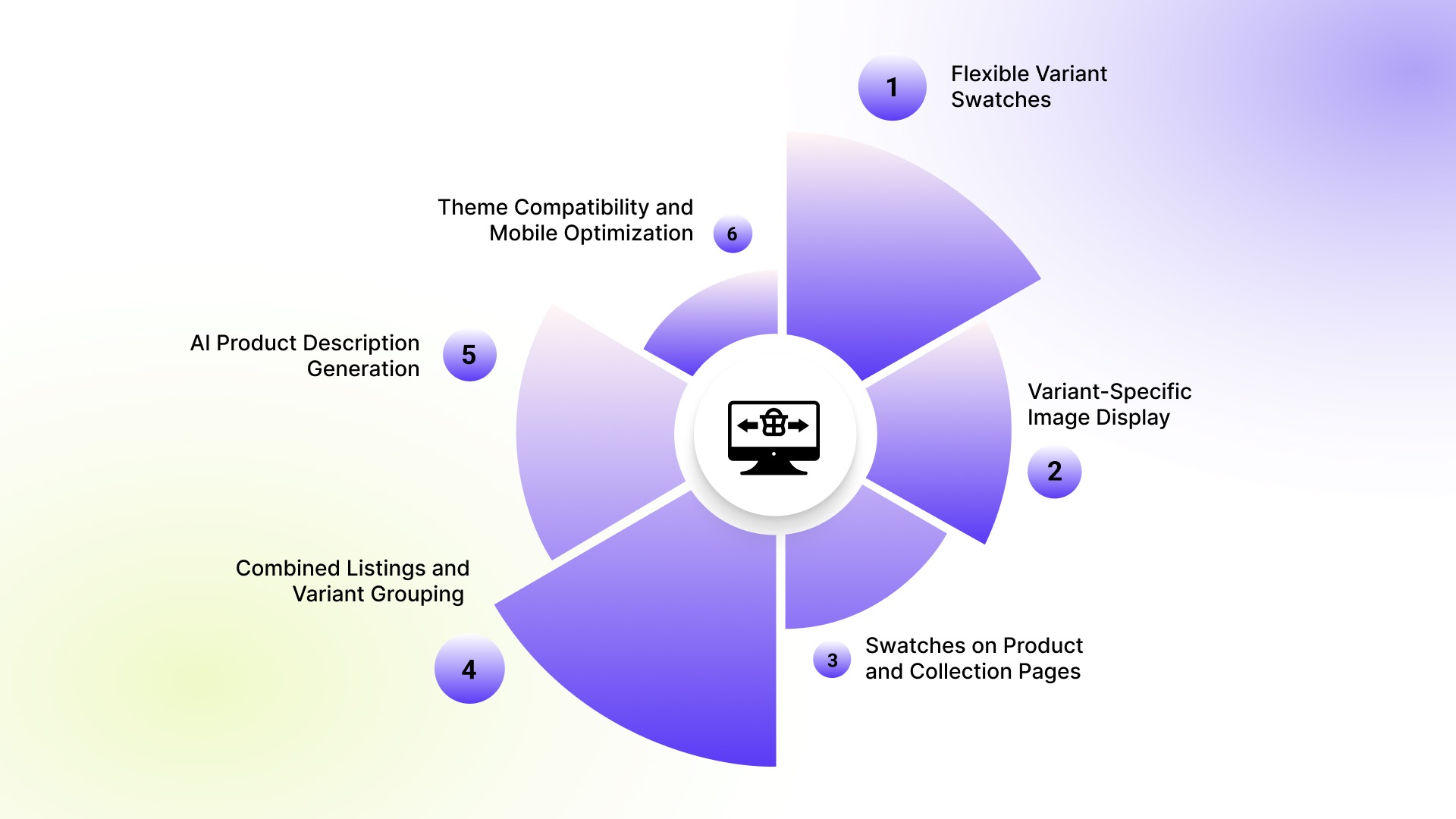
1. Flexible Variant Swatches
NestScale supports multiple swatch types, including color, image, text, dropdowns, and buttons. Merchants can customize shapes, borders, tooltips, and styling to match their store design.
2. Variant-Specific Image Display
The app allows multiple images per variant and ensures that only relevant images appear when a variant is selected. This helps keep product galleries cleaner and more aligned with user selection.
3. Swatches on Product and Collection Pages
Variant swatches can be displayed not just on product pages, but also directly on collection pages, making it easier for customers to browse and compare options without extra clicks.
4. Combined Listings and Variant Grouping
NestScale lets merchants group related products into a single listing or split variants into separate product cards. This improves how products are structured and discovered across the storefront.
5. AI Product Description Generation
The app includes an AI-powered feature to generate product descriptions in bulk, helping merchants maintain consistency in product content while saving time.
6. Theme Compatibility and Mobile Optimization
NestScale is designed to work across Shopify themes with mobile-responsive layouts and offers support for theme integration when needed.
NestScale Pricing Breakdown
NestScale offers three main plans, including a free tier, with additional costs depending on selected features and support needs.
The structure makes it easy to get started, but the total cost can vary depending on how many add-ons or support features your store requires.
NestScale Strengths and Limitations
NestScale Product Variants is designed to simplify how variants are displayed and managed across a Shopify storefront. It performs well when the goal is to bring multiple variant-related functions into one place.
At the same time, its all-in-one approach also defines where it may feel less flexible, depending on how your store operates and scales.
Where NestScale Performs Well
NestScale is most effective for stores looking for a consolidated solution to manage variant presentation without relying on multiple apps.
Its key strengths include:
- Combines swatches, variant images, and product grouping in one setup, reducing the need for multiple apps
- Makes variant selection more visual with swatches on both product and collection pages
- Keeps product galleries cleaner by showing images relevant to the selected variant
- Allows grouping or splitting of products to improve how variants are organized and discovered
- Easy to get started with, especially for small to mid-sized stores, due to its free plan and simple setup
These strengths make NestScale a practical choice for merchants who want to improve variant visibility and organization without adding too much operational complexity.
Where NestScale May Feel Limited
NestScale’s approach works well for many stores, but there are scenarios where its structure may feel less adaptable, especially as requirements become more specific or complex.
Some of the common limitations include:
- Covers multiple areas, but may offer less depth in each compared to more specialized tools
- Pricing can become less predictable with add-ons and extra support costs
- Managing structure across larger or more complex catalogs may require more effort
- Focuses more on setup than on deeper optimization of variant UX and merchandising performance
- Less flexibility to fine-tune individual layers since multiple features are bundled into one app
These limitations do not make NestScale ineffective. They simply reflect its positioning as a broad, all-in-one solution, which works well for many use cases but may not fully address more specialized or performance-driven needs as stores scale.
Recommended: How to Manage High-Variant Products in Shopify.
Where StarApps Studio Adds More Depth to Variant UX
StarApps Studio focuses on improving how product variants are experienced across the storefront. Instead of combining multiple features into a single app, it takes a more focused approach to areas like variant selection, image clarity, and product discovery.
This makes it particularly useful for stores that already have variant display in place but want better control over how those options are presented and explored by customers.
If NestScale helps you implement variant presentation, StarApps focuses on refining how that experience performs as your store grows.
Where StarApps Studio Fits In
StarApps Studio is best suited for Shopify stores that need more control over how variants are displayed, explored, and understood across both product and collection pages.
This is suitable for stores with:
- Large variant catalogs
- Visually driven products
- Multiple images per variant
- Collection pages where browsing impacts conversion
- A need to reduce confusion and improve decision speed
Rather than replacing an all-in-one setup, StarApps works as a more focused layer that improves how each part of the variant experience performs.
Color Swatch King for Better Variant Selection
As product catalogs grow, simple dropdowns often make it harder for shoppers to quickly scan and compare options. This slows down decision-making, especially in visually driven categories.
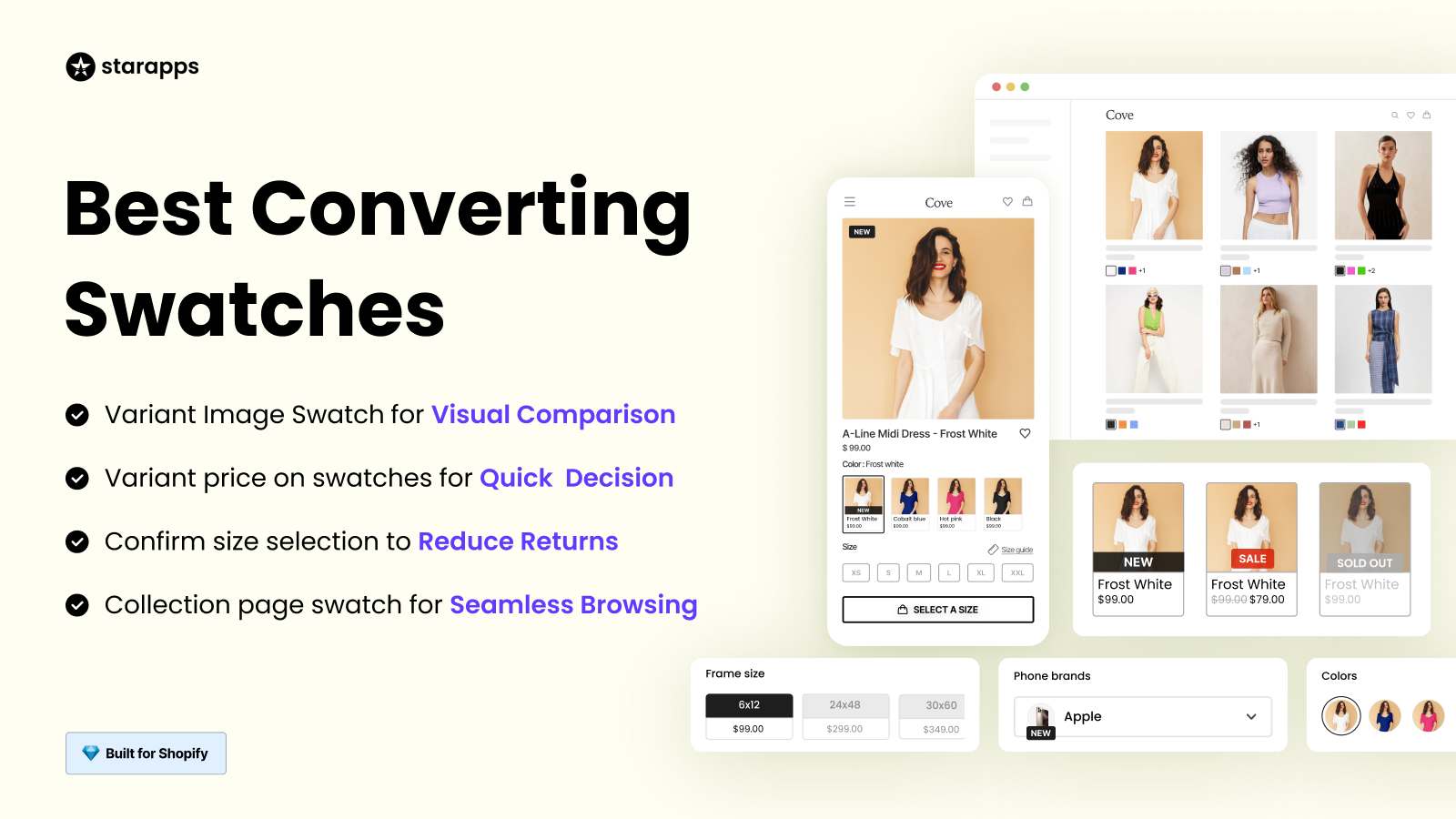
Color Swatch King replaces basic selectors with more intuitive, visual formats like swatches, buttons, and image-based options. This makes variant selection faster and easier to understand at a glance.
It is especially useful for:
- Stores with multiple colors, styles, or finishes
- Products where visual comparison impacts buying decisions
- Improving selection experience on both product and collection pages
Variant Image Automator for Cleaner Product Galleries
A common issue with variant-heavy products is that image galleries don’t always update cleanly when a selection is made. Shoppers may see unrelated images, which creates confusion and interrupts the buying flow.
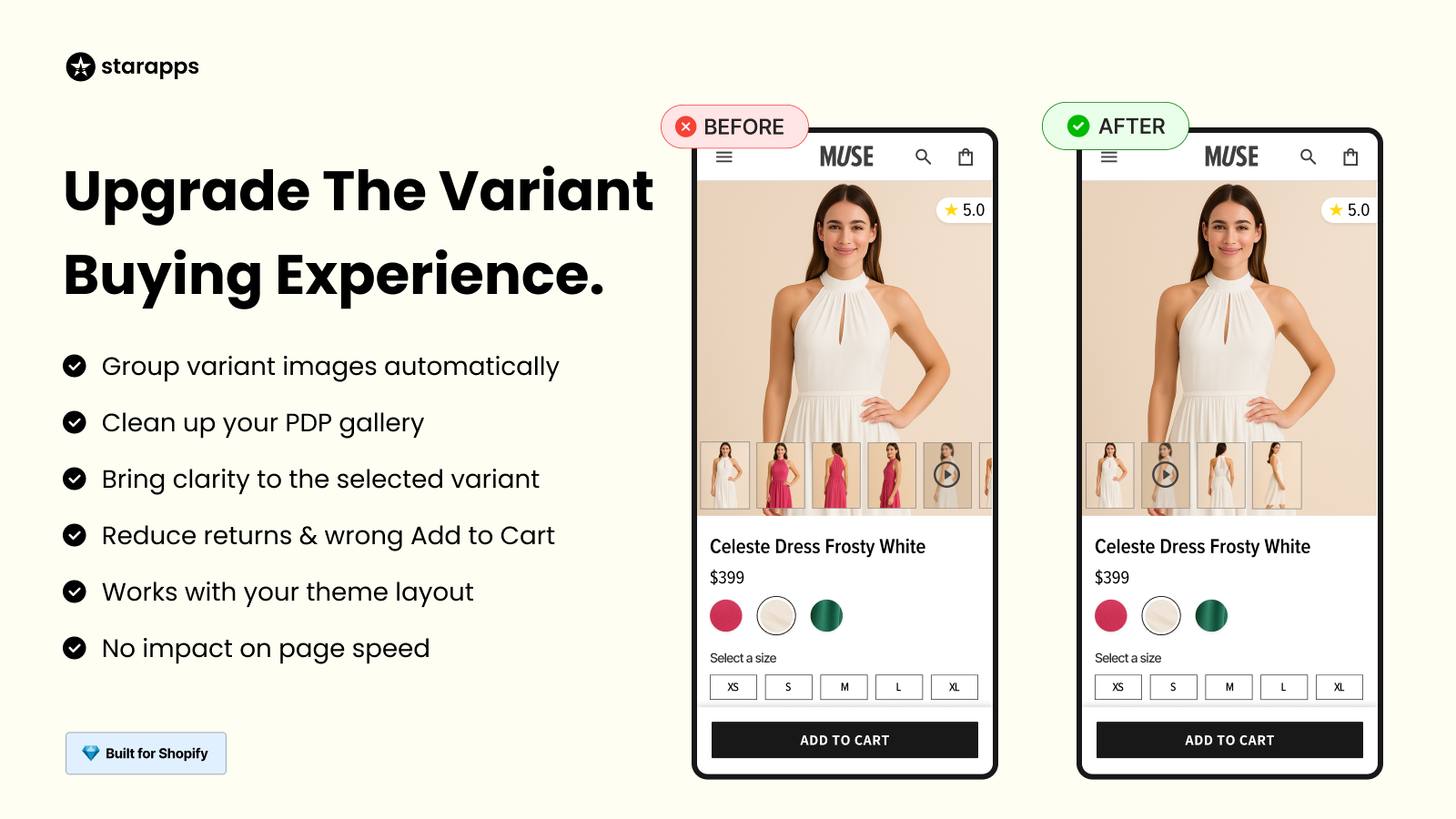
Variant Image Automator ensures that only the images relevant to the selected variant are shown. This keeps the gallery aligned with user actions and removes unnecessary visual noise.
This becomes valuable for:
- Products with multiple images per variant
- Stores managing large catalogs where manual tagging is not scalable
- Maintaining a consistent and accurate product viewing experience
SA Variants: Combined Listings for Better Discovery
In many Shopify stores, variants are grouped under a single product, which can make them harder to discover across the storefront.
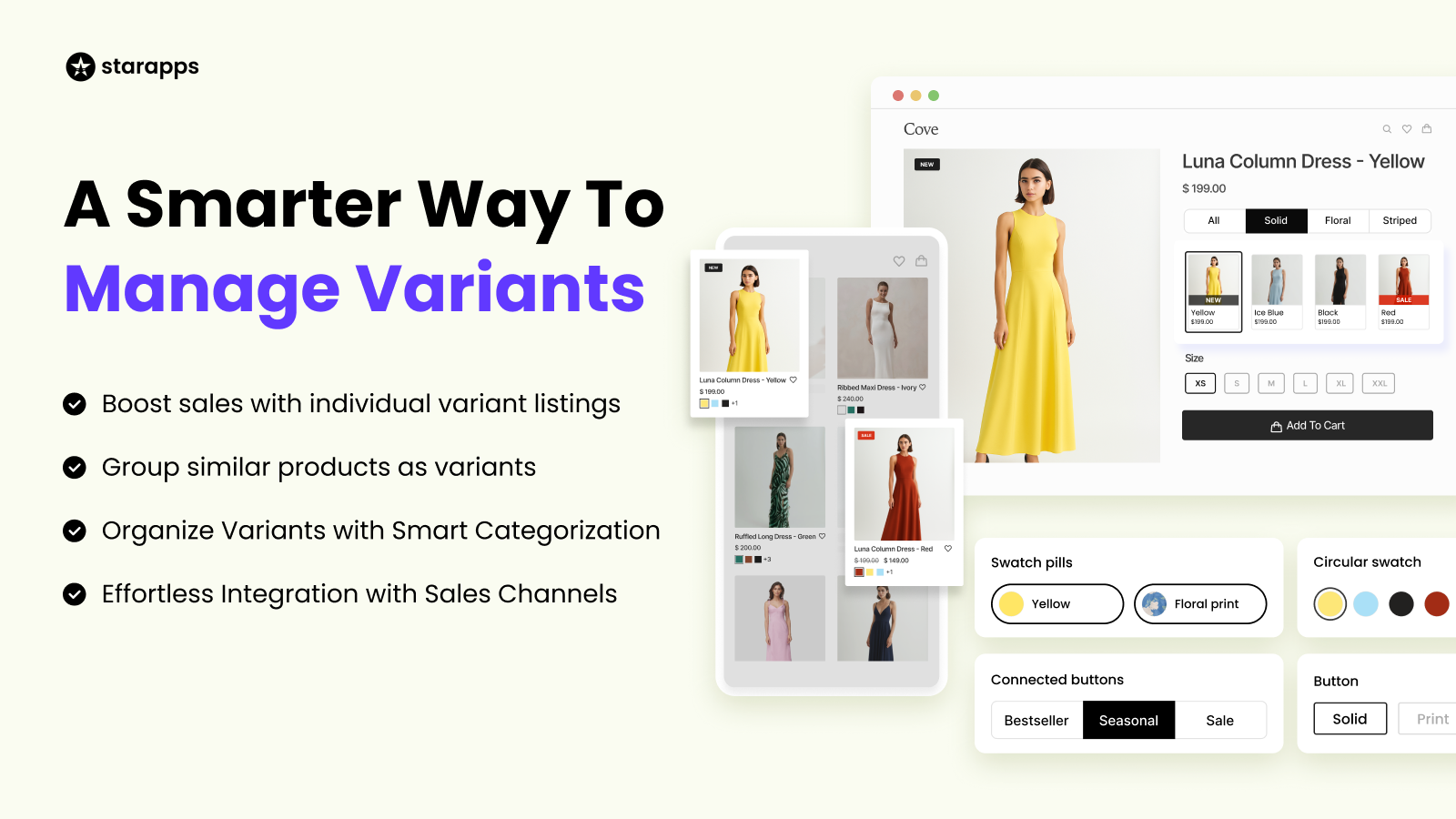
SA Variants: Combined Listings restructures this by allowing variants to appear as individual listings while still staying connected. This improves visibility across collection pages, filters, and search.
It works particularly well for:
- Stores with large or diverse variant catalogs
- Improving browsing and filtering across collections
- Creating a more structured and discoverable product experience
Why Variant Experience Matters More at Scale
As your store scales, the problem shifts from simply displaying variants to helping customers navigate them efficiently.
This shows up in areas like:
- Variant comparison speed
- Image clarity and relevance
- Collection-page browsing experience
- Product discoverability
Improving these areas has a direct impact on how easily shoppers can find what they want and complete a purchase. That is where a more focused approach to variant UX and merchandising becomes important.
How StarApps Compares to NestScale
StarApps Studio and NestScale Product Variants are built to solve similar problems, but they approach them differently.
NestScale focuses on providing a combined, all-in-one setup for variant display, images, and product grouping. It is designed to help merchants implement these features quickly within a single app.
StarApps Studio, on the other hand, takes a more specialized approach, where each app focuses on improving a specific part of the variant experience, such as selection, image clarity, or product discovery. This allows for more control and refinement as store requirements grow.
Which One Makes More Sense for Your Store?
If your store is trying to solve:
- Quick setup for swatches, images, and variant grouping
- A need to manage everything within a single app
- Basic to moderate variant presentation improvements
Then NestScale Product Variants is usually the more direct fit.
If your store is trying to solve:
- Variant confusion across product and collection pages
- Cluttered or inconsistent product galleries
- The need for deeper control over variant UX and merchandising
- Scaling challenges as your catalog grows
Then StarApps Studio becomes more relevant.
Final Thoughts
NestScale Product Variants is a practical choice for merchants who want a simple, all-in-one way to manage variant display without setting up multiple tools. It works well when the goal is to implement core functionality quickly and keep things consolidated.
However, as stores grow and the focus shifts toward improving how customers interact with variants, a more specialized approach can become valuable. That is where StarApps Studio fits in, offering deeper control over variant selection, image handling, and product discovery through its focused app ecosystem.
The right choice ultimately depends on your store’s stage, complexity, and how much emphasis you place on refining the storefront experience.
FAQs
1. Does NestScale work with all Shopify themes?
NestScale is designed to be compatible with most Shopify themes. However, depending on how your theme is built, some adjustments or support may be required to ensure swatches, images, and listings display correctly.
2. Can NestScale handle Shopify’s variant limit?
NestScale does not change Shopify’s native variant limit directly, but it allows merchants to work around it by grouping products or structuring variants differently through combined listings.
3. Will NestScale affect my store's speed or performance?
Like most frontend apps, performance impact depends on how it is implemented and how many features are active. A well-configured setup generally runs smoothly, but heavier use of images and scripts may require optimization.
4. Is NestScale suitable for large product catalogs?
NestScale can support growing catalogs, but as the number of products and variants increases, managing structure and consistency may require more effort depending on your setup and workflows.
5. Can NestScale be used alongside other Shopify apps?
Yes, many merchants use NestScale alongside other apps for different purposes. For example, one app may handle variant display while others focus on SEO, analytics, or advanced merchandising, depending on the store’s needs.
Heading

End-to-end traceability
To ensure regulatory compliance, you must have a complete overview of your products from production to shipping. Book a demo to see how Katana can give you full visibility of your operations.



.png)

.svg)

.svg)

.svg)
.png)