


Identify common Shopify issues impacting usability and sales, and learn practical solutions to fix them before they affect growth. Click for solutions now!
No matter how beautifully you design your Shopify store, hidden technical and UX issues can quietly drag sales down.
Research shows that page speed and UX issues drive up to 70% of cart abandonment, with half of shoppers leaving sites that take just 2+ seconds to load, directly costing sales and eroding ROI.
As ecommerce expectations rise, even brief Shopify outages or glitches can disrupt revenue during peak periods. In this post, we break down the top 10 Shopify issues affecting your store and offer clear, practical solutions you can implement today.
Key Takeaways
- Shopify issues commonly affect store speed, SEO, product visibility, and user experience, especially as catalogs and traffic grow.
- Many problems arise from how products, variants, images, and themes are managed rather than from Shopify itself.
- Addressing issues early, such as poor variant selection, image mismatches, and hidden products, prevents lost sales and customer frustration.
- Using theme-safe, performance-optimized solutions helps stores fix problems without breaking design or slowing down pages.
- A proactive approach to Shopify maintenance and UX optimization supports scalability, better conversions, and long-term growth.
What Makes Shopify Such a Good Choice for e-Commerce?
Shopify is a cloud-based eCommerce platform that allows businesses to build, manage, and scale online stores without needing to handle hosting, security, or complex backend infrastructure.
It provides everything required to sell online, from product management and payments to checkout, shipping, and analytics, within a single, managed ecosystem.
What makes Shopify a strong choice for eCommerce businesses is how it combines operational simplicity with commercial scalability. Merchants can launch quickly using pre-built themes and native tools, then expand their stores as demand grows by adding apps, custom features, and integrations.
Shopify also supports high traffic volumes, multiple sales channels, and global selling, making it suitable for both growing brands and established businesses.
Key reasons businesses choose Shopify
- Fast setup with low technical overhead: Shopify allows businesses to launch stores quickly without managing servers, security patches, or hosting. This lets teams focus on products, marketing, and customers instead of infrastructure.
- Scalable architecture for growing stores: From small catalogs to thousands of SKUs, Shopify handles traffic spikes, high order volumes, and global sales without requiring major platform changes.
- Strong checkout and payments system: Shopify’s checkout is optimized for speed and reliability, with built-in payment options, fraud protection, and support for multiple currencies and regions.
- Extensive app ecosystem: Shopify’s App Store enables merchants to extend functionality, covering merchandising, SEO, fulfillment, analytics, and UX—without rebuilding their store from scratch.
- Theme flexibility with consistent performance: Merchants can customize storefronts while still benefiting from Shopify’s optimized frontend framework and mobile-first design standards.
When a platform powers millions of stores, even small gaps in setup, UX, or performance can quietly turn into costly problems if left unchecked.
The Most Common Shopify Issues That Impact Store Performance
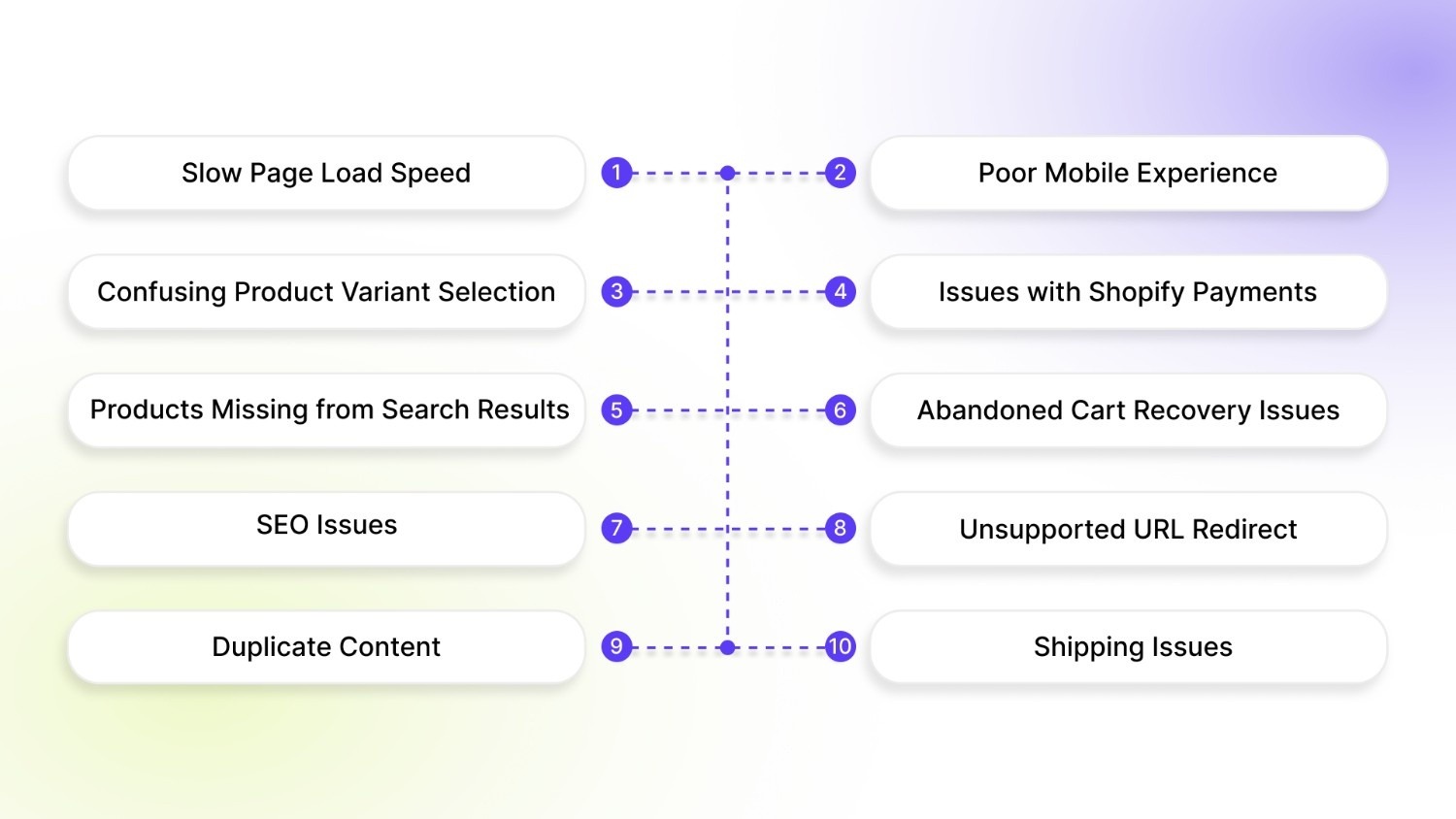
Because Shopify is highly customizable and app-driven, small misconfigurations, UX gaps, or app conflicts can quietly impact performance, conversions, and discoverability. That’s why understanding common Shopify issues and knowing how to fix them is critical to fully realizing the platform’s potential.
Below are the Shopify issues most businesses face as they grow, along with clear, actionable ways to fix them.
1. Slow Page Load Speed
Page speed issues usually build up over time. High-resolution product images, feature-heavy themes, and multiple third-party apps add extra scripts that browsers must load before a page becomes usable. On mobile devices, where processing power and network speed are limited, this delay becomes even more noticeable.
Slow-loading pages increase bounce rates, reduce time on site, and directly hurt conversions. Even small delays can cause users to leave before viewing products, especially during high-intent moments like browsing collections or switching variants.
Here are the fixes that actually solve this:
- Compress every product image with TinyPNG before uploading. This shrinks massive files down to tiny sizes while keeping them crisp and professional-looking.
- Go to your Shopify Admin, find the Apps section, and delete anything you haven't used in months. Most successful stores run just 6-8 apps total; anything more slows everything down.
- Switch to a fast theme like Dawn (super lightweight) or Prestige (built for sales). These load completely in about 3 seconds flat, giving customers instant access to your products.
- Every week, run a free speed test using Google PageSpeed Insights. It shows exactly what's slowing you down and gives one-click suggestions to improve.
For variant-heavy stores, SA Variant Image Automator automatically handles photo optimization across all colors and sizes. No more mismatched images or slow-loading galleries killing your conversion rate.
2. Poor Mobile Experience
Many Shopify stores are designed and tested primarily on desktop. As a result, elements like buttons, images, popups, and variant selectors don’t always adapt well to smaller screens. Touch targets may be too small, layouts may feel cramped, and important actions can become hard to complete on mobile devices.
Mobile traffic often makes up the majority of store visits. When the mobile experience feels slow, cluttered, or difficult to use, shoppers leave quickly.
Here are the simple fixes:
- Test every product page, collection, and checkout on your actual phone, not just the desktop preview. Tap every button, swipe every gallery, swipe every variant selector. If it feels clunky, it is.
- Switch to mobile-first themes like Dawn or Sense. These themes load fast and put big, tappable buttons where fingers naturally land. No more "pinch to zoom" nightmares.
- Clean up clutter, remove oversized popups, stacked banners, and overlapping elements. Give breathing room around buttons so thumbs hit their mark first try.
- Make variant selection touch-friendly with bigger swatches and clear price updates. Customers should see "Red M - $29.99 - In Stock" instantly when they tap.
3. Confusing Product Variant Selection
Many stores rely on text-heavy dropdown menus to display variants such as color, size, or style. On product pages with multiple options, this creates friction, especially when customers can’t easily visualize differences between variants or see what’s in stock.
When customers struggle to understand variant options, they hesitate or worse, select the wrong variant.
Here’s how to fix it effectively:
- Replace text-only dropdowns with visual swatches or image-based selectors
- Display pricing and availability clearly for each variant
- Automatically hide or disable out-of-stock variants to reduce confusion
Also Read: How to Display Shopify Product Variant Names
4. Issues with Shopify Payments
Payment issues often arise from incomplete setup, unsupported payment methods for certain regions, failed verifications, or conflicts with third-party payment apps. In some cases, currency settings or tax configurations can also prevent payments from processing correctly.
When customers can’t complete a payment, sales are lost instantly. Payment errors also reduce trust, especially for first-time buyers.
Fix it properly:
- Log in to Shopify Admin > Settings > Payments. Verify Shopify Payments is primary and test with a $1 order yourself. Clear any "Additional payment methods" causing conflicts.
- Check tax settings match customer location exactly; India stores often miss regional GST codes that block transactions. Update immediately.
- Disable checkout-related apps temporarily (upsells, discounts). Test clean checkout. Re-enable one by one to find the culprit.
5. Products Not Showing in Search Results
Products may fail to appear in search results due to missing tags, incorrect product status, poor titles, or visibility settings that prevent them from being indexed. Variant-level issues can also limit discoverability if options aren’t structured properly.
If customers can’t find products through search or filters, they won’t buy them. Poor discoverability leads to lost sales, higher bounce rates, and underperforming collections, even when demand exists.
Here’s how to fix it:
- Ensure products are set to “Active” and visible on the Online Store
- Use clear, keyword-rich product titles and descriptions
- Add relevant tags and organize products into the right collections
- Review search and filter settings to confirm variants are indexed
Also Read: How to Add Product IDs with Color Swatches to Product Pages
6. Abandoned Cart Recovery Issues
Abandoned cart recovery often fails because follow-up emails are not triggered correctly, are sent too late, or lack clear messaging. In many cases, carts are abandoned due to unexpected shipping costs, forced account creation, or a slow, confusing checkout experience. Poor mobile checkout design can further prevent recovery.
Customers who abandon carts have already shown strong purchase intent. Without effective recovery, businesses lose high-value revenue and miss opportunities to re-engage warm leads.
Recover them step by step:
- Set up emails that fire immediately: First email (5 mins) shows their exact cart with large variant images. Second (24 hrs) offers 15% off with a countdown timer. Third (72 hrs) warns, "Your size is almost gone."
- Use customer names and exact variant details: "Sarah, your Black Medium Leather Jacket is waiting." Generic "complete your order" emails get ignored.
- Test the flow yourself, abandon a cart in your store. Does it show the right products? Does it arrive in the inbox? Fix broken links or spam issues first.
7. SEO Issues
SEO issues on Shopify often stem from default platform behaviors, theme customizations, or third-party apps that unintentionally affect site structure. Problems like incorrect redirects, HTML errors, duplicate content, and broken links reduce search visibility and confuse search engines during indexing.
When search engines struggle to crawl or understand your store, rankings drop, leading to lower organic traffic, fewer product discoveries, and missed revenue opportunities.
Fix your rankings permanently:
- Regularly audit your store using Google Search Console to catch crawl errors, broken links, and indexing issues
- Fix redirect chains and ensure all removed or renamed pages use clean 301 redirects
- Validate and clean up HTML errors caused by themes or injected app scripts
- Use canonical tags to prevent duplicate content across product and collection URLs
- Review apps periodically and remove those adding unnecessary scripts or URL parameters
8. Page Redirecting to an Unsupported URL
This usually occurs when product or collection URLs are changed or deleted without proper redirect rules. In some cases, apps or manual edits create redirect chains or send users to non-existent or blocked URLs.
Search engines cannot properly index unsupported URLs, resulting in lost rankings and poor user experience. Visitors landing on dead or broken pages are likely to exit immediately.
Here’s how to fix it effectively:
- Audit all redirects in Shopify’s URL Redirects section
- Replace broken or chained redirects with direct 301 redirects
- Avoid redirecting to external or blocked URLs
- Test redirects after product or collection updates
9. Duplicate Content
Shopify automatically creates multiple URLs for the same product through collections, tags, and filters. Without proper canonical tags, search engines see these as separate pages with identical content.
Duplicate content splits ranking signals and weakens SEO performance. Instead of one strong page ranking well, multiple weaker versions compete against each other.
Eliminate duplicates:
- Use canonical tags pointing to the main product page. Shopify auto-handles most, but verify in Google Search Console.
- Remove duplicate collection pages and merge "mens-sale" and "mens-clearance" into a single, strong page.
- Avoid indexing filtered or parameter-based URLs
- Standardize internal linking to preferred URLs
- Customize meta titles and descriptions where necessary
10. Shipping Issues
Shipping issues in Shopify usually arise from misconfigured shipping zones, incorrect carrier rates, mismatched product weights, or conflicts between shipping apps and fulfillment settings. As stores scale, managing multiple regions, carriers, and delivery rules becomes more complex, increasing the risk of errors at checkout.
Unexpected shipping costs, missing delivery options, or failed rate calculations are among the top reasons customers abandon checkout.
Fix shipping completely:
- Review and test shipping zones and rates regularly to ensure accuracy across regions
- Verify product weights and dimensions so that real-time carrier rates are calculated correctly
- Limit overlapping shipping rules and remove unused or conflicting shipping apps
- Enable backup flat rates to prevent checkout failures if carrier APIs are unavailable
- Test the full checkout flow for different locations to catch issues before customers do
Also Read: 7 Methods to Hide Out-of-Stock Variants in Shopify
Many Shopify issues do not start with technology failures; they begin when product variants are difficult to see, compare, or understand.
Enhance UX & Solve Variant-Related Shopify Issues With StarApps Studio
A large number of Shopify performance and UX issues stem from how product variants are displayed, managed, and presented across themes and devices. As catalogs scale, default Shopify functionality often struggles with variant clarity, image accuracy, and collection-page discoverability.
StarApps Studio addresses these issues at the variant level, ensuring stores remain fast, visually consistent, and conversion-focused, without breaking themes or relying on heavy custom code.
Here’s how StarApps Studio Solves Variant-Related Shopify Issues:
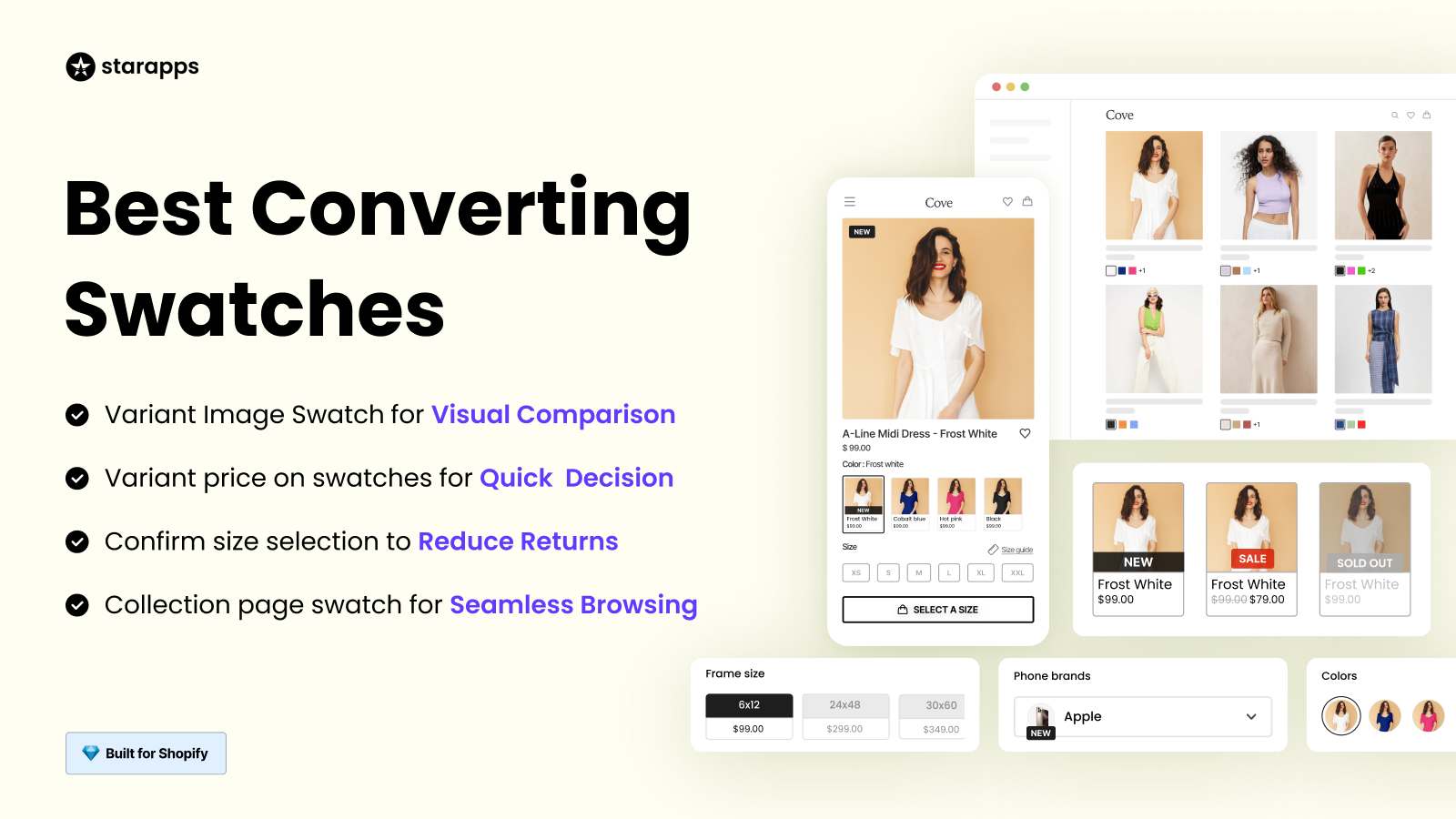
- Swatch King replaces dropdowns with color or image swatches and shows variants on collection pages, making options easy to see and compare.
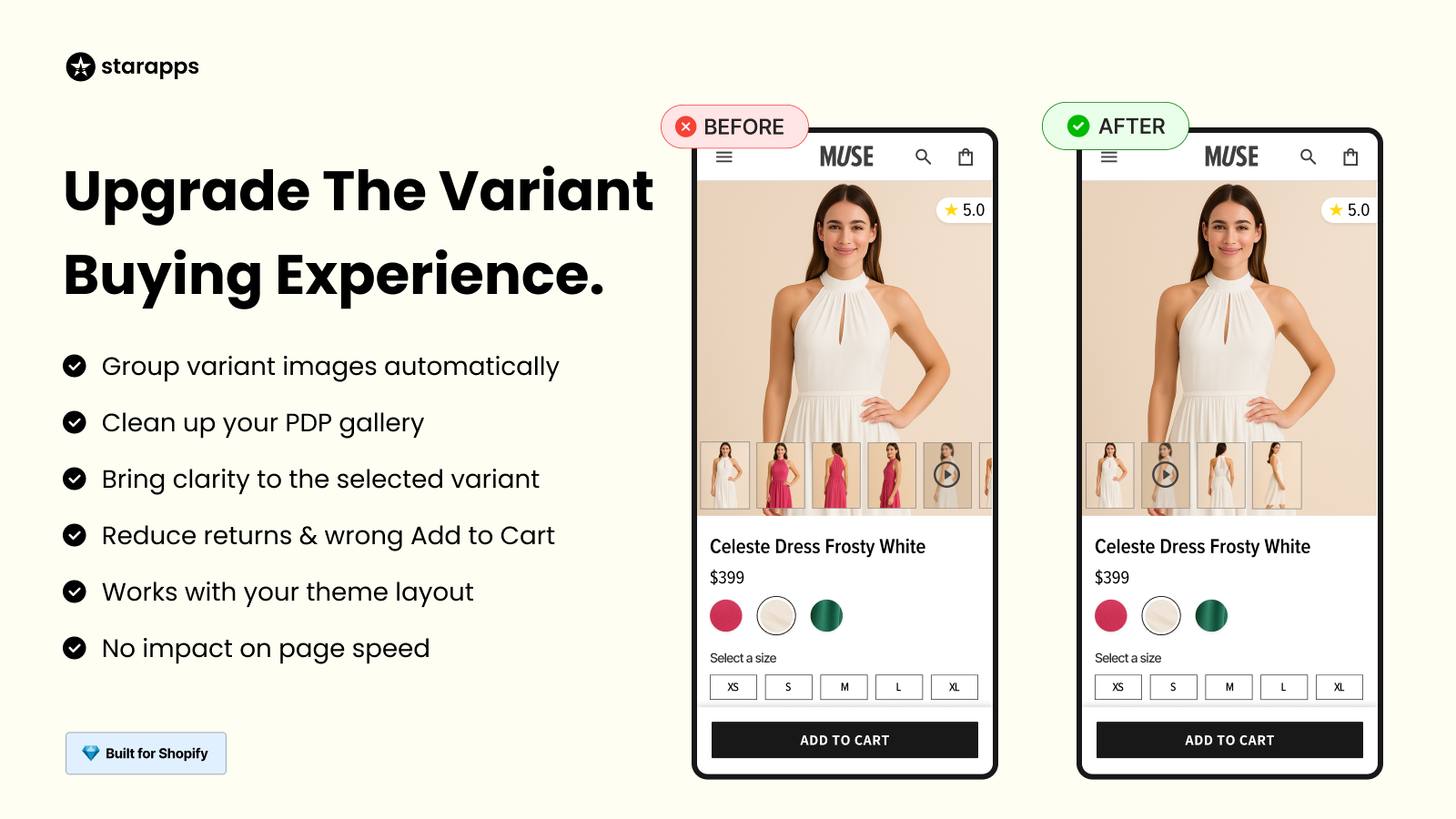
- Variant Image Automator displays only the images that match the selected variant, keeping product galleries clean and accurate.
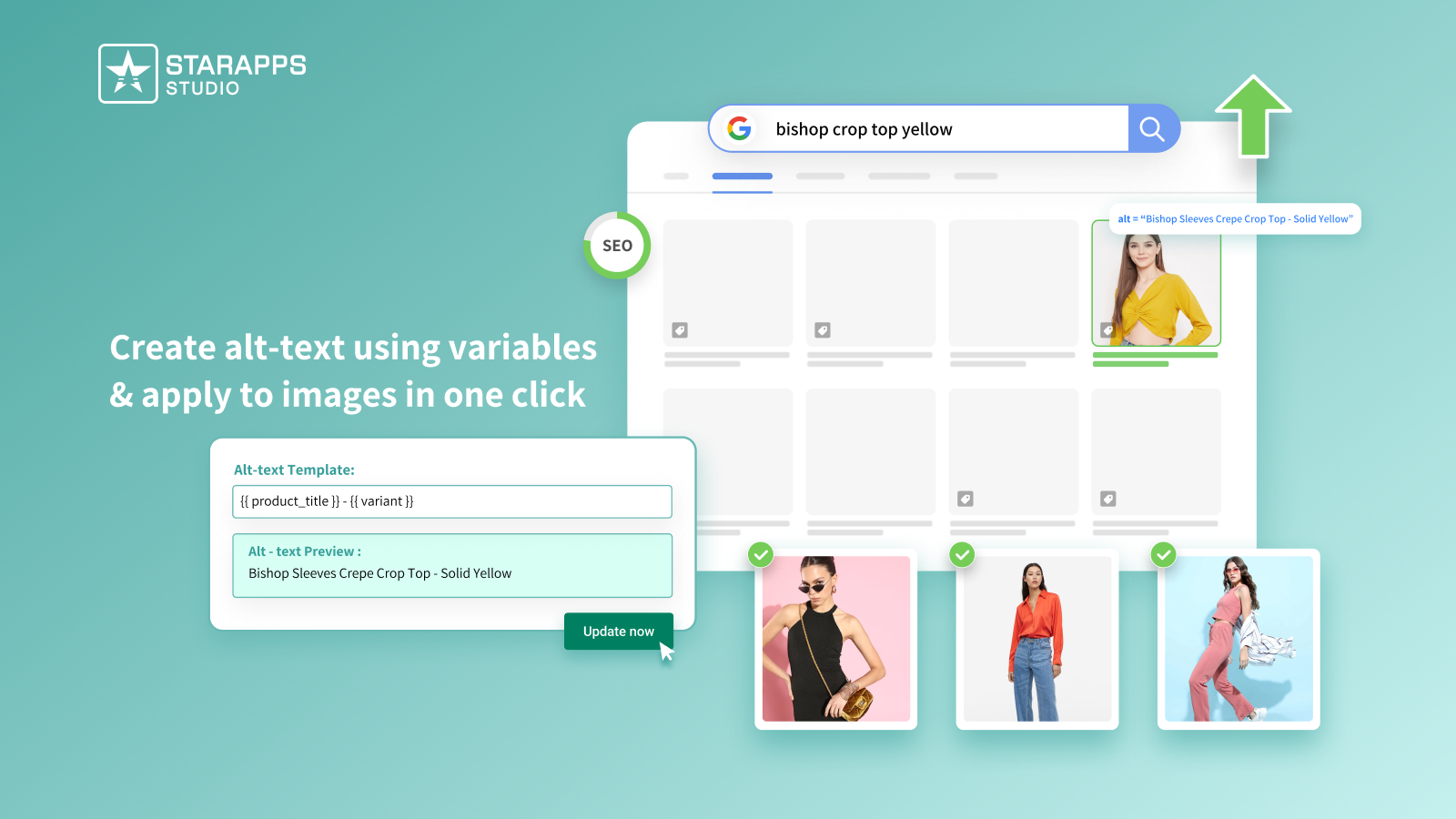
- Variant Alt Text King automatically generates and syncs variant-level ALT text daily, supporting SEO and accessibility without manual updates.

- Variant Descriptions King shows the right description for each variant, so customers clearly understand what they are buying.
If variant complexity is limiting your Shopify store’s performance, it’s time to fix the root cause, not patch the symptoms.
Explore StarApps Studio to improve variant clarity, strengthen UX, and scale confidently without compromising speed or theme integrity.
Conclusion
Shopify issues often arise not from the platform itself, but from how stores handle product variants, images, and visibility as they scale. When variant selection is unclear, images are mismatched, or products are hard to find, both user experience and conversions suffer.
By addressing these issues at the variant level, stores can improve clarity, reduce friction, and create a smoother shopping experience across all themes and devices. Solutions that focus on visual selection, accurate product imagery, and better variant visibility help stores grow without compromising performance or design.
If your Shopify store struggles with complex variants, confusing product displays, or hidden options, StarApps Studio provides purpose-built solutions to solve these problems efficiently.
Book a demo today to simplify variant management, enhance UX, and support long-term store growth, without custom code or theme limitations.
FAQs
1. What are the most common Shopify issues store owners face?
Common Shopify issues include slow store speed, confusing variant selection, incorrect product images, SEO limitations, and products not displaying properly on collection pages.
2. Why do Shopify product variants cause user experience problems?
Default Shopify variant dropdowns and image handling can make it hard for customers to compare options, leading to confusion, hesitation, and abandoned purchases—especially in large catalogs.
3. How can I fix incorrect product images showing for variants?
This issue usually occurs when images are not properly linked to variants. Using automated variant image management ensures only the correct images display when a variant is selected.
4. Why are my product variants not visible on collection pages?
Shopify typically shows only one product per listing, hiding variants. This limits discoverability and SEO unless variants are intentionally displayed as individual listings.
5. Do Shopify apps slow down themes or affect performance?
Poorly built apps can impact speed, but performance-optimized, theme-safe apps integrate without modifying core theme files and maintain fast load times.
Heading

End-to-end traceability
To ensure regulatory compliance, you must have a complete overview of your products from production to shipping. Book a demo to see how Katana can give you full visibility of your operations.



.png)

.svg)

.svg)

.svg)
.png)