
Shopify Image SEO Guide to Improve Speed and Search Visibility

Shopify image SEO guide covering image optimization, speed improvement, alt text, and workflows to improve search visibility and store performance
Product images drive both search visibility and buying decisions on Shopify, yet they are often uploaded without a clear SEO or performance plan. Large image files slow product pages, inconsistent alt text limits image search visibility, and poorly structured image libraries become harder to manage as catalogs grow.
Shopify image SEO focuses on preparing, naming, and presenting images in a way that supports faster load times while helping search engines understand product context. For stores managing multiple variants or high SKU counts, small image decisions can directly affect traffic, mobile experience, and conversions.
This guide covers practical ways to optimize images without disrupting your existing storefront setup.
Key Takeaways
- Shopify image SEO directly impacts speed, search visibility, and conversions. Optimized images reduce load time while helping products appear in both search and image results.
- Most performance issues come from workflow gaps, not image quality. Large files, inconsistent sizing, poor naming, and missing alt text accumulate as catalogs scale.
- Optimization should happen before upload, not after. Preparing dimensions, naming files correctly, and compressing images prevent long-term technical debt.
- Track outcomes using business metrics, not just SEO metrics. Improvements should reflect in mobile speed, bounce rate reduction, image impressions, and conversion performance.
- Fix images first, themes second. Many stores invest in new themes when image handling and optimization workflows are the real bottleneck.
Why Shopify Image SEO Becomes Critical as Your Store Scales
Images make up the largest share of most Shopify pages. Product galleries, variant images, banners, and collection thumbnails quickly add weight to a page, especially for stores with large catalogs. When images are uploaded without optimization, page speed slows down, which affects both search visibility and the shopping experience.
This has a direct impact on performance metrics that matter for growth:
- Core Web Vitals: Heavy images increase load time and delay visual stability, which can affect rankings and user experience.
- Mobile conversions: Most shoppers browse on mobile devices, where slower image loading often leads to early exits.
- Browsing behavior: Customers are less likely to scroll through galleries or switch variants when images load slowly.
Image SEO also influences how products are discovered. Many merchants focus only on traditional search results, but image search plays an important role in product discovery, especially for visually driven categories such as fashion, beauty, and home goods. Properly optimized images help search engines understand products and surface them in relevant searches.
At the same time, reducing image size alone is not the goal. Product images need to remain clear enough for customers to evaluate color, texture, and details. Shopify image SEO helps maintain the right balance between speed and visual quality, allowing stores to improve performance while still presenting products effectively.
When treated as part of a growth strategy rather than a technical cleanup, image optimization supports faster pages, better discovery, and a smoother buying experience as the catalog expands.
How Shopify Handles Images and What Makes Image SEO Different Here
Shopify manages images differently from many other platforms, which is why generic image SEO advice often falls short. The platform already performs several optimizations automatically, but that does not remove the need for proper image preparation.
Shopify uses a global CDN (Content Delivery Network) to deliver images quickly across regions. It also generates multiple image sizes and serves the appropriate version depending on the device and screen size. This helps reduce load time, but only to a certain extent.
A few important details explain why image optimization still matters:
- Automatic resizing does not reduce the original file weight. Uploading very large images means Shopify still processes and stores heavy source files. This can affect initial loading and overall page performance.
- Theme behavior affects image loading. Some themes load multiple images at once, include large sliders, or preload galleries, increasing page weight even when images are resized.
- Variant-heavy products multiply image requests. Stores with many colors or styles often load more images than necessary if galleries are not structured properly. Tools like StarApps’ Variant Image Automator help manage this by automatically displaying variant-specific images, keeping galleries organized while improving the customer experience.
This is where many stores run into issues. Advice like “just compress images” ignores how Shopify themes, variant galleries, and image loading work together. Effective Shopify image SEO focuses on preparing images for how Shopify actually serves them, rather than relying on general SEO checklists.
Once this difference is clear, optimization decisions become more practical and easier to scale across large product catalogs.
The 5 Shopify Image SEO Factors That Impact Rankings and Speed
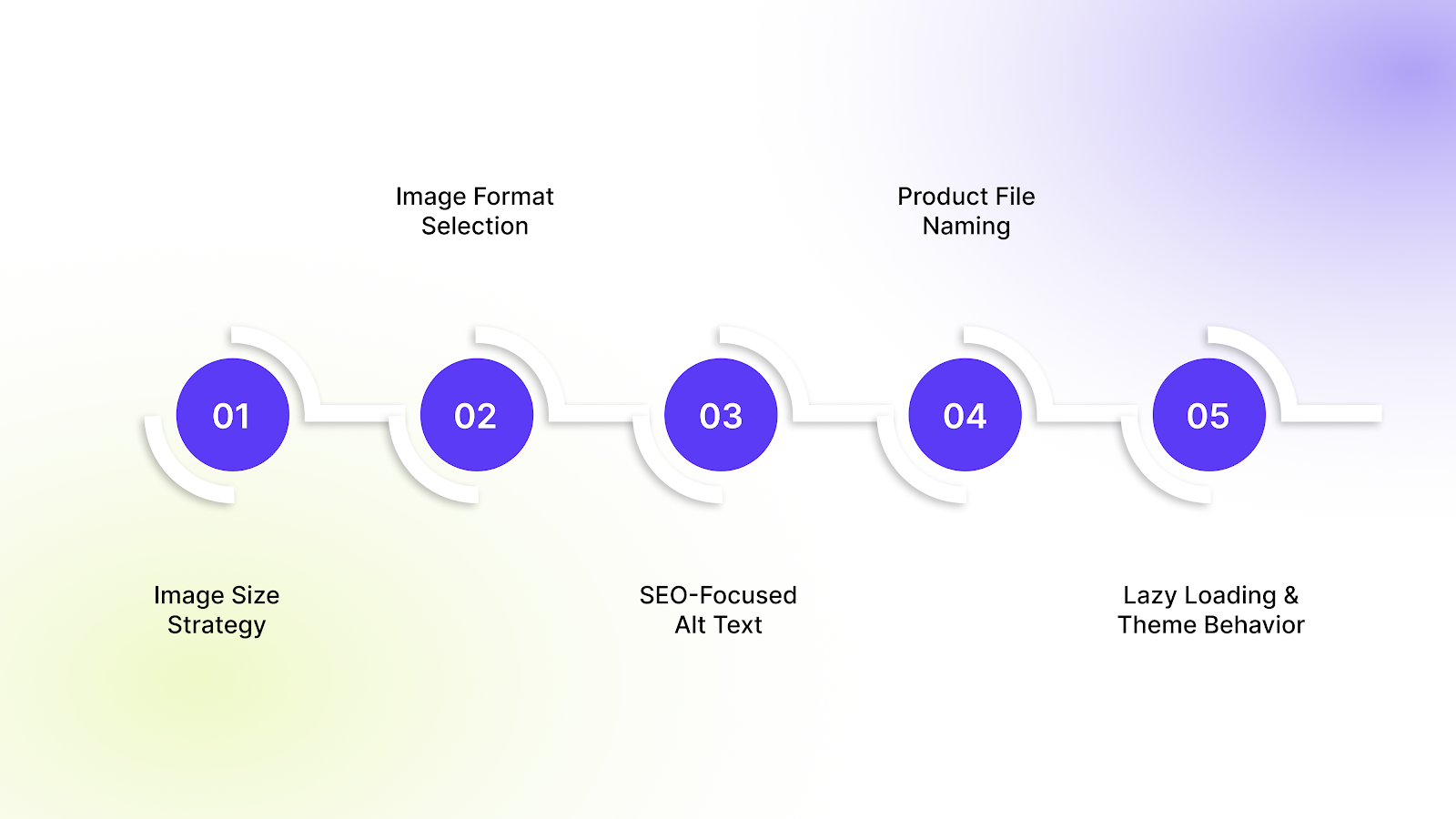
Many image SEO guides list long checklists. In practice, a few decisions influence both performance and search visibility far more than others. Store owners managing large catalogs benefit from focusing on these core areas.
1. Image Dimensions and File Size Strategy
A common issue on Shopify stores is uploading images much larger than they appear on screen. Shopify resizes images, but large originals still increase processing and loading time.
Key considerations:
- Upload size vs rendered size: If product images display at 1200px width, uploading 4000px images adds unnecessary weight.
- Consistent sizing across products: Mixed image dimensions create layout shifts and slower loading.
- Recommended ranges by product type:
- Fashion and lifestyle products: 1500–2000px width for zoom clarity
- Accessories and small products: 1200–1600px width
- Collection thumbnails: smaller optimized versions where possible
The goal is clear product visuals without carrying excess file size across every page.
2. Image Format Selection
Image format affects both quality and loading speed. Choosing the right format depends on how the image is used.
- JPEG: Best for most product and lifestyle images. Offers good quality with smaller file sizes.
- PNG: Useful for graphics, icons, or images requiring transparency, but usually heavier for product photography.
- WebP: Smaller file sizes with good quality, supported by most modern browsers, and suitable for stores prioritizing speed.
Commercially, high-detail products may require slightly higher quality images, while collection or secondary images can use lighter formats without affecting customer perception.
3. Alt Text That Drives Search Traffic
Alt text helps search engines understand images, but many stores treat it as an afterthought or leave it empty. Well-structured alt text improves image search visibility while supporting accessibility.
Effective alt text usually includes:
- Product name
- Variant details such as color or material
- Relevant descriptive keyword
Example structure: Product name + variant + defining attribute
This keeps alt text descriptive without keyword stuffing and allows large catalogs to maintain consistency. Stores managing large catalogs often automate alt text generation to keep variant images consistent as new products are added. Apps such as Variant Alt Text King help maintain structured alt text automatically without manual updates.
4. File Naming for Product Discoverability
Search engines read file names before images are uploaded. Default names like IMG_4588.jpg provide no context and reduce discoverability.
A simple pre-upload workflow helps:
- Rename files using product-focused terms
- Use hyphens instead of spaces
- Include product and variant information where relevant
Example:
linen-shirt-blue-front.jpg instead of IMG_4588.jpg
Establishing this process early prevents large-scale cleanup later as catalogs grow.
5. Lazy Loading and Theme Behavior
Most Shopify themes use lazy loading to improve speed by loading images only when they come into view. This reduces initial page weight and improves loading performance.
However, some exceptions matter:
- Images visible immediately when a page loads should not be delayed excessively.
- Primary product images and above-the-fold collection images should load quickly to avoid visual delays.
- Themes with heavy sliders or multiple galleries may still load too many images at once.
Reviewing how the theme handles image loading ensures that optimization efforts actually translate into faster performance rather than just better technical scores.
Shopify Image SEO Mistakes That Slow Down Growing Stores
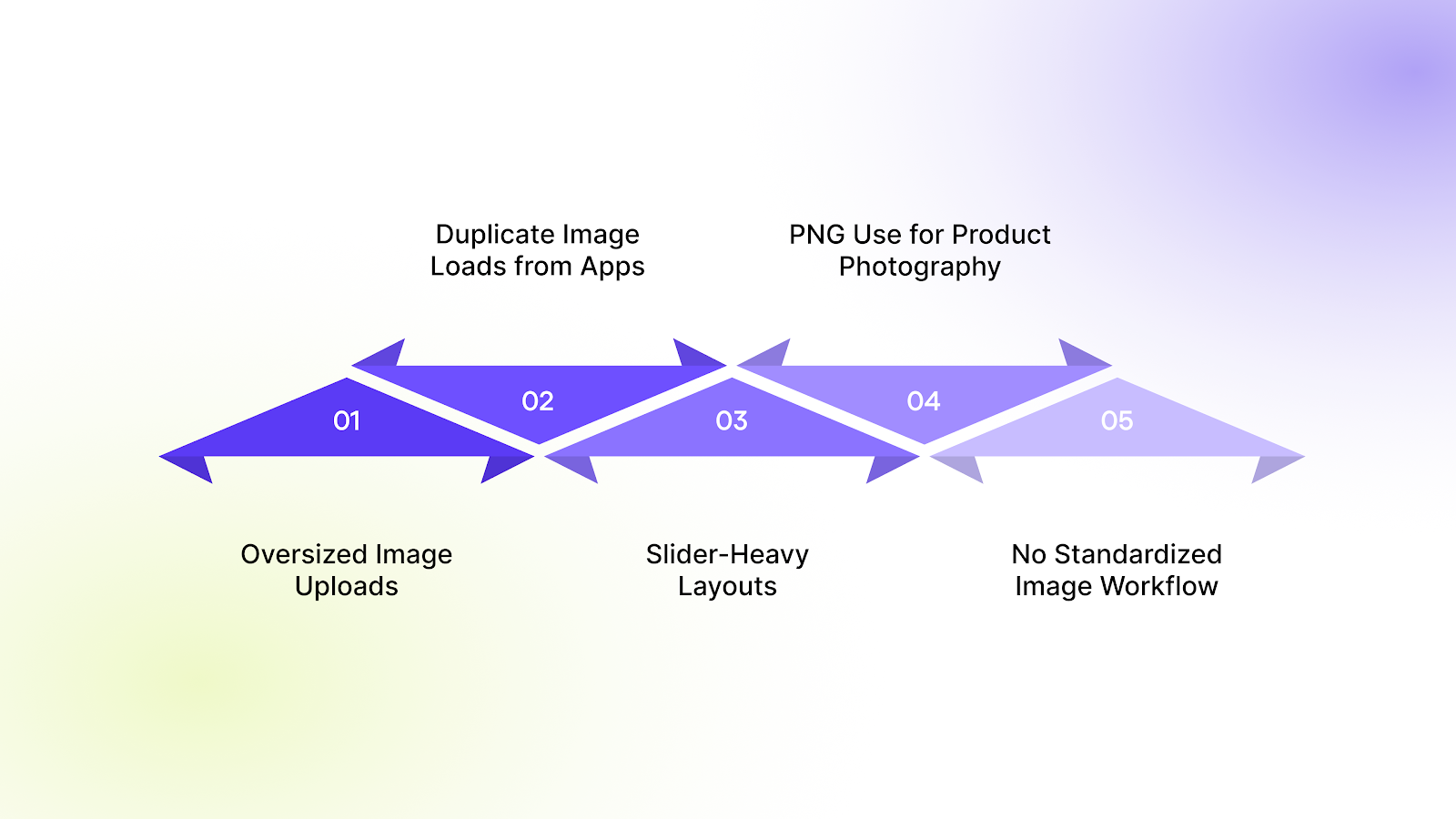
As catalogs expand and teams grow, image-related issues tend to accumulate gradually. Many performance problems are not caused by Shopify itself, but by small decisions repeated across hundreds of products. Identifying these early prevents speed issues and reduces future cleanup work.
Common mistakes include:
- Uploading oversized images: Product images are often uploaded at 3000–4000px even when the storefront displays them at 800–1200px. Larger files increase page weight without improving the customer experience.
- Apps creating duplicate image loads: Some apps add additional image layers or load variant images unnecessarily, increasing the number of image requests on product pages.
- Slider-heavy product layouts: Multiple sliders or large image carousels force browsers to load several high-resolution images at once, slowing initial page load.
- Using PNG files for product photography: PNG files are significantly heavier than JPEG or WebP for standard product images, leading to slower loading without visible quality benefits.
- No defined image workflow for teams: When multiple team members upload images without naming, sizing, or alt text guidelines, inconsistencies build up quickly and affect both speed and search visibility.
Most image issues appear when stores scale and uploads become inconsistent across teams. Instead of constantly correcting problems later, successful Shopify stores rely on a defined image workflow that keeps performance, consistency, and search visibility under control.
Recommended: Why Image Alt Text Matters for SEO and Accessibility.
A Practical Shopify Image Optimization Workflow for Scaling Stores
Keeping image SEO consistent at scale requires a repeatable process. Here’s how to implement it:
- Image preparation before upload: Resize images based on how they appear on the storefront. Maintain consistent dimensions across products to avoid layout shifts. Product images should remain clear for zoom without exceeding the necessary resolution.
- Naming structure: Rename files before uploading using product-focused terms. Include product and variant details where relevant, separated with hyphens. This helps search engines understand image context from the beginning.
- Compression stage: Compress images before upload to reduce file size while maintaining visual clarity. This prevents large source files from slowing pages as the catalog grows.
- Upload rules: Maintain consistency in image order, aspect ratio, and number of images per product. Avoid duplicate or unused images that add unnecessary page weight.
- Alt text format: Follow a consistent structure such as: Product name + variant + key attribute. This keeps alt text descriptive and manageable across large product catalogs.
- Monthly audit checklist: Review newly added products for oversized images, missing alt text, inconsistent naming, and unnecessary formats. Regular checks prevent performance issues from accumulating.
As stores scale, manual management becomes difficult to maintain. Many merchants combine this workflow with tools that automatically organize variant images and maintain image-related metadata.
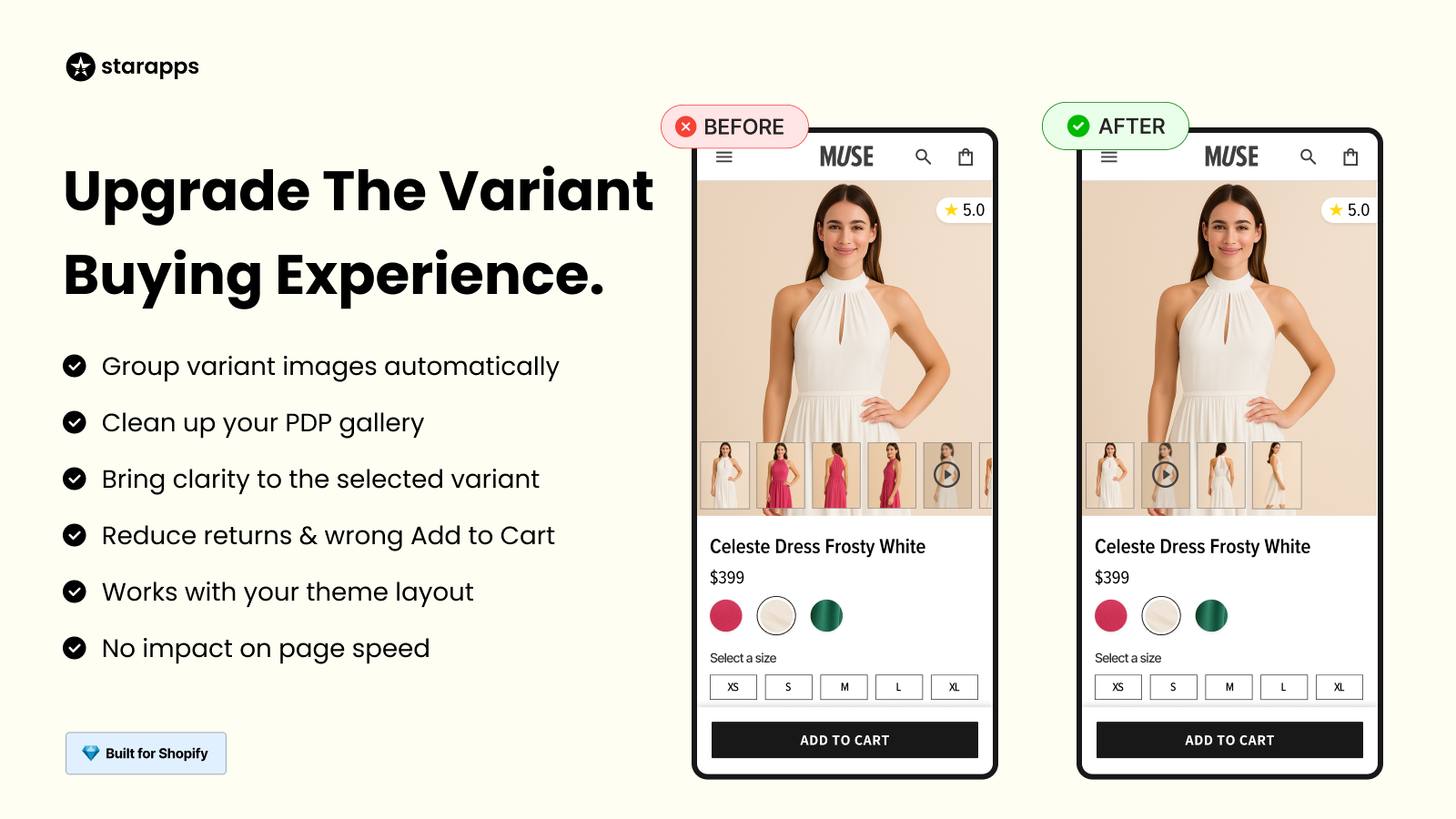
StarApps studio offers tools such as Variant Image Automator and Variant Alt Text King, which help maintain consistency across large catalogs, reducing manual effort while keeping image SEO structured as new products are added.
Key Metrics to Evaluate Your Shopify Image SEO Performance
Image optimization should lead to measurable improvements, not just technical changes. Store owners should track performance indicators that reflect both search visibility and customer behavior.
Key metrics to monitor include:
- Page load improvement: Faster product and collection pages indicate that image size and loading behavior are optimized correctly.
- Mobile speed score: Improvements in mobile performance scores often reflect reduced image weight and better loading order, especially on image-heavy pages.
- Image search impressions: Growth in image search impressions shows that search engines are better at understanding and indexing product images.
- Bounce rate changes: Lower bounce rates can signal that pages load quickly enough for customers to continue browsing.
- Conversion rate impact: Clear, fast-loading images help customers evaluate products faster, which can positively influence purchase decisions over time.
Once you track performance, the next step is deciding whether slow pages are caused by images or your Shopify theme.
When to Fix Images vs When to Fix Your Shopify Theme
Optimizing images helps, but not every slowdown is caused by them. Knowing when the issue is your theme saves time and effort.
Image fixes usually help when:
- Product images are significantly larger than the display size
- PNG files are used for standard product photographs
- Alt text and file naming are inconsistent across products
- Newly added images increase page weight over time
Theme-level changes may be required when:
- Product pages load multiple galleries or sliders at once
- Collection pages preload too many images
- Apps or theme features load hidden images in the background
- Speed issues persist even after image sizes are reduced
Reviewing both areas ensures effort is spent in the right place. Optimizing images improves performance at the asset level, while theme adjustments address how those images are loaded and displayed across the storefront.
Final Thoughts
Image SEO works best when treated as an ongoing process rather than a one-time fix. Start by reviewing image sizes, formats, and alt text across your top-performing products, then establish clear upload and naming rules for future additions.
As catalogs grow, maintaining consistency manually becomes difficult, especially for stores managing multiple variants and frequent product updates. StarApps Studio helps simplify this stage by organizing variant images and maintaining structured image data automatically, reducing manual effort while keeping storefront performance intact.
If image management is slowing down your store or team, book a demo with StarApps studio to know how you can keep product images optimized as your catalog scales.
FAQs
1. Does Shopify automatically optimize images for SEO?
Shopify automatically resizes images for different devices and supports modern formats, but it does not optimize file names, alt text, or image structure for SEO. Store owners still need to manage naming, compression, and image relevance to improve search visibility.
2. How many images should a Shopify product ideally have?
There is no fixed number, but most products perform well with 4–8 high-quality images that clearly show angles, usage, and variants. Adding excessive images can increase page weight and slow loading without improving conversions.
3. Can image optimization improve conversion rates, not just SEO?
Yes. Faster-loading images improve user experience, reduce bounce rates, and help customers evaluate products more confidently. Clear, consistent product images also reduce purchase hesitation and returns.
4. Should Shopify stores use image sitemaps?
In most cases, Shopify automatically includes images in its sitemap structure. Additional image sitemaps are usually unnecessary unless the store relies heavily on image-based discovery or large editorial content sections.
5. How often should Shopify image optimization be reviewed?
For growing stores, a monthly review is ideal. Stores with frequent product launches or large catalogs may benefit from periodic audits to catch oversized files, missing alt text, or inconsistent image formats before they affect performance.
Heading

End-to-end traceability
To ensure regulatory compliance, you must have a complete overview of your products from production to shipping. Book a demo to see how Katana can give you full visibility of your operations.



.png)

.svg)

.svg)

.svg)
.png)