

Magento to Shopify migration guide covering data transfer, SEO, common challenges, and how to set up your store for better performance.
Running a Magento store often comes with ongoing maintenance, higher development effort, and slower iteration when your catalog or traffic grows. Many DTC brands reach a point where managing products, variants, and storefront performance starts taking more time than it should. That’s where Magento to Shopify migration becomes a practical next step.
This guide walks you through the full process, from planning your data migration to setting up your Shopify store and avoiding common pitfalls. You’ll also learn how to handle product structures, variants, and storefront experience so your new store is ready to support growth from day one. Let’s get started!
Quick Overview
- Magento and Shopify handle products differently, so configurable products must be restructured into Shopify’s variant system before migration
- Product migration is where most issues occur, especially with variant limits, CSV formatting, and image-to-variant mapping
- Shopify’s fixed URL structure requires a complete redirect plan to avoid traffic and ranking loss
- Magento features and extensions need to be mapped to Shopify apps in advance to avoid missing functionality after launch
- Post-migration success depends on fixing variant display, image behavior, and product discovery, not just completing the data transfer
Why are Magento Stores Moving to Shopify?
Many Magento stores reach a point where ongoing development effort, hosting costs, and maintenance begin to slow down growth. Managing updates, performance, and infrastructure often requires dedicated technical resources, especially as product catalogs and traffic increase.
Shopify shifts this responsibility to a fully managed platform, where hosting, security, and core performance are handled out of the box. This allows store owners and teams to spend less time on backend management and focus more on merchandising, product experience, and scaling the business.
How Magento and Shopify Differ in Store Structure and Setup
A Magento to Shopify migration is not just a platform switch. The way products, URLs, and storefront features are structured changes, which directly affects how your store functions and how customers interact with it.
Product Structure: Configurable vs Variants
Magento uses configurable products with multiple attributes, while Shopify relies on a variant-based system with defined options (like size or color).
- Shopify limits variants to 3 options and 100 combinations per product
- Complex Magento catalogs often need restructuring before import
- Variant presentation (swatches, images, descriptions) requires additional setup in Shopify
This is one of the most important areas to plan carefully, especially for stores with large or variant-heavy catalogs.
URL Structure Differences
Magento allows flexible, customizable URLs, while Shopify follows a fixed structure.
- Product URLs include /products/
- Collection URLs include /collections/
- Custom URL paths cannot be fully replicated
This means you’ll need proper URL mapping and redirects to maintain existing traffic and rankings.
App vs Extension Ecosystem
Magento relies on extensions that often require developer support, while Shopify uses apps that are easier to install and manage.
- Shopify apps cover most common use cases
- Setup is faster, but feature depth can vary
- Some Magento-specific functionality may need multiple apps in Shopify
Choosing the right apps early helps avoid rework later.
Checkout and Customization Limitations
Magento allows deep checkout customization, while Shopify keeps checkout more controlled.
- Shopify checkout is optimized and standardized
- Customization is limited unless using Shopify Plus
- Most stores benefit from faster setup and fewer technical dependencies
Understanding these differences early helps set realistic expectations and prevents delays during migration.
How to Migrate from Magento to Shopify in 8 Simple Steps

A Magento to Shopify migration works best when each stage is handled in sequence, with careful attention to how product data is structured and imported. Most issues during migration come from poor data preparation, especially with variants and images.
Step 1: Backup Your Magento Store
Start with a complete backup of your existing store.
- Export your database, media files, and core store data
- Store backups securely for recovery if needed
- Avoid major catalog changes during migration to keep data consistent
Step 2: Export Data from Magento
Export all required data, typically in CSV format.
- Products, including attributes and variant configurations
- Customers and order history
- Categories, CMS pages, and blog content
- Product images and media assets
Magento exports often include extra attributes that don’t directly map to Shopify, so expect additional structuring.
Step 3: Clean and Structure Your Data
This step determines how smoothly your data will import into Shopify.
- Remove duplicate products, unused attributes, and outdated entries
- Standardize variant options such as size, color, and material
- Ensure all SKUs are unique and consistent
- Map Magento attributes to Shopify’s variant system (max 3 options per product)
Furthermore, you need to pay attention to product data that requires more than basic cleanup due to platform differences:
- CSV structure differences: Shopify expects a specific format for variants, images, and options
- Variant mapping issues: Magento’s configurable products often exceed Shopify’s variant limits and may need to be split or simplified
- Image mapping challenges: Each image must be aligned with the correct variant to avoid confusion on product pages
- Attribute cleanup: Irrelevant or inconsistent attributes can break variant grouping during import
Getting this step right prevents major issues later in the process.
Step 4: Set Up Your Shopify Store
Prepare your Shopify store before importing data.
- Configure currency, taxes, and shipping zones
- Choose and set up your theme
- Create collections based on how you want products grouped
- Set up essential pages like policies and contact information
This ensures your data fits into a structured environment once imported.
Step 5: Import Data into Shopify
Use Shopify’s import tool or a migration app to bring in your data.
- Upload product CSV files and verify variant structure
- Import customers and orders if required
- Upload and assign product images correctly
- Review products for missing fields or incorrect mappings
However, there are a few common product migration mistakes to avoid:
- Broken variants: Incorrect mapping can split or misgroup variants
- Duplicate SKUs: Causes inventory and tracking issues
- Missing or misassigned images: Leads to poor product page clarity
Careful validation after import is necessary to catch these issues early.
Step 6: Rebuild Design and Navigation
Magento themes do not transfer to Shopify, so your storefront needs to be rebuilt.
- Recreate navigation menus and category structure
- Set up collection pages for product discovery
- Adjust product page layouts for clarity and usability
- Ensure mobile responsiveness across all pages
Step 7: Set Up Apps and Integrations
Replace Magento extensions with Shopify apps based on your requirements.
- Install apps for variant display, search, filtering, and reviews
- Set up payment gateways and shipping integrations
- Connect analytics and tracking tools
App selection plays a key role in how your storefront functions after migration.
Step 8: Test Before Launch
Testing ensures your store is ready for customers.
- Verify product pages, variants, and image behavior
- Test navigation, search, and filtering
- Place test orders to validate checkout
- Check redirects, metadata, and indexing setup
- Review performance on mobile and desktop
Launch only after confirming that the store functions reliably across all key areas. After setting up your Shopify store, it’s important to address how your existing rankings and indexed pages will be affected.
How to Maintain Search Rankings During Migration to Shopify
Search visibility is often the biggest concern during a Magento to Shopify migration. Since URL structures and page setups change, search engines need clear signals to understand where your content has moved. A structured approach helps maintain rankings and prevents traffic drops.
- URL Mapping Strategy: Create a complete mapping of your existing Magento URLs to their new Shopify equivalents. Since Shopify uses fixed URL structures, exact matches may not always be possible. Each important page—products, categories, and content- should have a clear destination to avoid broken links and ranking loss.
- 301 Redirects: Set up 301 redirects for all old URLs to their new Shopify URLs. This ensures users and search engines are automatically directed to the correct pages. Missing redirects can lead to 404 errors, which affect both user experience and search performance.
- Metadata Transfer: Preserve key SEO elements such as page titles, meta descriptions, and image alt text during migration. These elements help maintain existing rankings and ensure your pages remain relevant in search results.
- Sitemap and Indexing: Submit your updated sitemap through Google Search Console after launch. Monitor indexing status and crawl errors to identify any issues early. This helps search engines quickly understand your new site structure and update rankings accordingly.
After addressing SEO considerations, it’s important to be aware of common issues that can arise during migration.
Key Challenges in Magento to Shopify Migration and How to Fix Them

Even with a structured approach, certain issues tend to come up during a Magento to Shopify migration. Addressing them early helps reduce rework and prevents post-launch disruptions.
URL Mismatches
Magento allows flexible URL structures, while Shopify follows a fixed format for products and collections. This often leads to differences in page URLs after migration, which can affect traffic and indexing if not handled properly.
Fix: Create a detailed URL mapping plan before migration and implement 301 redirects for all important pages. This ensures both users and search engines are directed to the correct locations.
Password Reset Limitation
Customer passwords from Magento cannot be transferred to Shopify due to platform restrictions. This can create confusion for returning customers if not communicated clearly.
Fix: Plan for this during launch by sending account activation or password reset emails to all customers. Adding a clear message on your storefront can also help reduce support queries.
App Replacements
Magento extensions do not carry over to Shopify, and some features may not have direct equivalents. This can affect functionality if replacements are not identified early.
Fix: List all critical extensions used in your Magento store and map them to Shopify apps during the planning phase. Install and test these apps before launch to ensure they meet your requirements.
Variant Complexity
Magento supports more flexible product configurations, while Shopify has limits on variant options and combinations. This can make it difficult to replicate complex product setups.
Fix: Review your product catalog and simplify variant structures where needed. In some cases, splitting products or adjusting how options are presented will help maintain clarity on product pages.
Data Inconsistencies
Differences in data structure can lead to missing fields, incorrect mappings, or duplicate entries during import. These issues often show up after migration if data is not properly prepared.
Fix: Clean and standardize your data before exporting from Magento. After importing into Shopify, run thorough checks across products, customers, and orders to identify and fix inconsistencies early.
Now, before going live, a quick review of your store setup can help catch anything that might have been missed.
What to Check Before and After Launching Your Shopify Store
Completing a Magento to Shopify migration requires thorough validation to ensure your store is fully functional before customers start using it.
- QA Checklist: Review product pages, collections, navigation, and redirects to ensure all data is correctly displayed and linked. Pay close attention to variant options, pricing, and images across devices.
- Functional Testing: Test search, filters, cart behavior, and overall site flow to confirm everything works as expected. Identify and fix any broken links or inconsistent behavior across pages.
- Checkout Testing: Place test orders using different payment methods to verify checkout, shipping rates, taxes, and order confirmations. Ensure the entire purchase flow works without friction.
- Tracking Setup: Set up and verify Google Analytics, Meta Pixel, and other tracking tools. Confirm that key events like product views, add-to-cart, and purchases are being recorded accurately.
Once everything is working as expected, the next step is to look at how your storefront performs for customers.
Recommended: Top AI Tools for Shopify Stores 2026.
Improving Product Pages and Browsing After Migration
Even after a successful setup, certain storefront gaps can affect how customers interact with your store. Addressing these areas improves clarity, reduces friction, and supports better purchase decisions.
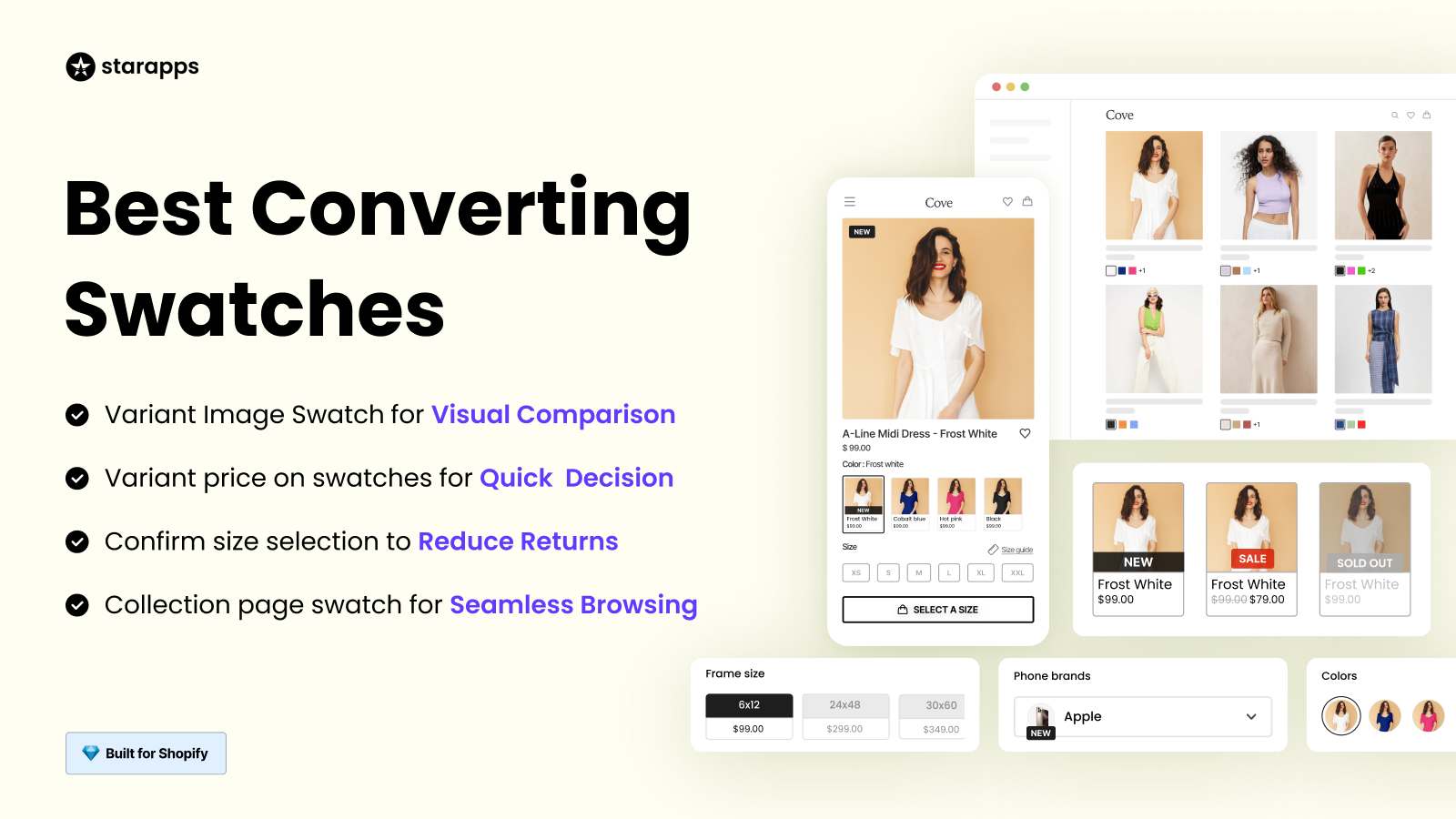
- Variant Display Issues: Default Shopify variant selectors can make it difficult for customers to quickly identify available options, especially in large catalogs. Using Color Swatch King presents variants as visual swatches, making selection faster and easier.
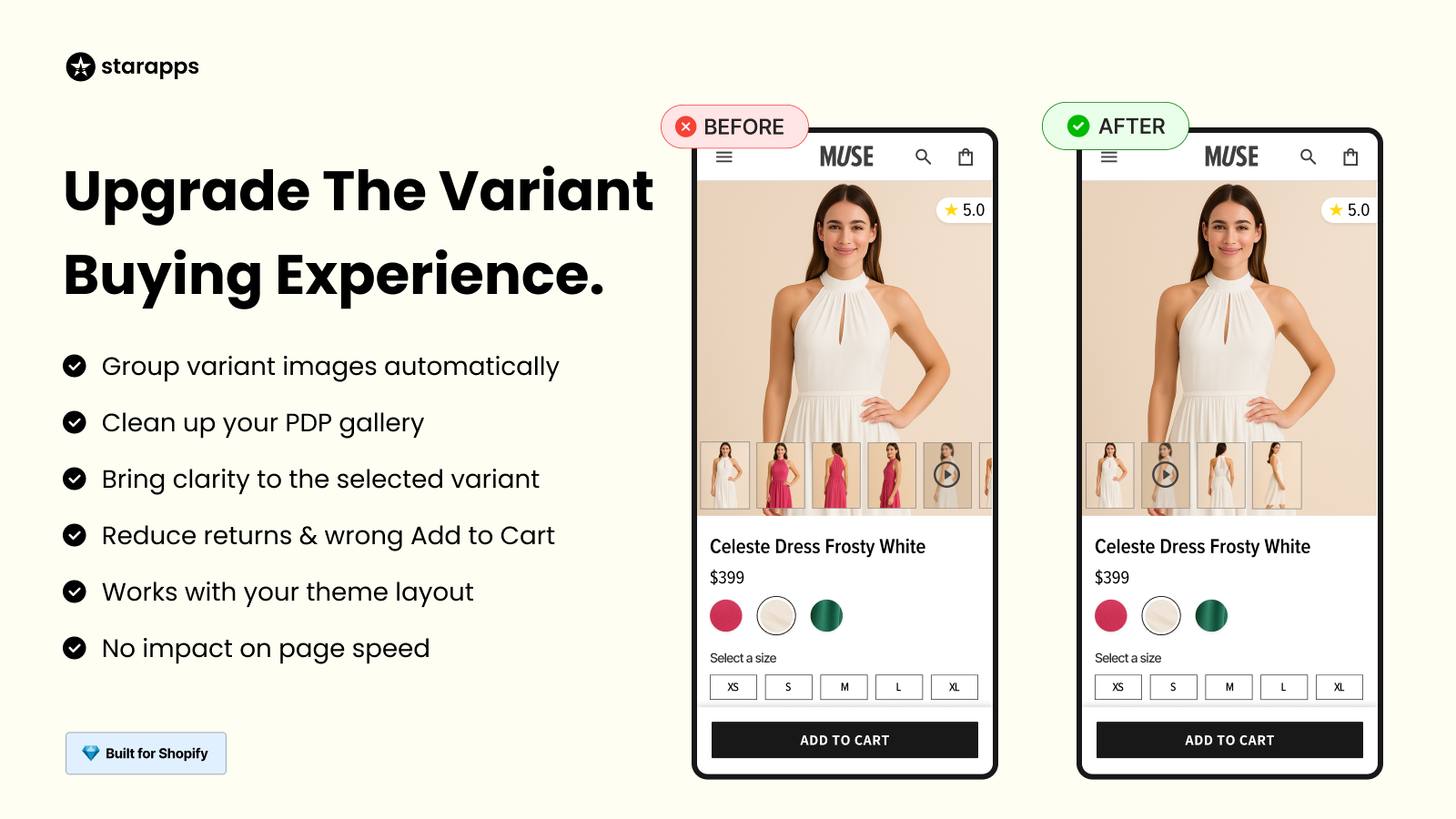
- Irrelevant or Confusing Product Images: Customers may see unrelated images when switching between variants if images are not properly assigned. Variant Image Automator ensures only relevant images are shown for each selected variant.
- Limited Product Discovery on Collection Pages: Shopify typically displays one product per listing, even when multiple variants exist, which limits visibility. SA Variants: Combined Listings allows each variant to appear as an individual listing, making it easier to find specific options.

- Lack of Variant-Specific Information: Product pages often show the same description for all variants, even when details differ. Variant Descriptions King allows you to display unique content for each variant, helping customers make more informed decisions.

Small improvements in how products are displayed and browsed can make a noticeable difference in how customers engage and complete purchases.
Final Thoughts
A Magento to Shopify migration sets the foundation, but store performance depends on how well your products, variants, and pages are structured after launch. Small gaps in variant display, images, or product information can directly affect how customers browse and make decisions.
This is where the right tools make a measurable difference. StarApps Studio offers purpose-built Shopify apps that help you fix these gaps and improve how your store presents products at scale.
If you’re planning a migration or refining your Shopify setup, connect with our team to build a store that’s easier to manage and ready to convert.
FAQs
1. How long does a Magento to Shopify migration take?
The timeline depends on store size, data complexity, and customization requirements. A small to mid-sized store can take a few days to a couple of weeks, while larger stores with complex catalogs and integrations may take longer due to data restructuring and testing.
2. Can I migrate my Magento store to Shopify without downtime?
Yes, most migrations can be completed without downtime by setting up and testing your Shopify store separately before switching domains. Proper planning ensures your existing store remains live until the new one is ready.
3. Do I need a developer to migrate from Magento to Shopify?
Basic migrations can be handled using apps or tools, but stores with complex product structures, custom features, or integrations often require developer support to ensure accurate data mapping and functionality.
4. Will my store design stay the same after migration?
Magento themes do not transfer to Shopify, so your store design will need to be rebuilt. Shopify themes offer flexibility, but recreating the exact layout and functionality may require adjustments.
5. What happens to my Magento integrations and third-party tools?
Magento integrations do not carry over directly. You will need to find equivalent Shopify apps or integrations and set them up again to match your store’s requirements.
Heading

End-to-end traceability
To ensure regulatory compliance, you must have a complete overview of your products from production to shipping. Book a demo to see how Katana can give you full visibility of your operations.
.png)

.svg)

.svg)

.svg)
.png)