
.jpg)

Looking for a Shopify app that only displays selected variant images? Compare the best apps to create cleaner product galleries and improve conversions.
Great product images help shoppers buy with confidence, but cluttered product galleries can make the shopping experience frustrating instead.
Imagine selling a T-shirt in 12 colors with five images for each color. Instead of seeing the five images that match their selection, shoppers have to scroll through 60 photos in a single gallery just to find the variant they want. The result is unnecessary friction, longer browsing time, and a confusing product page.
The challenge becomes even bigger for stores with multiple colors, styles, or materials. A 2025 study found that while richer product-image sets can help shoppers make decisions faster, excessive or irrelevant visual information can reduce purchase intention by increasing cognitive load.
That's why many merchants look for a Shopify app that only displays selected variant images. By showing only the visuals that match the selected option, these apps create cleaner product galleries, improve product clarity, and deliver a more intuitive shopping experience.
In this article, we'll explore why variant-specific image galleries matter, what features to look for, and the best Shopify apps for creating a cleaner, more conversion-friendly storefront.
Quick Overview
- Shopify displays all variant images by default, which can clutter product pages and confuse shoppers.
- Variant-specific image galleries show only the selected option, creating a cleaner and more intuitive shopping experience.
- The right Shopify variant image app simplifies image management while supporting multiple images, videos, and theme compatibility.
- Well-organized variant galleries improve product clarity, helping customers browse confidently and make faster purchase decisions.
- Solutions like StarApps Variant Image Automator help merchants automate variant image display and deliver a more polished storefront.
Why Shopify Displays Every Variant Image (And Why It's a Problem)

By default, Shopify treats all product images as part of a single gallery instead of creating separate galleries for each variant. While this works well for products with only a few images, it becomes a challenge for stores selling multiple colors, styles, patterns, or materials.
For example, imagine a customer selecting a Black sneaker. Instead of seeing only Black sneaker images, they may also see photos of the White, Blue, and Green variants mixed into the same gallery. This forces shoppers to scroll through unrelated images to find the product they're actually interested in.
As a result, merchants often face challenges such as:
- Cluttered product galleries
- Customer confusion during product selection
- Longer browsing and decision-making time
- Difficulty identifying the selected variant
- A higher risk of incorrect purchases
For stores with large product catalogs, these issues can quickly impact the overall shopping experience. That's why many merchants use a Shopify app that only displays selected variant images to automatically show only the photos that match a customer's selection, creating a cleaner and more intuitive product page.
Why Showing Only Selected Variant Images Improves the Shopping Experience

Displaying only the images that match a customer's selection does more than create cleaner product pages. It reduces friction, improves product discovery, and helps shoppers make faster, more confident purchase decisions.
- Better Shopping Experience: Customers immediately see the images that match their selected color, style, or material instead of scrolling through unrelated options. This keeps them focused on the product they're considering and creates a smoother browsing experience.
- Clearer Product Presentation: Showing only relevant images removes visual clutter and makes it easier for customers to understand exactly what they're buying. This is especially valuable for fashion, jewelry, furniture, beauty, and home décor stores with multiple variants.
- Higher Purchase Confidence: When the displayed images accurately reflect the selected product option, shoppers can evaluate products with greater confidence and are more likely to complete their purchase without second-guessing their selection.
- Faster Navigation: Imagine a product available in 15 colors with six images for each variant. Shopify's default gallery would display 90 images, forcing customers to scroll through unrelated content. A variant-specific gallery shows only the relevant images, making navigation significantly faster, especially on mobile devices.
- Reduce Customer Confusion and Ordering Mistakes: Clear, variant-specific galleries help customers identify the exact product they've selected, minimizing confusion and reducing the likelihood of incorrect purchases or unnecessary returns.
Those benefits are only possible when you choose the right solution, so it helps to know what features matter most.
Also Read: How to Change Shopify Product Description by Variant.
What to Look for in a Shopify Variant Image App

Choosing the right variant image app is about more than hiding irrelevant images. The best solutions simplify product management, improve the shopping experience, and scale effortlessly as your catalog grows.
1. Automatic Variant Image Assignment
Manually assigning images to hundreds of variants can quickly become time-consuming. Look for an app that automatically groups images with the correct variant, making product management faster, easier, and more scalable.
2. Dynamic Variant Image Galleries
Changing only the featured image isn't enough. The best apps display an entirely different gallery based on the customer's selection, ensuring shoppers see only the images relevant to the chosen product option. This is essential if you want shopify only one variant showing instead of every product image.
3. Support for Multiple Images Per Variant
Customers rely on multiple product images to evaluate colors, materials, and details before making a purchase. Choose an app that supports front and back views, close-up details, lifestyle images, videos, and 3D media for every variant.
4. No-Code Setup and Theme Compatibility
A good variant image app should integrate seamlessly with Shopify 2.0 themes, custom themes, page builders, and existing product galleries without requiring theme modifications. This allows merchants to improve their product pages without redesigning their storefront.
5. Fast Loading Performance
Some apps load every product image before hiding irrelevant ones, creating flickering galleries and slower page speeds. The best solutions display only the selected variant images from the start, resulting in a faster and smoother browsing experience.
6. Mobile-Friendly Experience
With a large share of Shopify traffic coming from mobile devices, variant image switching should feel effortless. Responsive galleries, swipe navigation, and image zoom create a smoother shopping experience while helping customers browse products with confidence on any screen size.
With those features in mind, here’s a closer look at some of the best apps available.
5 Best Shopify Apps That Display Only Selected Variant Images
Not every Shopify variant image app works the same way. While some simply switch the featured image, others create dynamic galleries that display only the images relevant to the selected variant.
The right app depends on your store's size, catalog complexity, and the shopping experience you want to deliver. Here are some of the best Shopify apps for creating cleaner, more intuitive variant image galleries.
1. Variant Image Automator by StarApps Studio
Best for: Merchants looking for a complete, no-code solution for variant-specific image galleries.
Variant Image Automator is designed to solve one of Shopify's most common product page challenges: displaying only the images that match the customer's selected variant. Instead of manually assigning images or maintaining separate product listings, the app automatically groups images by variant and updates the gallery in real time.
The result is a cleaner product page, a more intuitive shopping experience, and simpler image management as your catalog grows.
Key Features
- Automatically groups images by variant
- Displays only the selected variant images
- Supports multiple images, videos, and 3D media
- Compatible with Shopify 2.0 and custom themes
- No-code setup with seamless integration
- Fast-loading galleries that preserve your existing storefront design
2. Variant Image Wizard + Swatch
Best for: Stores that want to combine variant image galleries with visual color swatches.
Variant Image Wizard replaces traditional dropdown menus with interactive image and color swatches while automatically updating the product gallery based on the customer's selection. This creates a more visual and engaging browsing experience.
Key Features
- Multiple images per variant
- Image and color swatches
- Zoom functionality
- Carousel galleries
- Mobile-friendly layouts
It's a strong option for merchants who want to improve both product navigation and variant selection.
3. Rubik Variant Images & Swatch
Best for: Fashion and lifestyle brands that rely on visual product discovery.
Rubik simplifies variant selection by displaying dedicated image galleries for each product option. Customers can quickly switch between colors or styles while viewing only the images that correspond to their selection.
Key Features
- Variant-specific image galleries
- Image and color swatches
- Clean, organized product layouts
- Responsive mobile experience
Its visual-first approach makes it particularly effective for stores where product appearance heavily influences buying decisions.
4. Clever Variant Images
Best for: Merchants looking for a simple way to organize Shopify product galleries.
Clever Variant Images automatically filters product galleries based on the selected variant, helping reduce clutter without requiring custom development. Its straightforward setup makes it a practical choice for stores that want to improve product presentation with minimal effort.
Key Features
- Unlimited variant images
- Video support
- Responsive gallery layouts
- No-code installation
- Broad theme compatibility
5. Easy Variant Images
Best for: Growing Shopify stores that need an easy-to-manage variant image solution.
Easy Variant Images allows merchants to assign multiple images to each product variant and automatically updates the gallery when customers switch between options. Its lightweight setup makes it a good fit for stores looking for essential functionality without unnecessary complexity.
Key Features
- Simple setup process
- Multiple images per variant
- Automatic image switching
- Compatible with most Shopify themes
Shopify Variant Image Apps Compared
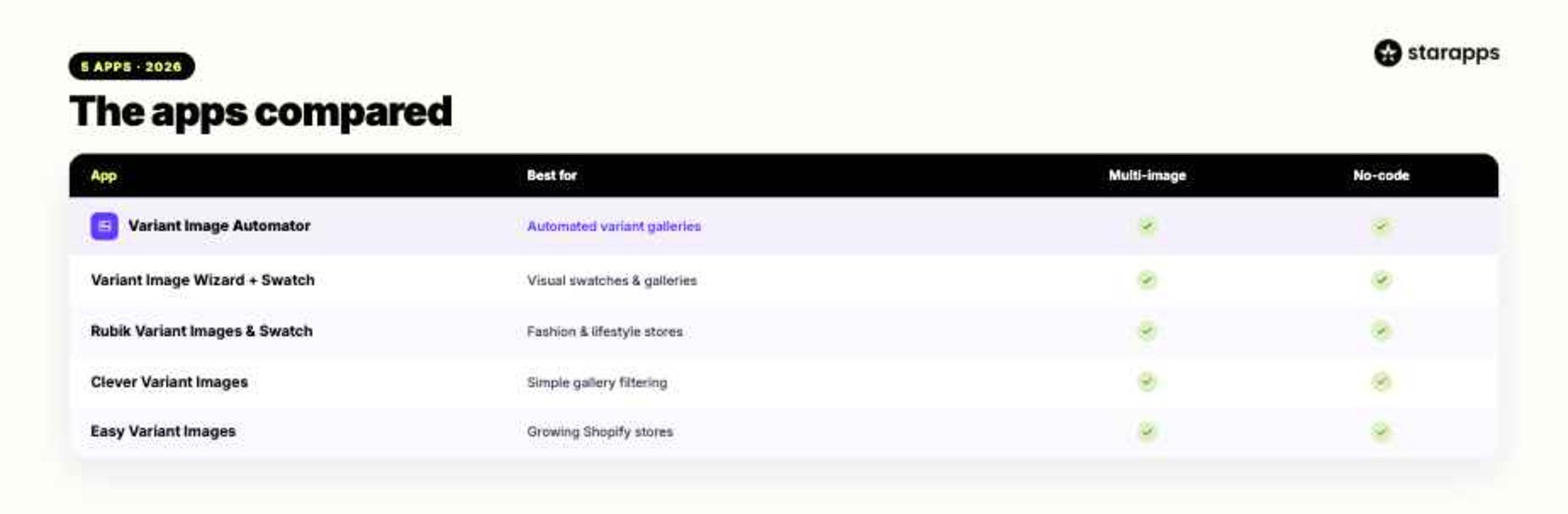
Every app on this list improves Shopify's default product gallery, but the right choice depends on your store's requirements, catalog size, and preferred workflow.
Merchants looking for automatic image grouping, support for multiple images, videos, and 3D media, along with seamless integration into existing Shopify themes, may find Variant Image Automator by StarApps Studio a strong fit. Its no-code setup and automatic image organization simplify variant management while helping create cleaner, more intuitive product pages.
Who Should Use a Shopify Variant Image App?
A Shopify variant image app is most valuable for stores that sell products with multiple colors, styles, materials, or finishes. Instead of displaying every product image in one gallery, it helps shoppers focus on the exact variant they're considering, creating a cleaner and more intuitive buying experience.
These apps are particularly useful for:
- Fashion & Apparel: Show dedicated galleries for every color, fabric, or pattern so customers can compare options without scrolling through unrelated images.
- Furniture & Home Décor: Display different wood finishes, upholstery options, and materials while keeping product pages organized and easy to browse.
- Jewelry & Accessories: Highlight the selected metal, gemstone, or style with variant-specific galleries that showcase product details more clearly.
- Beauty & Cosmetics: Present shade-specific images for products like lipsticks, foundations, and palettes, helping shoppers make more confident purchase decisions.
If your store fits one of those categories, the next step is choosing the right app for your catalog and workflow.
Recommended: Top AI Tools for Shopify Stores 2026.
How to Choose the Best Shopify Variant Image App
Choosing the right variant image app isn't just about displaying different photos. The best solutions simplify product management, integrate seamlessly with your storefront, and continue to perform as your catalog grows.
- Support for Multiple Images: One image is rarely enough to showcase a product effectively. Look for an app that supports multiple images, videos, and rich media for every variant so shoppers can view products from different angles before making a purchase.
- Automatic Image Management: As your catalog grows, manually assigning images becomes increasingly time-consuming. Apps with automatic image grouping save hours of work while keeping product management simple and scalable.
- Theme Compatibility: Choose a solution that works seamlessly with Shopify 2.0 themes, custom themes, and existing product galleries without requiring code changes or storefront redesigns.
- Performance: Some apps load every product image before hiding irrelevant ones, which can slow down page speed. The best solutions display only the selected variant images, creating a faster and smoother browsing experience.
- Scalability: Whether you manage 50 products or 5,000, your variant image solution should make image management easier as your inventory grows, not more complicated.
Once your app is in place, a few simple practices can help you get even better results.
Tips for Getting the Most Out of a Shopify Variant Image App
A few simple practices can help you create cleaner product pages and improve the shopping experience.
- Keep Image Sets Consistent: Use the same image order for every variant, such as front view, side view, close-up, and lifestyle shot. This makes it easier for customers to compare options.
- Showcase Multiple Images: Include multiple images for each variant to highlight different angles, colors, and details, giving shoppers a complete view of the product.
- Display Only Relevant Images: Avoid duplicate or unrelated photos. Showing only the images for the selected variant keeps galleries organized and reduces customer confusion.
- Optimize for Mobile: Test variant image switching on mobile devices to ensure galleries load quickly and navigation feels smooth across all screen sizes.
- Keep Galleries Updated: Whenever you add new colors or styles, update the corresponding variant images so customers always see accurate product visuals.
These small improvements help customers browse with confidence while keeping your product pages clean and easy to navigate. If you want to make that process even easier, StarApps offers tools built to simplify variant management.
Upgrade Your Shopify Variant Experience with StarApps
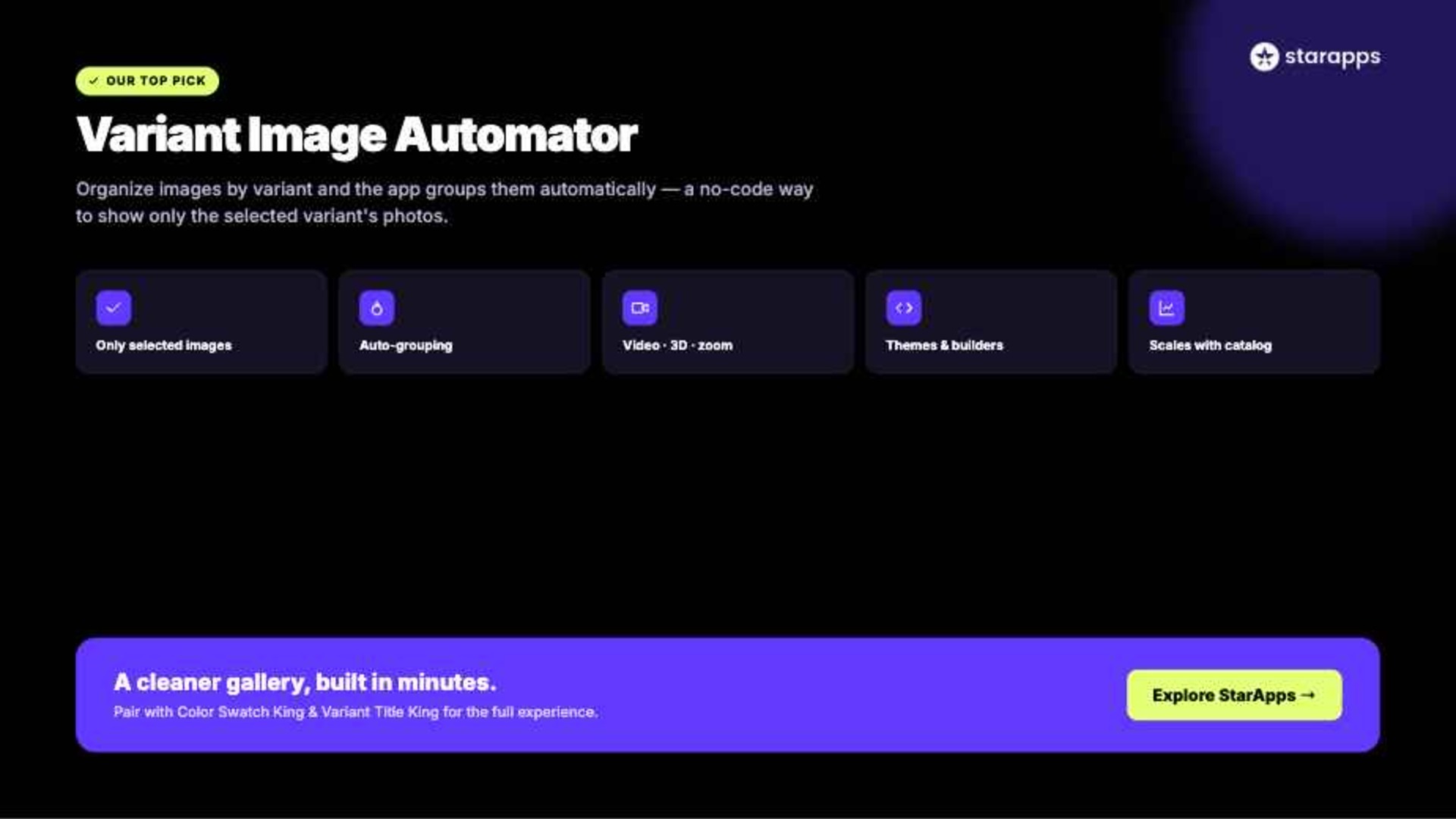
A clean product gallery makes it easier for customers to find the variant they want and shop with confidence.
Variant Image Automator by StarApps Studio automatically displays multiple images for the selected variant, eliminating the need for manual image assignments and reducing gallery clutter. Simply organize your product images by variant, and the app groups them automatically while preserving your existing gallery layout.
With Variant Image Automator, you can:
- Display only the images for the selected variant
- Automatically group multiple images without manual tagging
- Support videos, 3D media, image zoom, and color swatches
- Work seamlessly with Shopify themes, custom themes, and popular page builders
- Simplify variant image management as your product catalog grows
Whether you sell apparel, furniture, beauty products, or any catalog with multiple variants, StarApps helps create cleaner product pages and a more intuitive shopping experience.
If you're looking for a Shopify app that only displays selected variant images without custom development, Variant Image Automator provides a simple, no-code solution that integrates with your existing storefront and helps customers focus on the products they've selected.
Conclusion
Your product gallery should help shoppers make decisions, not distract them. For stores with multiple colors, styles, or materials, showing only the selected variant images keeps pages cleaner, reduces confusion, and makes product browsing easier.
A Shopify app that only displays selected variant images is a simple way to improve product presentation and save time as your catalog grows. To make variant management even easier, you can explore apps like Color Swatch King, Variant Title King, and SA Variant Image Automator. They help you present variants more clearly, automate repetitive tasks, and create a smoother shopping experience.
For more Shopify customization ideas, explore StarApps Studio and build a store that is easier to browse and better equipped to convert.
FAQs
1. What is the best Shopify app that only displays selected variant images?
Look for an app that supports variant-specific galleries, automatic image assignment, and seamless theme integration. Apps like StarApps Variant Image Automator, Variant Image Wizard, and Clever Variant Images are popular choices for creating cleaner product pages.
2. How can I show product variant images only when selected in Shopify?
Shopify displays all product images by default. A dedicated variant image app automatically updates the gallery to show only the images that match the selected color, style, or material.
3. Does Shopify support only one variant showing by default?
No. Shopify lets you assign a featured image to each variant but still displays all product images together. A third-party app is required to show only the selected variant images.
4. Can I display multiple images for each Shopify variant?
Yes. Most variant image apps support multiple images, videos, and 3D media for each variant, giving customers a better view of the selected product.
5. Will a Shopify variant image app work with custom themes?
Most leading apps are compatible with Shopify Online Store 2.0 and many custom themes. If you're using a highly customized storefront, it's best to verify compatibility before installing.
Heading

End-to-end traceability
To ensure regulatory compliance, you must have a complete overview of your products from production to shipping. Book a demo to see how Katana can give you full visibility of your operations.
.png)

.svg)

.svg)

.svg)
.png)