

Maximize BFCM Shopify results with tactics that improve speed, variants, marketing, and offers. Get ready to increase traffic and sales fast.
In 2024, Shopify merchants set a new record, hitting $11.5 billion in sales over the Black Friday-Cyber Monday (BFCM) weekend. This monumental achievement underscores the importance of this period for Shopify store owners.
The pressure to meet high expectations can feel intense, especially as you prepare your store for a surge in traffic and sales. With so much riding on these few days, it’s easy to feel overwhelmed by the number of tasks to manage.
In this blog, we’ll explore how to prepare your Shopify store for BFCM 2025. From optimizing your product pages to crafting irresistible offers and managing customer support, we’ve got you covered.
Key Takeaways:
- Start Early: Begin planning 2–3 months ahead to avoid last-minute pressure and maximize sales potential.
- Optimize Performance: Focus on speed, mobile-friendliness, and variant management for smooth customer experiences.
- Craft Irresistible Offers: Use tiered discounts, bundles, and time-sensitive deals to boost conversions.
- Effective Marketing: Use email, SMS, and social media ads to target the right customers and create urgency.
- Post-BFCM Strategy: Analyze sales data and customer behavior to build long-term growth and loyalty.
How to Prepare for BFCM: A Step-by-Step Timeline
The earlier you start preparing for BFCM 2025, the better your chances of success. Procrastinating until the last minute can result in missed opportunities and heightened stress.
In 2024, ecommerce sales from the two weeks leading up to BFCM through the weekend itself grew by about 45% year over year, as shoppers started buying earlier instead of waiting for a single day. Starting ahead gives you time to perfect your strategy and capture those early sales before the rush.
Here’s a breakdown of the key activities you should focus on each month leading up to BFCM.
- August–September: Begin planning your promotions, product catalog, and marketing campaigns. Set your BFCM goals and start preparing your website for performance testing.
- October: Finalize all promotions and offers. Begin testing your site’s speed and mobile optimization. Start reviewing your inventory to ensure adequate stock.
- November (early): Set up your final marketing campaign and schedule social media posts. Ensure your site can handle traffic spikes and is ready for the BFCM weekend.
Key Deadlines: Ensuring Your Store Is Ready for High Traffic
- 2 Weeks Before BFCM: Start your sales early to capture more customers. Prepare your site for a heavy load by running stress tests and reviewing performance using Shopify’s Theme Inspector or Lighthouse inside Chrome DevTools. Confirm your inventory is fully stocked so you’re ready for increased order volume.
- 1 Week Before BFCM: Double-check that all discounts, promotions, and product pages are live. Verify your site speed and mobile optimization once more, and ensure your checkout process is smooth. Use Shopify’s built-in analytics to spot any friction points or unexpected drops in conversion before the rush begins.
- BFCM Weekend: Make sure your customer support team is on standby, and that fulfillment workflows are running efficiently. Monitor site performance in real time using Shopify analytics dashboards. This lets you quickly identify traffic spikes, checkout errors, or product page issues and resolve them before they impact sales.
Now that the timeline for preparation is clear, it’s time to focus on ensuring your Shopify store can handle the traffic surge.
Optimize Your Shopify Store for Maximum Performance
Your Shopify store must be fully optimized for speed and user experience before BFCM. If your site slows down during high traffic, you risk losing customers. Slow load times, poor navigation, or a frustrating checkout process can lead to lost sales, especially during a peak shopping period like BFCM.
Here are the key areas to focus on when optimizing your Shopify store for maximum performance:
Website Speed & Scalability: Don’t Let Performance Break Your Sales
- Test Your Site Speed: Use tools like Google PageSpeed Insights to measure your store’s speed and pinpoint areas for improvement.
- Mobile Optimization: Make sure your website is visually appealing and works well on mobile devices, as many customers shop using their phones.
- Image Compression: Compress large images and optimize them for web use to keep your site fast during peak traffic. Variant Image Automator not only assigns the correct images to each variant for a smoother browsing experience. It also keeps variant galleries lean during high-traffic spikes, helping your store maintain quick load times when it matters most.
- App and Plugin Management: Review all installed apps and remove any unnecessary ones that might be slowing down your site. Keep only the essential apps running.
Handling Product Variants: Best Practices for Large SKU Stores
- Variant Organization: Use Color Swatch King to organize your product variants and display them clearly on product and collection pages.
- Variant Image Display: Ensure each product variant is linked to the correct image. With Variant Image Automator, your pictures will automatically be assigned to the correct variants, keeping the user experience smooth.
- Product Filtering: Add filtering options to your collection pages so customers can sort through product variants by size, color, or price, improving the browsing experience.
- Show Variants on Collection Pages: Use SA Variants: Combined Listings to show all product variants directly on the collection page, simplifying the process for customers to find what they want.
With your Shopify store running smoothly, the next step is to ensure your product catalog is aligned with your BFCM goals.
Analyze Your Product Performance: Maximize Your Best-Sellers
To make the most of BFCM 2025, it’s crucial to identify which products will drive the most sales. Knowing your top performers and slow-moving items allows you to allocate resources efficiently. This can help you focus on products that offer the best potential return on investment and optimize your BFCM sales.
Here are the key steps to analyze your product performance and ensure your best-sellers shine during BFCM:
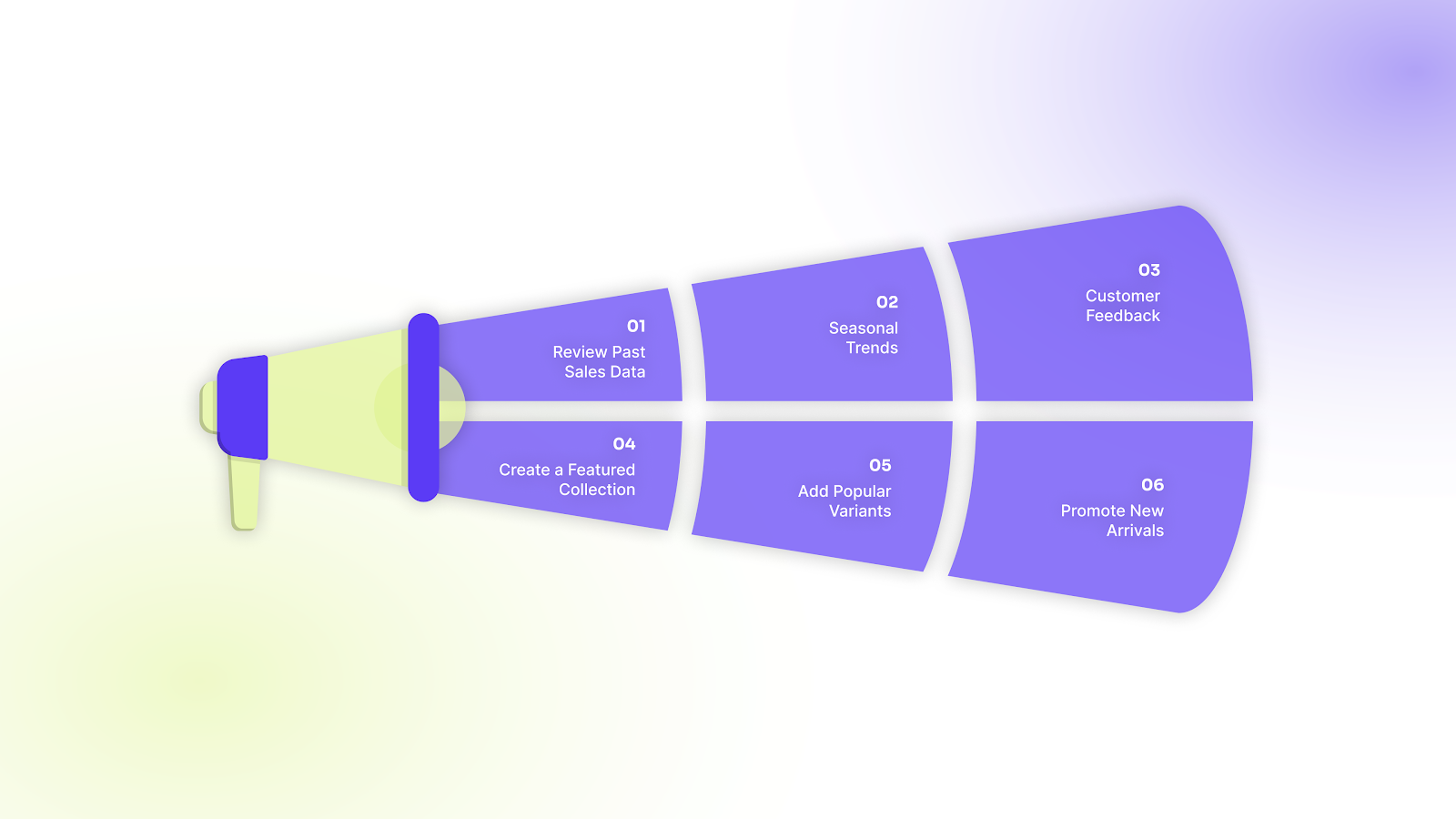
- Review Past Sales Data: Look at your sales from previous BFCM weekends to identify your top-performing products and categories. Use Shopify’s analytics tools to gather this data.
- Seasonal Trends: Some products may perform better during certain times of the year. Look for any seasonal patterns in sales to forecast demand for the upcoming BFCM.
- Customer Feedback: Analyze customer reviews and ratings for your products. Positive reviews can help you identify your best-sellers, while negative feedback shows areas to improve.
- Create a Featured Collection: Curate a collection of your top products to showcase during BFCM. Highlight these items in your marketing campaigns.
- Add Popular Variants: Use SA Variants: Combined Listings to show multiple variants directly on collection pages, making it easier for customers to find what they want.
- Promote New Arrivals: Feature new or seasonal products that could appeal to BFCM shoppers. This can generate excitement and attract repeat customers.
By identifying your best-performing products and adjusting your catalog, you’ll be able to focus on driving traffic to your top sellers and boosting your BFCM sales.
Create Offers That Drive Sales This BFCM
Creating compelling offers and discounts is one of the best ways to drive sales during BFCM. Shoppers are always looking for value, especially during this high-stakes weekend. Well-structured discounts not only attract customers but can also increase your average order value and build brand loyalty.
Here are the key steps to crafting offers that will make your Shopify store irresistible to BFCM shoppers:
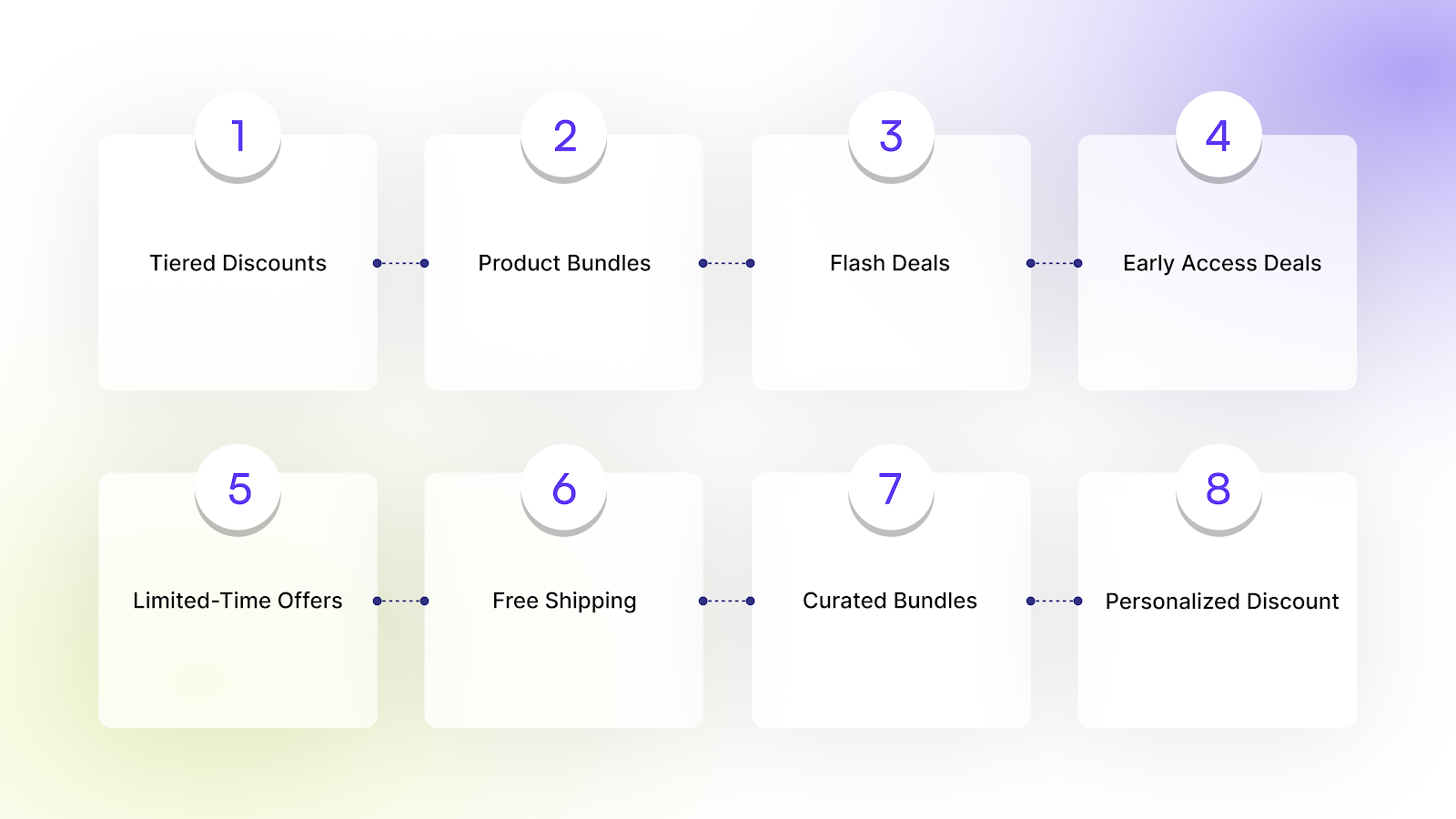
- Tiered Discounts:
Offer increasing discounts based on the purchase amount. For example, a clothing store could offer 10% off casual wear over $50 and 20% off winter wardrobes over $100. The Variant Title King app can help clearly display the discount in the product title, dynamically updating to show how much customers will save based on their cart value.
- Product Bundles:
Bundle complementary items together at a discounted price. For instance, a beauty store might bundle a facial serum, moisturizer, and face mask at a special BFCM price to offer a better deal than individual purchases. With SA Variants: Combined Listings, you can group products and show all their variants, such as scents or sizes, in a clear, easy-to-navigate list on the collection page.
- Flash Deals:
Introduce time-limited deals on selected items or categories to create urgency. For example, offer a flash sale on headphones with 30% off for just one hour. Using the Variant Image Automator app, you can automatically display variant-specific images for products on sale, drawing attention to the deal and boosting conversions with clear, variant-specific visuals.
- Early Access Deals:
Provide early access to sales for your loyal customers or email subscribers, rewarding your most engaged audience and building excitement. For example, a fashion store could send an exclusive email offering early access to BFCM discounts on popular items.
- Limited-Time Offers:
Use countdown timers to show that the deal ends soon, motivating customers to act quickly. For example, run a limited-time offer on skincare products, where customers get a free travel-size item if they purchase two products within 24 hours.
- Free Shipping:
Offer free shipping on all orders or for orders over a specific amount to reduce cart abandonment. For example, an electronics store might offer free shipping on orders over $75 for tech products.
- Curated Bundles:
Create product bundles based on customer preferences. For example, offer a “Winter Essentials” bundle with scarves, gloves, and hats. A fashion store could bundle a scarf, gloves, and a hat as a BFCM winter collection, encouraging customers to shop for the full set.
- Personalized Discounts:
Send customized discount codes to repeat customers or those who have abandoned their carts. For example, a beauty store could offer 25% off to bring back abandoned carts. The Variant Descriptions King app lets you add specific descriptions for each variant, helping customers make their final purchase, especially when tied to a discount.
Once your discounts are ready, the next step is to reach your customers through effective marketing tactics.
Effective Marketing Tactics to Drive Shopify Sales This BFCM
Effective marketing strategies are key to driving traffic and sales during BFCM. The more targeted and engaging your campaigns are, the higher your chances of standing out. From email marketing to paid ads and social media, reaching the right audience at the right time is crucial for BFCM success.
Here are the essential marketing strategies to help you boost your BFCM sales:
- Email Campaigns: Send personalized emails to your customer list, highlighting your best deals and exclusive offers. Use segmented campaigns based on past behavior.
- SMS Marketing: Use SMS to send time-sensitive deals or reminders about your BFCM sales. Text messages have higher open rates and can drive immediate actions.
- Social Media Ads: Run paid ads on Facebook, Instagram, and TikTok to target your ideal customer segments. Make your BFCM promotions clear and visually compelling.
- Retargeting Campaigns: Set up ads to reach visitors who visited your site but didn’t purchase. Show them specific products they viewed to bring them back.
- Influencer Collaborations: Collaborate with influencers in your niche to promote your BFCM sales. Their endorsement can help build trust and extend your reach.
- User-Generated Content: Encourage customers to share their purchases on social media using a hashtag. Feature their content to build social proof and engage potential buyers.
- Countdown Timers: Add countdown timers to product pages and promotional banners to create urgency and encourage shoppers to purchase before the sale ends.
- Referral Programs: Offer discounts or rewards for customers who refer friends or family to your store during BFCM. This helps extend your reach and grow your customer base.
After planning your marketing, focus on ensuring your backend operations are prepared for the traffic surge.
Preparing Your Shopify Store’s Backend for BFCM Traffic
Preparing your Shopify store for BFCM isn't just about front-end design and offers; your backend must be ready for the traffic and volume. Without the proper infrastructure, your store could crash under the pressure, leading to lost sales and customer frustration.
Here are the essential backend tasks you must complete before BFCM:
- Stress-Test Your Site: Simulate high traffic and load spikes using tools such as Apache JMeter or Locust (or use Shopify Load Testing (preview environment) if available) to check how your store handles concurrent users, checkout surges, and stress conditions.
- Check Server Capacity: Although Shopify offers global hosting and CDN support out of the box, the apps you install and theme customizations can affect performance. Consider disabling or removing non-essential apps/modules to keep your store lean.
- Review Inventory Management: Enable inventory tracking for all products and variants. Then use automated methods to hide sold-out items to prevent customer frustration from seeing items they can’t purchase. Consider using apps like Nada or Hide&Seek, which automatically hide sold-out products (and re-show them when restocked), keep collections clean, and avoid 404-page issues.
- Set Up Order Fulfillment: Ensure your fulfillment processes (packing, shipping, returns) are optimized and that stock levels sync properly across sales channels or locations. If you run multiple warehouses/locations or have a large catalog, use apps or native Shopify functionality to keep inventory counts accurate in real time.
- Prepare Customer Support: Run test orders using test-mode payment or sandbox mode (if using external gateways) to confirm payment and checkout workflows are smooth and reliable. Make sure support systems (chatbots, helpdesk, automation) are ready, as a spike in orders often comes with increased customer queries.
- Test Payment Gateways: Make sure your payment systems work properly by running test transactions. Customers should experience a smooth checkout process to avoid cart abandonment.
- Create Backup Systems: Have backups of critical data (orders, customer data, inventory) and ensure integrations (apps, themes) can recover gracefully if something fails under load.
- Update Shipping Policies: Clearly communicate shipping cut-offs, expected delivery times, and stock availability. If certain items are low or likely to go out of stock, mark them accordingly or hide them to set accurate customer expectations.
Once BFCM ends, it's easy to get caught up in the immediate post-sale rush, but the real work begins afterward.
What to Do After BFCM: Turning Quick Wins Into Ongoing Growth
Analyzing your performance and customer behavior can help you build long-term growth strategies. By turning BFCM insights into year-round improvements, you can make a loyal customer base and increase sales in the months that follow.
Here are the steps to turn your BFCM sales success into sustained growth:
- Review Sales Data: Analyze sales figures, customer behavior, and popular products. Identify which items performed the best and why.
- Customer Segmentation: Use BFCM customer data to create segmented lists for future marketing campaigns. This helps target specific groups based on their shopping behavior.
- Evaluate Marketing Campaigns: Assess which marketing channels and campaigns brought in the most revenue. Look for patterns and consider reallocating your ad spend for future campaigns.
- Follow Up with Customers: Send thank-you emails to your customers and encourage them to follow your store on social media. Personalized follow-up can increase repeat purchases.
- Loyalty Programs: Introduce loyalty or rewards programs for customers who bought during BFCM. Offering rewards to repeat customers can encourage their continued patronage throughout the year.
- Refine Your Product Offering: Based on customer demand and product performance, adjust your inventory and introduce new products that align with customer interests.
- Prepare for Future Sales: Use BFCM insights to plan for future sales events. Whether it’s the next holiday season or a flash sale, early planning will help you replicate BFCM’s success.
By analyzing your post-BFCM performance, you’ll be able to make smarter decisions for future sales and build long-term growth.
How StarApps Supports Your BFCM Strategy
StarApps Studio offers a set of apps designed to help you improve your Shopify store for BFCM 2025. Whether you're aiming to improve performance, manage variants, enhance SEO, or increase conversions, StarApps provides tools that fit your needs. Here’s a look at how their apps match the steps outlined in this guide:
Here are the key StarApps apps to consider:
- Color Swatch King: Improve how customers select variants with color swatches and images, making it easier to find what they want. This speeds up the selection process and helps increase conversions.
- SA Variants: Combined Listings: Show variants more clearly on collection pages and give each variant its own SEO-friendly listing. This helps customers find what they need faster and improves search results.
- SA Variant Image Automator: Automatically assign the right images to variants, so customers always see what they’re selecting. This makes product comparison easy and reduces the effort of manually tagging images.
- Variant Alt Text King: Automatically update ALT text for your product images, which helps with SEO and makes your store more accessible.
- Variant Title King: Change product titles based on the selected variant. This helps customers understand exactly what they are purchasing and can boost conversions.
- Variant Descriptions King: Add unique descriptions for each product variant, and use tabs or accordions to organize long content. This helps improve navigation and provides useful information for customers.
These apps help improve your store’s performance, make it easier for customers to find the right products, and increase sales during BFCM and beyond.
Conclusion
Preparing for BFCM 2025 comes down to starting early, optimizing your store for performance, and using data to shape offers and campaigns that convert. When your site runs smoothly and your strategy is clear, you’re able to capture demand, increase average order value, and create a shopping experience customers want to return to.
If you're ready to take your Shopify store to the next level, StarApps Studio offers a suite of apps designed to solve key challenges for growing stores. Try StarApps today to improve product display, manage variants, and boost customer experience, especially during BFCM.
FAQs
1. What should I do if certain variants sell out during BFCM weekend?
If a variant runs out while the sale is live, update your inventory immediately and mark it as “Sold out” so customers don’t end up frustrated. Then consider offering a wait‑list or back‑in‑stock notification, this captures demand and gives you a chance to remarket once restocked. Also, for variants you want to keep available, keep a buffer stock or freeze inventory for high‑velocity SKUs before the sale begins.;
2. How can I use BFCM customer data to improve future sales?
After BFCM, review what customers bought and which products were abandoned. Use this data to create segmented email campaigns. For example, offer complementary products to buyers or a discount to those who abandoned their cart.
3. What payment and fraud protection measures should I take during BFCM?
Use at least two payment gateways (e.g., the built‑in one plus a third‑party method) to reduce the chance of checkout blockages if one fails under load. Confirm that fraud filters & payment‑gateway rules won’t block legitimate buyers (for example, by allowing shipping to high‑volume ZIP codes). Finally, test all payment options in advance to catch any issues before traffic spikes.
4. How can I avoid overspending on ads during BFCM?
Rather than blasting ads broadly, segment your audience: target previous customers, high-intent site visitors, and subscribers first. Use lookalike audiences derived from your best customers to minimize ad waste. Also, schedule ads to run during sales windows or flash deals instead of running continuously. This concentrates spending when conversions are most likely.
5. Can small stores succeed during BFCM, and how can they stand out?
Yes. Smaller stores can compete by offering curated bundles, niche‑specific deals, or exclusive products rather than trying to match big‑store discounts. Focus on creating value (bundles, free‑shipping thresholds, add‑ons) rather than just slashing prices. Use targeted email or SMS to loyal customers or niche communities who value what you offer.
Heading

End-to-end traceability
To ensure regulatory compliance, you must have a complete overview of your products from production to shipping. Book a demo to see how Katana can give you full visibility of your operations.



.png)

.svg)

.svg)

.svg)
.png)