
10 Key Features of Automated Inventory Management for Modern Retail

Discover the top features of automated inventory management that streamline stock control, boost accuracy, and improve profitability for modern businesses.
Inventory problems don’t arrive all at once; they build quietly. One missed update becomes a stockout. One slow-moving SKU ties up cash. One oversold product damages trust.
For businesses selling online, in-store, or across multiple channels, this adds up fast. Manual inventory systems weren’t designed for today’s pace or complexity. Companies using outdated tracking face a much higher risk of stockouts and excess inventory, directly impacting revenue and repeat purchases.
And the cost of delay is massive. Retailers lose over $1.77 trillion each year to overstocks, stockouts, and returns, according to IHL Group. These losses don’t come from dramatic breakdowns; they come from blind spots in inventory visibility.
This isn’t something to fix later. It’s a visibility problem that requires real-time control. Automated inventory management turns inventory into a live system instead of a static record.
In this article, we break down what automated inventory management includes, the features that matter most, and how businesses stay efficient before inventory becomes a growth bottleneck.
TL;DR
- Automated inventory management replaces spreadsheets with real-time stock visibility across locations and sales channels.
- Core features like barcode/RFID scanning, reorder automation, and demand forecasting reduce errors and prevent stockouts.
- Integrations with POS, eCommerce, and reporting tools turn inventory data into faster, smarter decisions.
- Pairing backend accuracy with clear storefront variant presentation helps improve conversions, reduce returns, and scale confidently.
What Is an Automated Inventory Management System?
An automated inventory management system uses software and connected technologies to track, update, and control inventory with minimal manual effort. Instead of spreadsheets, periodic stock counts, or disconnected tools, inventory levels update automatically as products move through your business.
Every sale, return, restock, or transfer is recorded in real time. This happens through tools like barcode scanning, RFID tags, POS and eCommerce integrations, cloud-based dashboards, and automated alerts working together behind the scenes.
At its core, automated inventory management turns inventory from a static record into a live system. You can see what’s available, what’s running low, and when it’s time to reorder, without manual checks or reconciliation.
This shift matters because inaccurate inventory creates real business problems: delayed orders, poor customer experience, and cash tied up in unsold stock. Automation solves these issues at scale by delivering reliable, real-time data across every location and channel.
So how does inventory move from guesswork to real-time accuracy? It starts with how these systems work behind the scenes.
How Automated Inventory Management Systems Work
Automated inventory management systems function as a central source of truth for your stock. They connect key tools and data sources to track inventory continuously and accurately, without manual intervention.
- Barcode scanning: Every product is assigned a unique barcode. Scanning it during sales, returns, or receiving instantly updates inventory levels.
- Inventory software: The system records all product movement and shows what’s in stock, what’s sold, and what needs to be reordered.
- Real-time updates: Stock levels adjust the moment an item is sold or new inventory is added, keeping data accurate at all times.
- Reporting and insights: Built-in reports highlight top-selling items, slow movers, and upcoming restock needs.
- System integration: The software connects with your POS and online store, ensuring inventory stays consistent across all sales channels.
Also read: 10 BFCM Ecommerce Strategies for Successful Sales 2026
Understanding how the system operates is useful. But the real impact becomes clear when you look at how this accuracy and visibility affect revenue, customer trust, and the ability to scale.
Importance of an Automated Inventory Management System
Inventory is one of a retailer’s most valuable assets. How well it’s managed directly impacts revenue, customer satisfaction, and the ability to grow without friction. As operations become more complex, automated inventory management shifts from a nice-to-have to a business requirement.
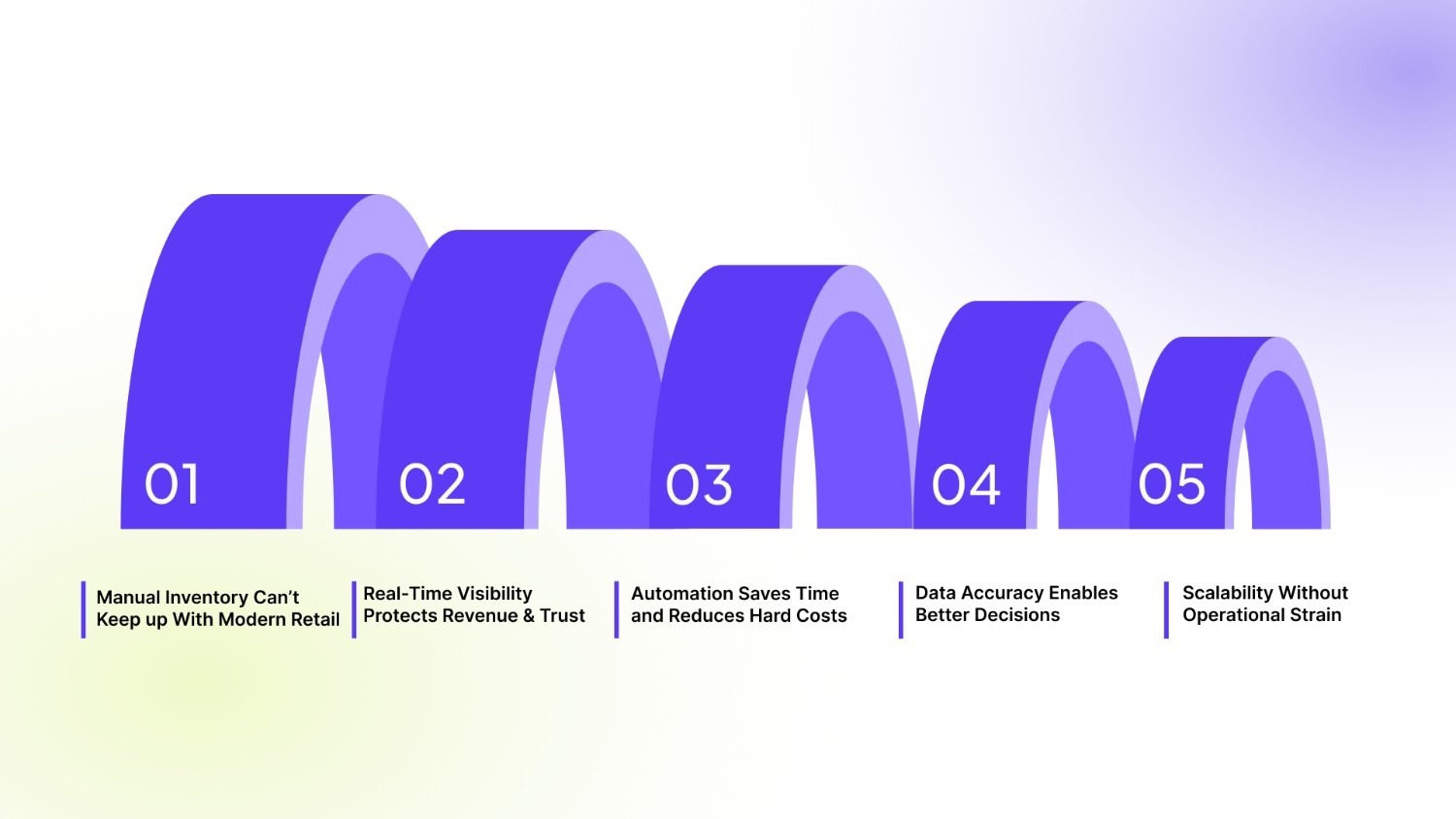
1. Manual Inventory Can’t Keep up With Modern Retail
Traditional methods are slow, reactive, and error-prone. Spreadsheet mismatches, delayed updates, and disconnected systems lead to stockouts, excess inventory, inaccurate financials, and shrinking margins. Automation replaces these fragmented workflows with a single, reliable system. Technologies like barcode scanning, RFID, and IoT sensors keep inventory data current across all channels and locations.
2. Real-Time Visibility Protects Revenue and Trust
Automated inventory management provides continuous visibility into available stock, allocated orders, and incoming supply. This reduces fulfillment delays and prevents customers from encountering out-of-stock items at checkout, protecting both revenue and brand trust.
3. Automation Saves Time and Reduces Hard Costs
Manual reconciliation consumes hours every week and still leaves room for error. Automated inventory management significantly reduces this effort by eliminating manual stock checks, data entry, and constant adjustments.
By keeping inventory aligned with actual demand, automation also minimizes losses from overstocking and stockouts, both of which directly impact profitability. The result is lower operational overhead, fewer costly mistakes, and more time for teams to focus on growth instead of corrections.
4. Data Accuracy Enables Better Decisions
According to IBM, poor data quality costs US businesses $3.1 trillion each year, with inventory inaccuracies as a major contributor. Automated inventory management improves data reliability by eliminating manual entry and keeping information consistent across systems. Built-in analytics help teams identify fast- and slow-moving items, forecast demand, and make informed pricing and purchasing decisions.
5. Scalability Without Operational Strain
Spreadsheets don't scale. As SKUs, locations, and sales channels expand, complexity increases exponentially. Automated inventory systems provide the infrastructure to grow confidently, ensuring inventory remains a strength rather than a bottleneck.
Also read: Shop vs Store: Which Should Your Shopify Brand Use?
If inventory accuracy is this critical, the next question becomes obvious: what should your system actually be capable of?
10 Core Features of an Automated Inventory Management System
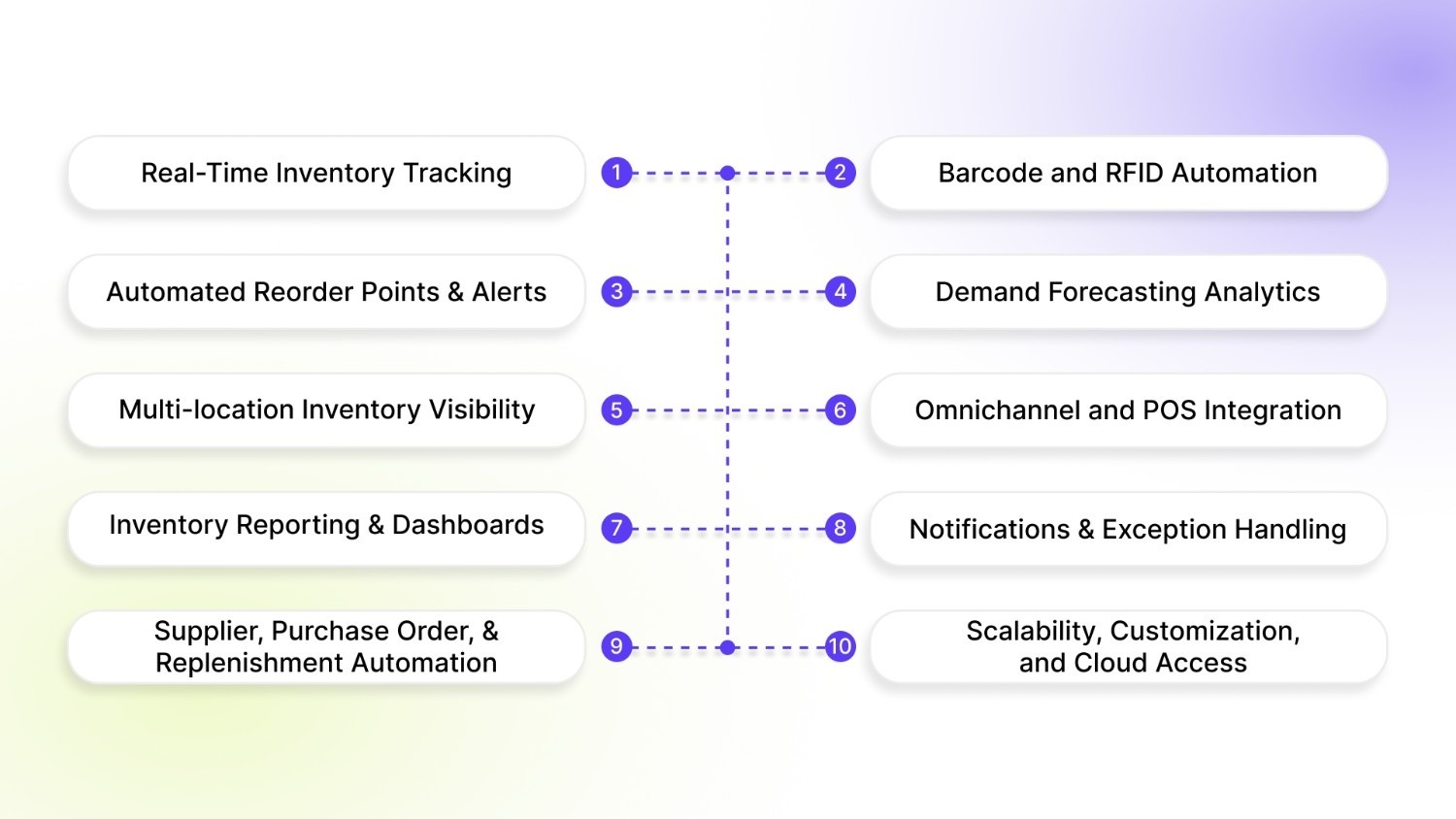
When evaluating an automated inventory management system, the goal isn’t to collect features for the sake of it. It’s to eliminate manual work, prevent costly inventory mistakes, and build a system that scales as your business grows. While tools may vary in depth, the features below form a solid, practical foundation for modern inventory operations.
1. Real-Time Inventory Tracking
This is the backbone of any automated system. Inventory updates the moment stock moves, whether through a sale, return, transfer, or restock.
- Instant updates across all locations and channels
- Eliminates end-of-day reconciliations and batch syncing
- Reduces overselling and unexpected stockouts
You always know what’s available, where it is, and what’s already committed to orders.
2. Barcode and RFID Automation
Barcode scanning and RFID remove manual SKU handling from daily operations.
- Barcodes update inventory during receiving, picking, and packing
- RFID enables faster, line-of-sight-free tracking for high-volume environments
- Improves accuracy and speeds up warehouse workflows
This drastically reduces human error while keeping inventory data current.
3. Automated Reorder Points and Alerts
Instead of manually monitoring stock levels, the system handles it for you.
- Tracks predefined thresholds for each SKU
- Sends alerts or triggers purchase orders automatically
- Prevents last-minute ordering and stock shortages
Replenishment becomes predictable and proactive, not reactive.
4. Demand Forecasting and Predictive Analytics
Strong systems don’t just respond to inventory changes; they anticipate them.
- Analyzes historical sales, seasonality, and trends
- Helps plan purchases with greater accuracy
- Avoids excess stock while preventing peak-season shortages
This keeps cash flow healthy and inventory aligned with real demand.
5. Multi-location Inventory Visibility
For businesses with multiple warehouses or stores, visibility is critical.
- Centralized view of inventory across all locations
- Supports stock transfers based on demand shifts
- Improves fulfillment speed and reduces shipping costs
You get one source of truth instead of siloed stock data.
6. Omnichannel and POS Integration
Inventory automation only works when it connects to where you sell.
- Syncs inventory across POS, ecommerce platforms, marketplaces, and ERPs
- Updates stock instantly after sales, returns, or exchanges
- Keeps availability accurate everywhere customers shop
This prevents data mismatches and order cancellations.
7. Inventory Reporting and Dashboards
Automation creates data, but dashboards turn it into insight.
- Tracks stock velocity, aging inventory, and turnover rates
- Identifies best-sellers and slow-moving items
- Supports smarter pricing, promotions, and purchasing decisions
Clear visibility replaces spreadsheet-driven guesswork.
8. Notifications and Exception Handling
Automated alerts keep teams ahead of problems.
- Low-stock warnings before shortages occur
- Alerts for discrepancies, negative stock, or unusual movements
- Reduces firefighting and manual monitoring
You act early instead of reacting late.
9. Supplier, Purchase Order, and Replenishment Automation
More advanced systems automate the full replenishment loop.
- Auto-generate purchase orders at reorder points
- Prefill supplier details and optimize quantities
- Track deliveries and restock timelines
This shortens procurement cycles and reduces human error.
10. Scalability, Customization, and Cloud Access
As businesses grow, inventory complexity increases.
- Cloud-based access from anywhere
- Handles higher SKUs, locations, and transaction volumes
- Custom workflows, permissions, and automation rules
The system adapts to your processes instead of forcing workarounds.
Not every inventory tool offers all of these features equally. Some automate the basics, while others support complex, multi-location, omnichannel operations. These features define what works today.
Also read: How to Become a Shopify Plus Partner in 2025: Key Requirements.
But inventory automation is evolving faster than most teams expect.
Trends To Watch In Inventory Management Automation
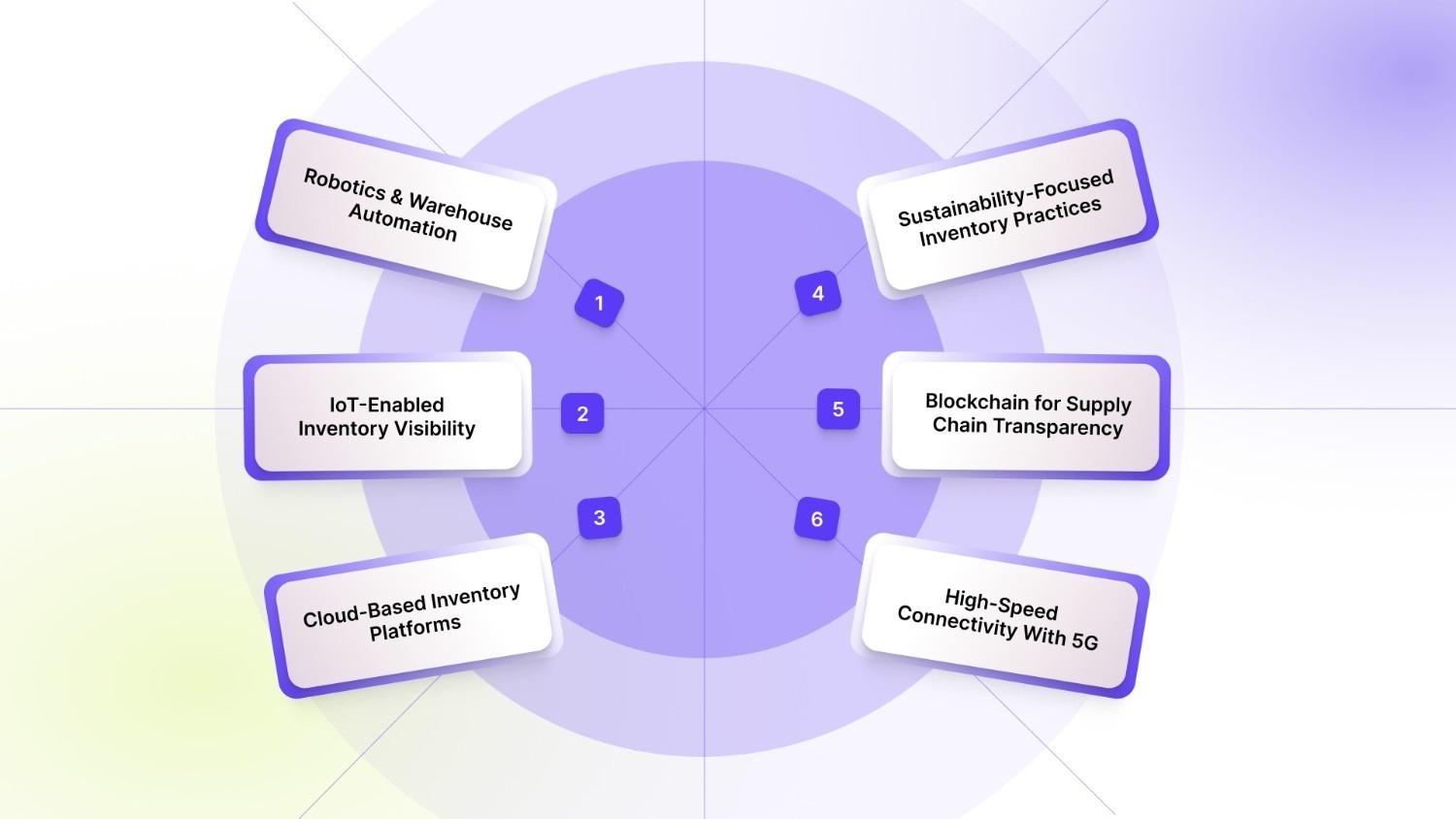
Inventory management automation is evolving quickly as businesses push for smarter, faster, and more resilient operations. While not all of the capabilities below are standard in every system yet, they’re gaining momentum and shaping the future of inventory management. When evaluating vendors, these are the trends worth paying close attention to.
- Robotics and Warehouse Automation: Automation is extending beyond software into physical operations. Robotics and automated machinery now handle repetitive warehouse tasks such as sorting, picking, packing, and internal transport. These systems increase speed and accuracy while reducing labor costs and manual errors.
- IoT-Enabled Inventory Visibility: IoT (Internet of Things) devices provide continuous, real-time insight into inventory movement. Smart shelves and sensors monitor stock levels, detect changes, and trigger automated actions like reorders. This improves accuracy, reduces waste, and delivers deeper visibility into supply chain performance.
- Cloud-Based Inventory Platforms: Cloud-based systems make inventory data accessible and synchronized across teams, locations, and channels. Centralized dashboards, real-time updates, and easier integrations allow businesses to manage inventory more efficiently and scale operations without added complexity.
- Sustainability-Focused Inventory Practices: Sustainability is increasingly influencing inventory strategies. Automation supports waste reduction through better demand forecasting, optimized sourcing, and more efficient delivery routes. These practices lower environmental impact while improving operational efficiency.
- Blockchain for Supply Chain Transparency: Blockchain is emerging as a solution for traceability and trust. By creating a secure, shared record of product movement, it helps verify authenticity and compliance, particularly important in industries where quality and origin matter.
- High-Speed Connectivity With 5G: 5G enables faster, more reliable data transmission across warehouses and distribution centers. With improved connectivity, automated inventory systems can process and share real-time data more effectively, increasing accuracy and responsiveness.
Taken together, these trends point toward inventory systems that are more intelligent, connected, and adaptive. But backend intelligence alone isn’t enough.
Also read: Shopify vs Shopware: Pick the Right E-Commerce Platform in 2025
As inventory systems become more advanced, the next challenge is ensuring that this accuracy is reflected clearly where it matters most, on the storefront.
Even the most sophisticated automated inventory management system can fall short if customers struggle to understand product options or select the right variant. When inventory data is accurate, but the product variant is unclear, customers hesitate, abandon carts, or make incorrect purchases, hurting conversions and satisfaction.
That's where the customer-facing layer becomes critical.
How StarApps Helps Merchants Optimize Operations
Automated inventory management ensures your stock data is accurate behind the scenes. StarApps Studio helps make sure that accuracy translates into a clear, intuitive shopping experience, especially for Shopify merchants.
StarApps Studio builds tools that improve how products and variants are presented on the storefront. Instead of relying on basic dropdowns or generic templates, merchants can show product options in a way that’s visual, easy to understand, and aligned with real inventory availability.
StarApps helps merchants:
- Display variant colors, styles, and options visually using swatches, images, and clean selectors
- Improve variant-level clarity, so customers know exactly what they’re choosing before they buy
- Reduce selection errors and returns caused by unclear product options
- Improve product discoverability, especially for products with multiple variants
- Create consistent product experiences across collections and product pages
By improving how variants are shown and selected, StarApps Studio helps ensure customers don’t choose unavailable options or abandon purchases due to confusion, a common issue even when the inventory data itself is accurate.
When real-time inventory accuracy is paired with clear product presentation, customers make faster, more confident decisions. The result is higher conversion rates, fewer returns, and stronger customer trust.
If you want to see how clearer variant displays and smarter storefront tools can amplify the impact of your inventory automation, contact our team to explore the right setup for your store.
Conclusion
Automated inventory management is the foundation of scalable, reliable commerce operations. When inventory updates in real time, teams stop reacting and start planning. Stockouts decline. Excess inventory shrinks. Customers trust what they see, and that trust directly impacts conversion and retention.
StarApps Studio helps merchants carry that accuracy through to the storefront by making product variants clear, consistent, and aligned with real inventory data. Because even the best inventory system falls short if customers can’t confidently choose the right product.
If your inventory is automated but your product presentation isn’t, you’re leaving growth on the table. Reach out to the StarApps team to see how clearer variant displays and smarter storefront experiences can turn inventory accuracy into results.
FAQs
1. What is AMS in inventory management?
AMS stands for Automated Management System. In inventory management, it refers to software that automates stock tracking, replenishment, reporting, and integrations across sales channels.
2. What businesses benefit most from automated inventory management?
Retailers, eCommerce brands, wholesalers, and manufacturers benefit the most, especially those managing multiple SKUs, locations, or sales channels. Automation helps them reduce stock issues and scale efficiently.
3. Is automated inventory management suitable for small businesses?
Yes. Small businesses save time, reduce errors, and avoid stockouts early on. Automation prevents inventory problems from growing as the business scales.
4. How does automated inventory management handle product variants?
Advanced systems track inventory at the variant level, such as size, color, or material. This ensures accurate availability and prevents selling variants that are out of stock.
5. Can automated inventory management work with multiple sales channels?
Yes. Modern systems sync inventory across online stores, marketplaces, and physical locations. When an item sells on one channel, stock updates everywhere instantly.
6. What should I look for when choosing an automated inventory management system?
Focus on real-time updates, variant-level tracking, forecasting, integrations, alerts, and reporting. Avoid tools that rely heavily on manual inputs or siloed data.
Heading

End-to-end traceability
To ensure regulatory compliance, you must have a complete overview of your products from production to shipping. Book a demo to see how Katana can give you full visibility of your operations.



.png)

.svg)

.svg)

.svg)
.png)